
 Share
Share
 Print
Print
|
|
|
|
|


Skill Hierarchy Button, via Skill Master
The Skill Hierarchy  button allows users to create a hierarchy of skills in case a skill is unavailable. This functionality applies to Work Order Reservation via the Man Hours Simulation program. In the example below, if skill 'AZ' is unavailable the system will automatically look for the 'A&P' skill since the 'A&P' skill is the next on the list based on the hierarchy and skill priority.
From the Skill Master, select the Hierarchy button. TRAX displays the Skill Hierarchy window as shown below.
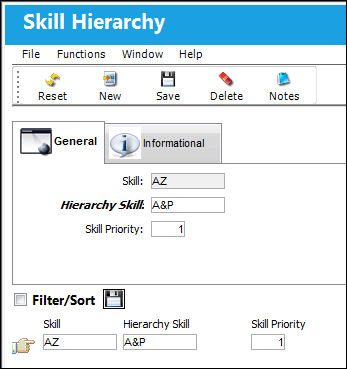
The following information/options are available in this window:
_____________________________________________________________________________________
Skill
The name of the Skill being set up.
Hierarchy Skill
Enter the hierarchy skill.
Skill Priority
Enter the skill priority. (1 being the highest)
_____________________________________________________________________________________
The Skill Hierarchy, Informational Tab and Notes  button are available to view or add information relevant to the record.
Share
Print
|
©1997-2026 Trax USA Corp. All rights reserved. This manual may not be copied, photocopied, reproduced, translated, or converted to any electronic or machine-readable form, in whole or in part, without prior written approval from Trax USA Corp. |
 |