
 Share
Share
 Print
Print
|
|
|
|
|


Customer Master, Optional Tab
From the Optional tab of the Customer Master window, users can add Goods and Services Tax (GST) information for the selected customer. This will enforce the listed tax percentage against the G/L every time a Customer Order or/and Exchange Order Out is completed.
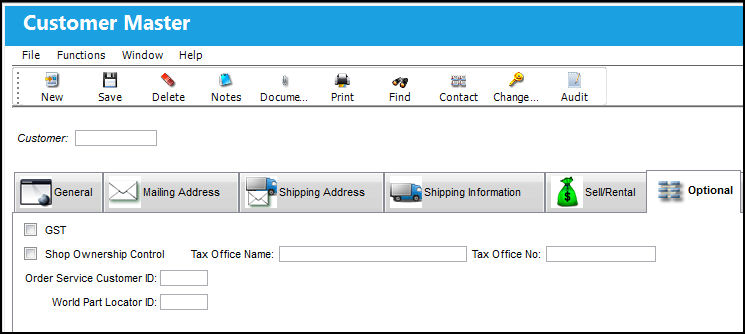
The following information/options are available in this window:
_____________________________________________________________________________________
GST checkbox
Select the Goods and Services Tax (GST) checkbox to apply a tax percentage to Orders throughout the system for the selected customer. For more information refer to the GST % G/L Functionality, via Customer Master, Optional Tab and the Goods and Services Tax (GST) Functionality via the Settings Manual.
Percentage
The percentage to be taxed for orders involving the selected customer.
G/L Account
The General Ledger account that is affected when an order is taxed.
Shop Ownership Control checkbox
When selected, upon closing Third Party Shop Work Orders the system will not remove serialized parts that have been issued to Third Party Shop W/Os. These parts will remain in Inventory.
Tax Office Name 
Free text field used to add the name of a tax office used by the customer.
Tax Office No
Numerical field used to add a phone number for the tax office used by customer.
_____________________________________________________________________________________
Share
Print
|
©1997-2026 Trax USA Corp. All rights reserved. This manual may not be copied, photocopied, reproduced, translated, or converted to any electronic or machine-readable form, in whole or in part, without prior written approval from Trax USA Corp. |
 |