
 Share
Share
 Print
Print
|
|
|
|
|


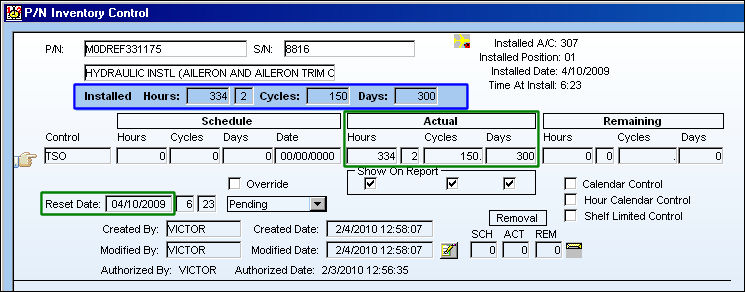
When a Part Number Control with a retroactive Reset Date is created while a part is currently Installed, P/N Control Actuals will only be accumulated for the current Installation of the Part Number Serial Number regardless of the P/N S/N's historical Install/Removals, if any. (See below diagram.)
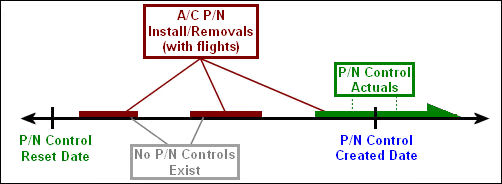
A P/N Control is retroactive when its Reset Date precedes its Created Date.
For detailed information, refer to the following:
From the Inventory Detail, A/C P/N Transaction tab, notice that the P/N S/N has been Installed and Removed multiple times and has accumulated Actuals through various flights. Also notice that the P/N S/N is currently Installed on an Aircraft and the Date it was installed (4/10/2009).
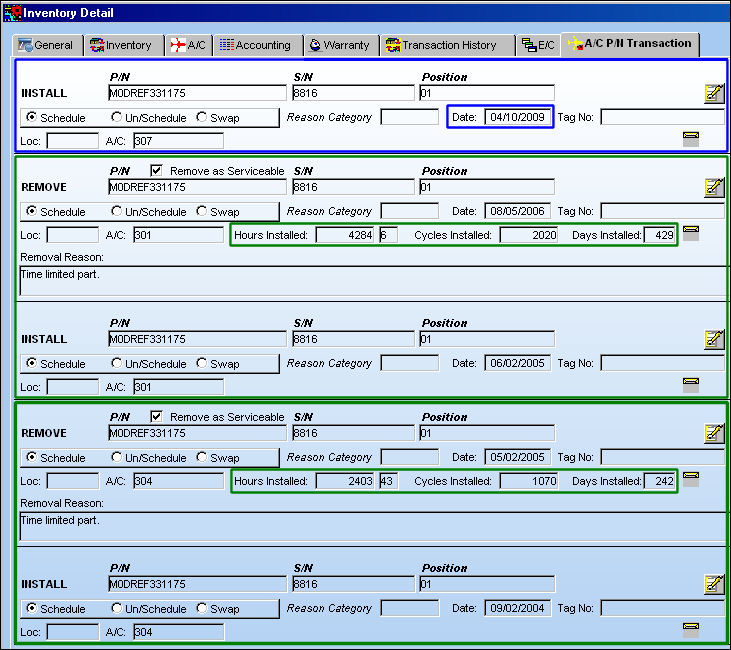
While the part is installed in an aircraft, a P/N Control is created for the part.
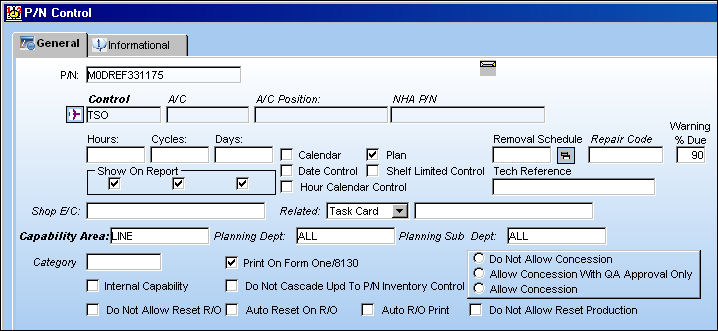
Notice the P/N Control Created Date (2/4/2010).
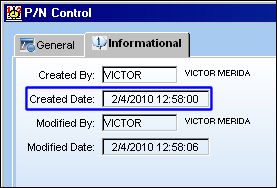
From the Inventory Detail, P/N Control  button window, the P/N Control Actuals reflect the current Installed times. The Reset Date has been automatically set as the most current Install Date (4/10/2009).
Users can edit the Reset Date to a previous date manually through the Technical Records/Update/P/N Control Authorization window. To change the Reset Date, deselect the Lock checkbox then enter the date and save.
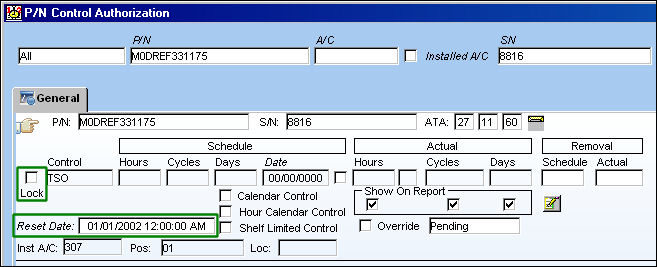
The Actual fields in the P/N Control Authorization window are blank for parts received without Actuals at receiving. For more information refer to the P/N Control Authorization via the Technical Records Training Manual.
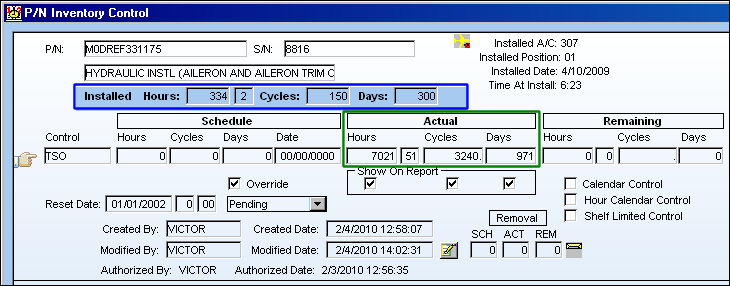
Return to the P/N Inventory Control window, note that while the Reset Date predates all historical Install/Removals for the P/N S/N, the P/N Control Actuals continue to reflect the current Installed Hours not the historical Install/Removals (as seen in the first image). This is the correct TRAX functionality.
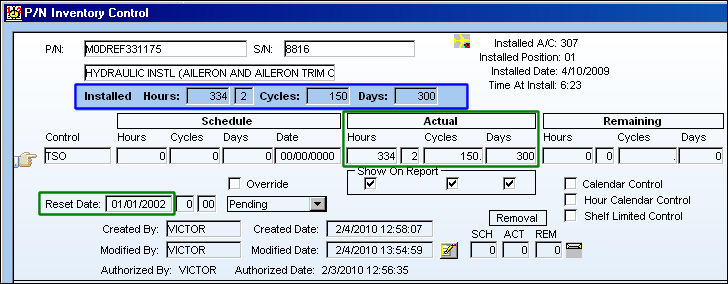
In this scenario, TRAX calculates the P/N Control Actuals in this manner because TRAX has no way of verifying whether or not this retroactive P/N Control had been previously reset before being installed on the current aircraft. Therefore, the P/N Control Actuals reflect only the current Installation of the part.
If the P/N Control had not been reset since the Reset Date or prior to the P/N's current aircraft Installation, then the P/N Control Actuals would need to be updated manually. Users can update the Actuals through the P/N Control Authorization window. To do so, the Override checkbox must be selected. Below, the Actuals entered are the historical Install/Removal times for the P/N S/N which can be viewed from the Inventory Detail, A/C P/N Transaction tab (as seen in the first image).
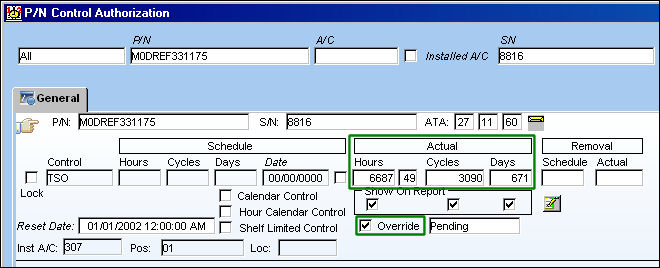
If this Override checkbox remains selected, the schedule will remain frozen. Any updates to the Schedule made from the P/N Master, P/N Control button will not update the P/N Control for this P/N S/N.
The following is the breakdown of the Historical Install/Removals that were entered into the above P/N Control Authorization window as listed in the Inventory Detail, A/C P/N Transaction tab (first image).
|
Hours |
Cycles |
Days |
Install/Removal #1 |
2403:43 |
1070 |
242 |
Install/Removal #2 |
4284:06 |
2020 |
429 |
Historical Install/Removals |
6687:49 |
3090 |
671 |
Once the historical Actuals are updated via the P/N Control Authorization window, they are added against the current Installed times in the Inventory Detail, P/N Control button window.
|
Hours |
Cycles |
Days |
Historical Install/Removals |
6687:49 |
3090 |
671 |
Current Install |
334:02 |
150 |
300 |
Total P/N Control Actuals |
7021:51 |
3240 |
971 |
Share
Print
|
©1997-2026 Trax USA Corp. All rights reserved. This manual may not be copied, photocopied, reproduced, translated, or converted to any electronic or machine-readable form, in whole or in part, without prior written approval from Trax USA Corp. |
 |