
 Share
Share
 Print
Print
|
|
|
|
|


Task Card Selection, Text Search Tab
The Task Card Selection, Text Search tab allows users to search for existing Task Cards using various search criteria. The New  button and Delete
  button are available to add and remove multiple search rows. Once the search criteria has been entered, select the Find
  button.
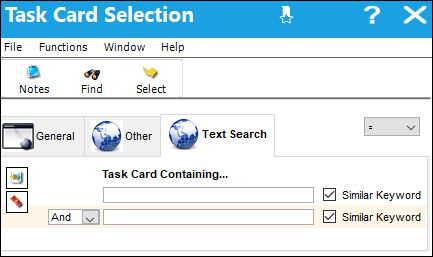
The following information/options are available in this window:
_____________________________________________________________________________________
Task Card Containing...
Enter any text that can be found in the Task Card.
New button
Select this button to enter multiple Task Card Containing entries.
Delete button
Select this button to remove a Task Card Containing entry.
And/Or drop down
Allows users to differentiate between the text entered into multiple Task Card Containing entries. The search could either search for a Task Card containing the text in both entries or in either entry. This drop down only appears when multiple Task Card Containing entries are present.
Similar Keyword checkbox
Select if a similar keyword can be searched for instead of the entered text verbatim.
_____________________________________________________________________________________
Select on the desired record and then select the Select  button to view and edit the Task Card details.
Share
Print
|
©1997-2026 Trax USA Corp. All rights reserved. This manual may not be copied, photocopied, reproduced, translated, or converted to any electronic or machine-readable form, in whole or in part, without prior written approval from Trax USA Corp. |
 |