
 Share
Share
 Print
Print
|
|
|
|
|


The A/C Out of Service, Request for In-Service tab allows users to enter additional information regarding the request to unlock an Out Of Service for an aircraft.
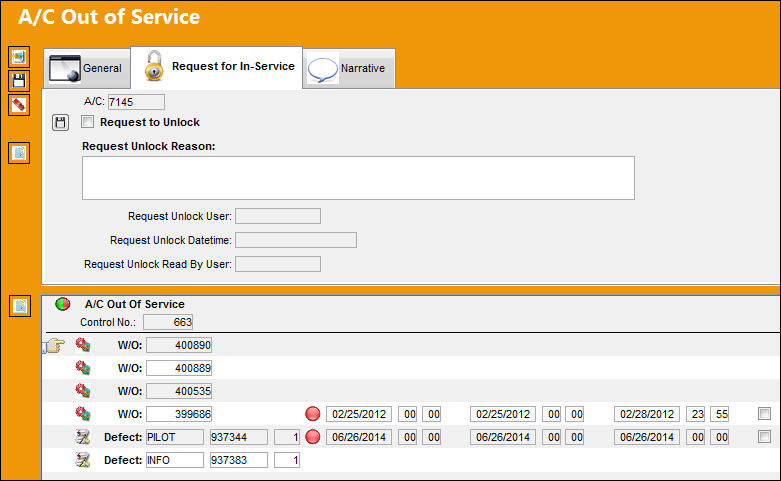
 Note: This window and all options within are security-controlled via both Technical Records/ Update/ Defect Report/ A/C In/Out Service and Technical Records/ Update/ A/C Controller Panel/ Defect A/C In/Out Service. Access to both of those settings must be granted to be able to access this button. For more information refer to the Security Explorer via the System Administration Training Manual.
The following information/options are available in this window:
_____________________________________________________________________________________
A/C
The individual aircraft tail number.
Request to Unlock checkbox
Select this checkbox to unlock the Out Of Service for this aircraft.
Request Unlock Reason
The reason why the request to unlock to OOS was made.
Request Unlock User
The user who requested the A/C OOS be unlocked.
Request Unlock Date/Time
The date and time the A/C OOS was requested to be unlocked.
_____________________________________________________________________________________
Share
Print
|
©1997-2026 Trax USA Corp. All rights reserved. This manual may not be copied, photocopied, reproduced, translated, or converted to any electronic or machine-readable form, in whole or in part, without prior written approval from Trax USA Corp. |
 |