
 Share
Share
 Print
Print
|
|
|
|
|


Picklist Creation, General Tab
The Picklist is in two parts, the header information (containing Work Order and delivery information) and the detail information (containing the parts and quantities required). The first window that appears is the header.
From the Picklist Issue Selection window, select the Picklist Creation  button.
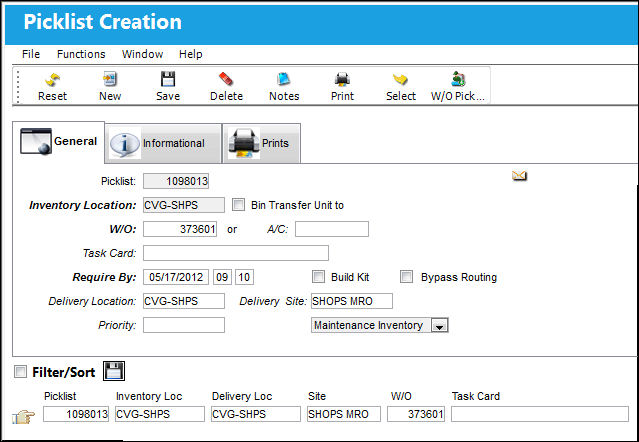
The following information/options are available in this window:
_____________________________________________________________________________________
Picklist
List of reserved components for a maintenance event or for transfer.
Inventory Location
The inventory location the user wants to issue parts from.
Bin Transfer Unit to checkbox
Select this checkbox to transfer the unit to another Bin.
When this checkbox is selected, the Bin field appears.
Bin - The specific storage bin within the inventory location.
W/O
The Work Order used to categorize, manage, and schedule work requirements for aircraft maintenance. The Work Order that is associated with this Picklist. Use either the W/O field or the A/C field.
A/C
The individual aircraft tail number.
A line work order must be set up to select A/C only. The associated line work order will default to the W/O field and a "line w/o" will be flagged in the window. Use either the W/O field or the A/C field.
Task Card
The Task Card / Job Card that details the scheduled maintenance work.
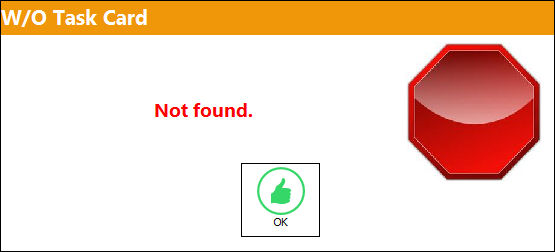
 When the W/O field is populated, the Task Card field becomes mandatory. Upon attempting to save the Picklist header with a W/O but without a Task Card will result in the following hard warning:
Require By
The date that the picklisted parts are required by.
Build Kit checkbox
Check if you wish to build a kit from the parts entered. The Kit part number must be previously set up in the system. Refer to the Kits section for additional information regarding building Kits in P/N Master.
Bypass Routing
If activated, the system will not consider the routing for parts set up in Settings/Update/Location.
Delivery Location
The location to which the part(s) is being delivered.
Delivery Site
Site to which part(s) will be delivered.
Priority
The level of importance placed on the need for a part. Notification based on the requisition priority may be defined by location. These codes are defined in the Priority System Transaction Code.
Inventory Type Drop List
The type of inventory the item is registered as in the system. The available options are All, General, GSE and Maintenance Inventory. All is set as the default.
_____________________________________________________________________________________
Share
Print
|
©1997-2026 Trax USA Corp. All rights reserved. This manual may not be copied, photocopied, reproduced, translated, or converted to any electronic or machine-readable form, in whole or in part, without prior written approval from Trax USA Corp. |
 |