
 Share
Share
 Print
Print
|
|
|
|
|


Picklist Creation
Picklists are used to issue parts from inventory that are needed to perform certain work. They are always associated with a Work Order (or W/O Task Card) and an Aircraft. Picklists are issued at the Location where the maintenance is planned, but can be transferred to a different location if the entire planned maintenance for that Work Order is transferred. If the parts that are on a picklist are not available at the inventory store location, a Requisition will be issued. The system can automatically create a Picklist when parts are reserved for a work order. For example, line maintenance on an aircraft requires that specific parts be available (on hand) to perform the line maintenance routine. To get a part issued from the inventory system, it must be processed with one of the issue transactions. There are three types of issues (Manual Issue, Picklist Issue, and Express Issue).
Manual Issue
The Manual Issue program is used to issue parts from the system 'Over the Counter' from a store's location.
Picklist Issue
The Picklist Issue (Picklist Creation) will issue the parts to a Picklist, which will be added to a Work Order.
Express Issue
The Express Issue option was designed specifically for using a bar code system for the issue of parts.
The Picklist is printed in the stock room (where parts are stored), the parts are collected and are all issued in one transaction.
The basic Picklist issuing logic follows goods received batch FIFO (first in, first out). However, the following conditions apply:
- Shelf Life supersedes FIFO if it is due sooner
- Switch PKQTYOWNER - Picklist Reservation of Owned Parts First for 3rd Party W/Os
- Switch GLFIFO - Use FIFO Instead Of LIFO
The following tabs and buttons are available:
Picklist Creation Tabs |
Picklist Creation Buttons |
|
|
|
 Reset button
 New button
 Save button
 Delete button

 Select button
Upon selecting into the record, the Picklist Creation Detail appears.
This update window is also available in query mode where users can view the records provided in this window but cannot create new records or edit existing data. Refer to this module's Query menu.
 Picklist and Requisition Process Flow

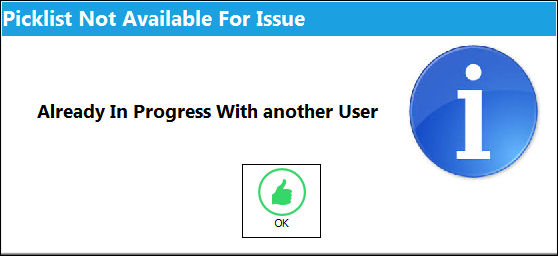
If one user attempts to view/edit a Picklist record that is currently being viewed/edited by another user, the following warning prevents the second user from proceeding. This also applies to the Picklist Supervisor window.
From the Picklist Creation, Informational tab, the In Use checkbox indicates that the Picklist is currently 'In Use'. When the Picklist is marked as 'In Use', the user who has the Picklist locked will be listed to the right of the checkbox. The Unlock Picklist  button from the Informational tab is also available when the Picklist is in use. These features are also available in the Picklist Supervisor, Informational tab.
Share
Print
|
©1997-2026 Trax USA Corp. All rights reserved. This manual may not be copied, photocopied, reproduced, translated, or converted to any electronic or machine-readable form, in whole or in part, without prior written approval from Trax USA Corp. |
 |