
 Share
Share
 Print
Print
|
|
|
|
|


P/N Initial Multi Load
The P/N Initial Multi Load option allows the user to initially load more than one part at a time into Inventory (only consigned or managed parts). This feature is used to load a large quantity of parts belonging to a customer or a vendor. These parts will be managed and/or used by your company's Inventory department until issued or otherwise removed from TRAX.
This differs from the PN Initial Load option where the user can only initially load one part at a time into Inventory.
Enter the header information and select the New  button.
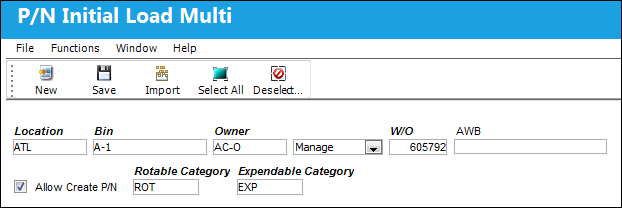
Header
The following information/options are available in this window:
_____________________________________________________________________________________
Location
The Location for maintenance events, inventory stores, orders, transactions, or training events.
Bin
The specific storage bin within the inventory location.
Owner
The code for the owner of the part(s).
Loan Category drop down
Loan Part Category (short, long, consigned, manage or pool).
Consigned - The part is still associated with the specified owner and does not yet belong to your company. Ownership is changed when the part is issued to an aircraft or Work Order. Once initial loaded, from the Inventory Transaction window, this part will be flagged as 'CONSIGNED.' For more information refer to Initial Loading Consigned Inventory. Once the consigned part is issued to an Aircraft, that part will then belong to the your company and Journal Entries will be written at that time (if Inventory Switch  CONSINED is set to Yes). A new P/O will be created and closed automatically to capture this transaction. For more information refer to Purchasing and Issuing Consigned Parts (P/Os) via the Inventory Training Manual.

Contract  - The Customer Contract associated to the Inventory Owner in the Customer Master, General Tab.
When the 'Contract' Loan Category is selected, the Contract field appears:
Contract - The Customer Contract that is linked to the Owner.
Manage - Maintenance organization manage parts in their inventory that are owned by a particular owner and are to be used only for a particular customer's aircraft.
When the 'Manage' Loan Category is selected, the W/O field appears:
W/O - The Work Order used to categorize, manage, and schedule work requirements for aircraft maintenance. This is the Work Order which generated the order or requires the part being ordered.
AWB 
The airway bill number related to the part.
Allow Create P/N checkbox
Select this checkbox to create a P/N in the Part Number Master. This P/N will be created from any P/N listing on the multi-load text file which are not in the P/N Master at the time of import.
Rotable Category
This field is displayed only when the Allow Create P/N checkbox is selected. It contains the category of the rotable part number which will be created with the multi-load text file.
Expendable Category
This field is displayed only when the Allow Create P/N checkbox is selected. It contains the category of the expendable part number which will be created with the multi-load text file.
_____________________________________________________________________________________
The following fields become available. Populate the P/N information for the P/N Initial Multi Load.
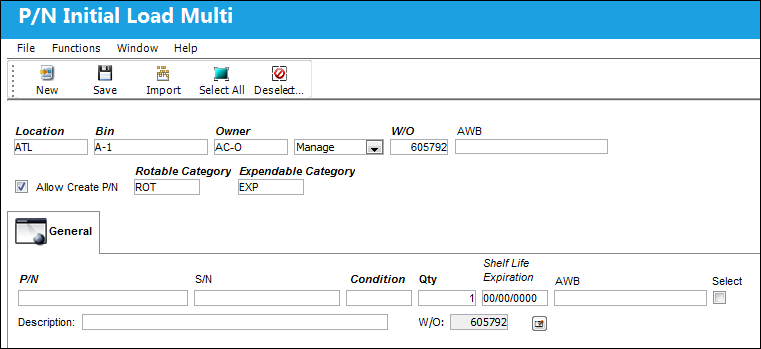
Detail
The following information/options are available in this window:
_____________________________________________________________________________________
P/N
The Part Number reference for the aircraft part.
S/N
The Serial Number for the specific serialized part.
Condition
The condition of the part.
Qty
The number of parts for the transaction.
Shelf Life Expiration
The shelf life expiration date of the part, as applicable.
Edit  button
Allows users to edit saved information.
Selection checkbox
Allows users to select the parts they want to load. After saving the record, only the selected parts remain to be uploaded.
Multiple items can be selected with the use of the Select All  and De-select All
  buttons.
_____________________________________________________________________________________
The Import  button offers additional functionality.
Share
Print
|
©1997-2026 Trax USA Corp. All rights reserved. This manual may not be copied, photocopied, reproduced, translated, or converted to any electronic or machine-readable form, in whole or in part, without prior written approval from Trax USA Corp. |
 |