
 Share
Share
 Print
Print
|
|
|
|
|


P/N Reorder Suggestion Update
The P/N Re-Order Suggestion Update is used to edit/update the system’s P/N Re-Order Level (that was generated when the P/N Re-order Level ‘Detail’ was run).
Please refer to the P/N Re-Order Level section for additional related information.
A synopsis of the steps involved with the Re-Order Level procedure follows:
- The P/N Re-Order Level/Detail selection is run. The ‘P/N Re-Order Level Suggestion Print’ is created by the system when the Find
 button is clicked. The report contains the suggested Re-Order level (quantities).
 - The P/N Re-Order Suggestion Update is used to edit/update the system’s P/N Re-Order Level (that was generated when the P/N Re-Order Level ‘Detail’ was run). If no changes are required, go to step 3.
- This function will update the Re-Order levels in the system and change the Re-Order level for the specified Location. The P/N Master Re-Order Level quantities are updated based on these results. Therefore, this functionally overrides any quantities specified in the P/N Master (Settings/Update/ P/N/General Tab[Inventory Levels
 Button]).
 - The P/N Re-Order Level/ Update Re-Order Level selection must be run. This step will update the system with the suggested quantities and changed quantities (if any).
Once the P/N Re-Order Level is run, go to Inventory/Update/P/N Re-Order Suggestion Update.
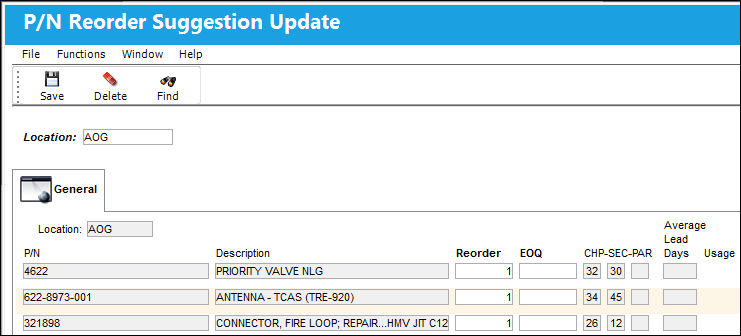
Enter the Location where the Re-Order Level review is taking place. Select the Find Button.
TRAX redisplays the screen with the records associated with that location.
Edit/update the suggested levels if desired (in the Re-Order column).
After saving, the Update Re-Order level selection must be run.
Share
Print
|
©1997-2026 Trax USA Corp. All rights reserved. This manual may not be copied, photocopied, reproduced, translated, or converted to any electronic or machine-readable form, in whole or in part, without prior written approval from Trax USA Corp. |
 |