
 Share
Share
 Print
Print
|
|
|
|
|


Physical Inventory Count Dashboard

The Physical Inventory Count Dashboard is a multi platform window that can be used as a one stop shop to accomplish all of the steps in the Physical Inventory Count process. From this Dashboard, the user can schedule Bin counts, begin the generation, and make adjustments. This window also allows the user to view generations that have been created, but not yet scheduled. This Dashboard is used to show the schedule of Inventory Counts that need to be handled on a weekly view. A progress bar for each count is provided to monitor the progress of the count.
Producing counts that will appear in this window can be accomplished through the following methods:
- Bin Schedule Generation button and the Physical Inventory Generation button
- Physical Count Schedule Generation window
- Physical Inventory Generation window
 The Physical Inventory Count Dashboard window is security controlled via Inventory/ Update/ Physical Inventory Count Dashboard. For more information, refer to the Security Explorer via the System Administration Training Manual.
The Physical Inventory Count Dashboard can be utilized based on Location, along with several other specifications.

The following information/options are available in this window:
_____________________________________________________________________________________
Location
The location where the count was generated.
Bin Quick Filter
Counts of specific Bin within Location.
Gantt View Type
Select the type of timeline to view the dashboard in the Physical Inventory Count Dashboard, Gantt tab.
Weekly radio button - Divide the Gantt timeline into Weeks.
Monthly radio button - Divide the Gantt timeline into Months.
Week arrow buttons
Select the specific week for which the results will be filtered.
Dashboard Reports
Select the different graphs to be produced and displayed in the Physical Inventory Count Dashboard, Dashboard tab.
Amount of Parts By Category - A pie chart of the different categories being counted, along with their amount displayed by a percentage.
Amount to Count Per Bin - A bar graph with the quantity to be counted for each Bin.
Bin Count Totals - A table with the Total to Count and Counted amounts for each Bin.
Total vs Counted - A bar graph for the Total to Count and Counted amounts for each Bin.
Accuracy Report - A report displaying the accuracy of previously conducted counts.
_____________________________________________________________________________________
Select the Find  button to produce the previously generated counts for the specified week and utilize the results in the various tabs available.
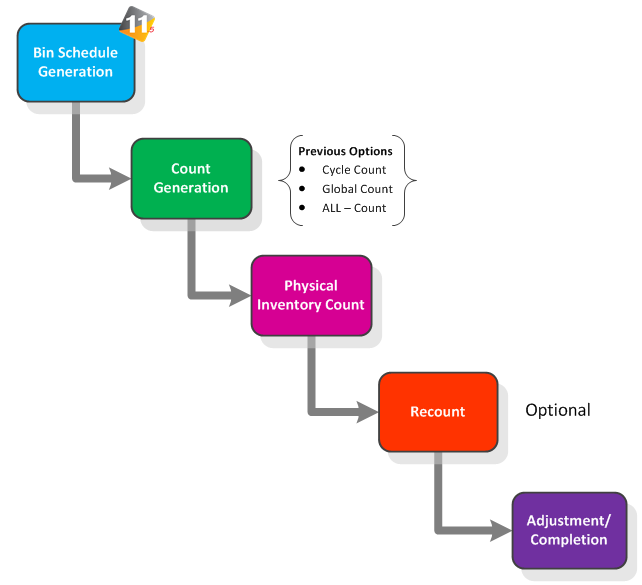
The following diagram illustrates the process for completing Bin Counts. The steps in the diagram below will be explained in further detail in upcoming topic.
The following tabs and buttons are available:
Physical Inventory Count Dashboard Tabs |
Physical Inventory Count Dashboard Buttons |
|
 Save button


 Share
Print
Share
Print
|
©1997-2026 Trax USA Corp. All rights reserved. This manual may not be copied, photocopied, reproduced, translated, or converted to any electronic or machine-readable form, in whole or in part, without prior written approval from Trax USA Corp. |
 |