
 Share
Share
 Print
Print
|
|
|
|
|


Email Log, General Tab
In the Email Log window, a list of email failures will display. If the user selects a failed email from the list, the email information will populate the From, To, Subject, and Message field information. This information may be edited and resent through the Re-send  button located in the tool bar section of the window.
To re-send a failed email the SMTP functionality must be set up. For information on how to set up the SMTP functionality, refer to the SMTP Email Button, via the Company Profile in the Settings Training Manual.
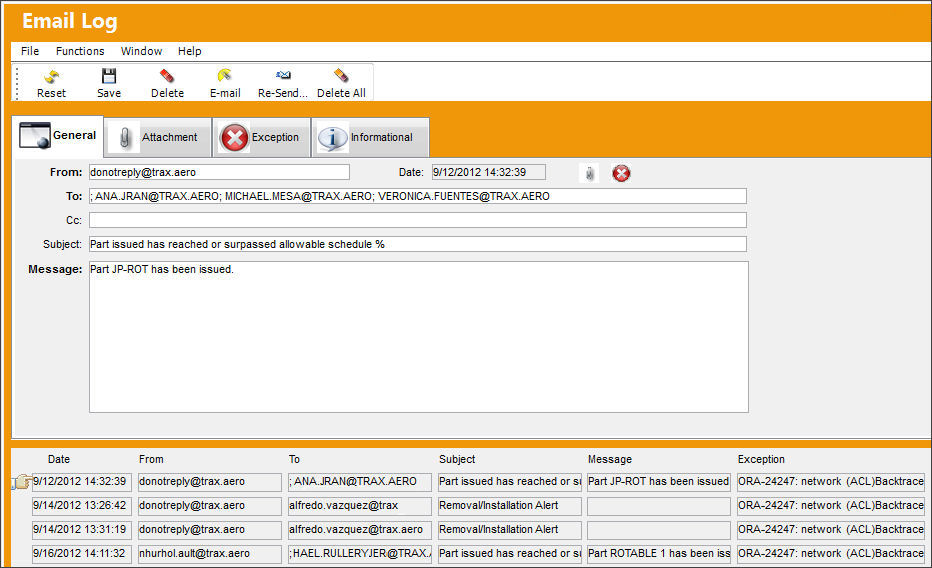
The following information/options are available in this window:
_____________________________________________________________________________________
From
The sender's user email address.
Date
The date the email was sent out.
To
The recipient's email address.
Cc
Add additional recipients to receive a courtesy copy of the email.
Subject
The email subject.
Message
The email content.
_____________________________________________________________________________________
Share
Print
|
©1997-2026 Trax USA Corp. All rights reserved. This manual may not be copied, photocopied, reproduced, translated, or converted to any electronic or machine-readable form, in whole or in part, without prior written approval from Trax USA Corp. |
 |