
 Share
Share
 Print
Print
|
|
|
|
|


Repair Order Receiving
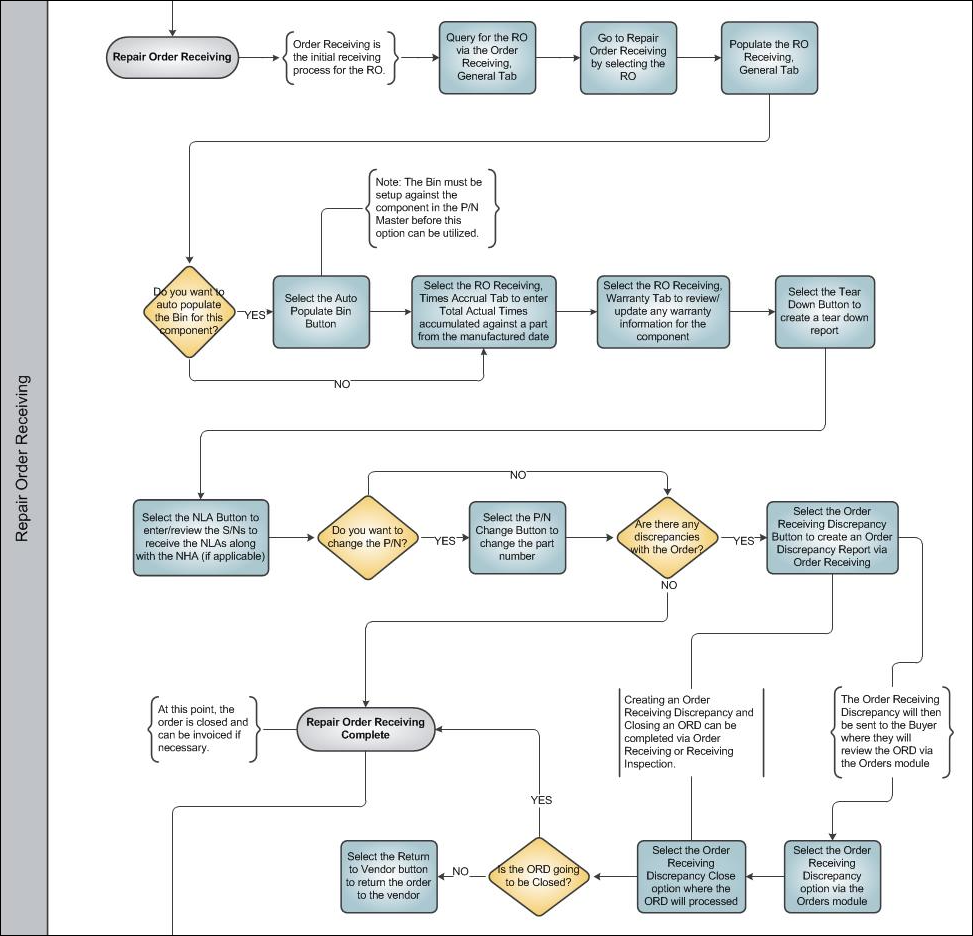
Order Receiving is the first step in the receiving process of an order and is typically completed by a receiving clerk. Once an order has been received, it will go to 'Closed' status where it can be invoiced. The component associated with the order will not be available in inventory until the Receiving Inspection process has been completed, where the status of the part will be 'Pending Receiving Inspection.'
Receiving Inspection is the secondary inspection that takes place for an item. This will depend on the R/I Flag in the P/N Master, Technical Engineering tab. If Receiving Inspection is required, the items will not be available in inventory until the secondary receiving has taken place.
Information on the order will appear at the bottom of the window following selection. If a requisition is associated with the order, it will display at this point. Following receiving, a message will be sent to the requesting user. Once the initial detail has been completed and saved, the Receiving Control, E/C, and the N/L/A windows may appear and require data to be entered.
Depending on the user's company setup, the Inventory Tag print message (or tag print window) will then appear. To print the tag, select 'YES' on the Print Tag pop up. The system will then take the user to the tag print window. To return without printing, select 'No.'
Although the Repair Order Receiving program functions the same as the other Order Receiving programs, in that it receives components from orders, it does have unique functionality.
Below is a listing of options that are unique for the Repair Order Receiving program:
- Receiving can only be performed against an existing order in the system.
- It is not possible to perform receiving without connecting it to an order.
- Alerts will appear during the Order Receiving process to indicate that certain properties of the part are being received. For example, if the part that is being received is shelf life controlled, and the time is expired, the user will be alerted.
Share
Print
|
©1997-2026 Trax USA Corp. All rights reserved. This manual may not be copied, photocopied, reproduced, translated, or converted to any electronic or machine-readable form, in whole or in part, without prior written approval from Trax USA Corp. |
 |