
 Share
Share
 Print
Print
|
|
|
|
|


The criteria (Hours/Cycles/Days) which is controlling the schedule is highlighted in turquoise.
The due date is calculated based on this schedules criteria.
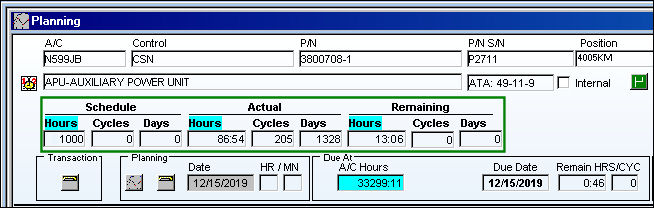
The following information/options are available in this window:
_____________________________________________________________________________________
Schedule Hours/Cycles/Days
The Schedule Hours/Cycles/Days for the item.
Actual
The Actual time accumulated on the item (hours/cycles/days) from the effective date and/or the last compliance date.
Remaining Hours/Cycles/Days
Planning will calculate the W/O Remaining Hours/Cycles and Days based on the time between the Planning Date and the W/O Schedule Start Date.
_____________________________________________________________________________________
TRAX will determine the remaining times by calculating the effective date of the planned maintenance event minus the actual flight times:
|
|
Actual Flight Hours from Effective Date/ Time |
|
|
1000 |
- |
86.54 |
= |
913.46 |
TRAX will calculate the due date based on the number of remaining hours and/or cycles factored by the mean hours set-up for each aircraft:
|
|
|
|
Number of Factored Days |
1000 |
/ |
10.00 |
= |
100 |
TRAX will add the factored number of days to today's date (the day on which the planning query is run) to come up with the due date:
Today's Date |
Plus |
Factored Days |
Equals |
Due Date |
08/11/2016 |
+ |
100 |
= |
11/19/2016 |
There is a different calculation for calendar day driven items. These will have their due date calculated by adding the remaining number of days to today's date.
The A/C Planning Query program will take data from the following areas of the system and process it to determine due items:
- Engineering Module: Engineering Controls for Aircraft (i.e. ADs) and also for P/N's (i.e. SBs and Mods) are shown in the Planning Query. Due dates are calculated for each item.
- Technical Records Module: P/N Control information (such as TSN
 and TSO ) is processed when components are installed on aircraft, to determine removal time. Only those P/N Controls that have a schedule entered will appear in the Planning Query.
 - Deferred Defects: Defect items that are deferred, can be shown as part of the Planning forecast, due dates are calculated according to defer parameters.
E/C Limit Schedule:
If the Engineering Control contains a Limit Schedule, the remaining/adapted Limit schedule will be displayed as it relates to the E/C attached to the Work Order. This Limit remaining schedule is displayed to the far right of the Planning element.
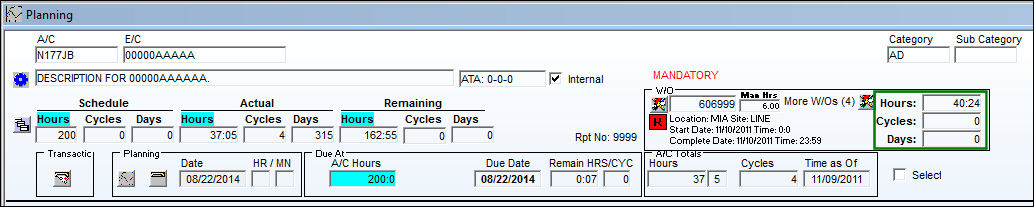
The Limit Schedule comes from the Engineering Control, Schedule tab. The below is the original Limit Schedule for the E/C.
The Limit Schedule allows users to more accurately accomplish a schedule for an E/C. The E/C is terminated once the limit has been reached. For example, if an E/C states that the maximum number of hours is 5000 hours (its limit), once the A/C has reached that amount of hours, the E/C is terminated. This is an option that can replace the Repeat Number more effectively. The limit schedule will allow the E/C to repeat until the limit is reached.
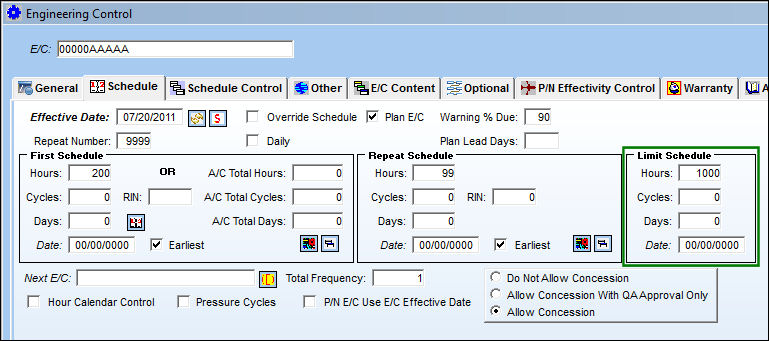
For detailed information on the Limit Schedule refer to Engineering Control, Schedule Tab via the Engineering - E/C Training Manual.
Share
Print
|
©1997-2026 Trax USA Corp. All rights reserved. This manual may not be copied, photocopied, reproduced, translated, or converted to any electronic or machine-readable form, in whole or in part, without prior written approval from Trax USA Corp. |
 |