
 Share
Share
 Print
Print
|
|
|
|
|


Audit Closing
Once all the Steps have been ‘Closed’ on an Audit, the status of the Audit will go to ‘Completed.’ Upon the status of the Audit being 'Completed,' the next phase of the process is the Audit Authorization, performed via the Auditor Review.
With the Audit is at ‘Authorized’ status, the final process is for the Manager of Quality (or whoever is responsible) to officially sign off each Step. This will trigger the system to change the status of the Audit to ‘Closed’. Once ‘Closed’, if the Audit is a repetitive one, the next schedule of the Audit will be activated. Note that Security access must be set up for the authorized user (specifically for this window) via System Administration/ Explorer/ Security Explorer/ QA. Once all the Steps have been ‘Authorized’, the status of the Audit will go to ‘Authorized’ via Quality Assurance/ Update/ Audit Creation/ Following/ General Tab. The Manager of Quality Audit Tab will appear for update (if appropriate Security access has been granted via System Administration/ Explorer/ Security Explorer).
The manager responsible for signing off the Audit must check their list as often as required to determine if there are any Audits waiting for review/authorization.
The following is the basic life cycle of the Quality Assurance Process, particularly the Audit Closing:
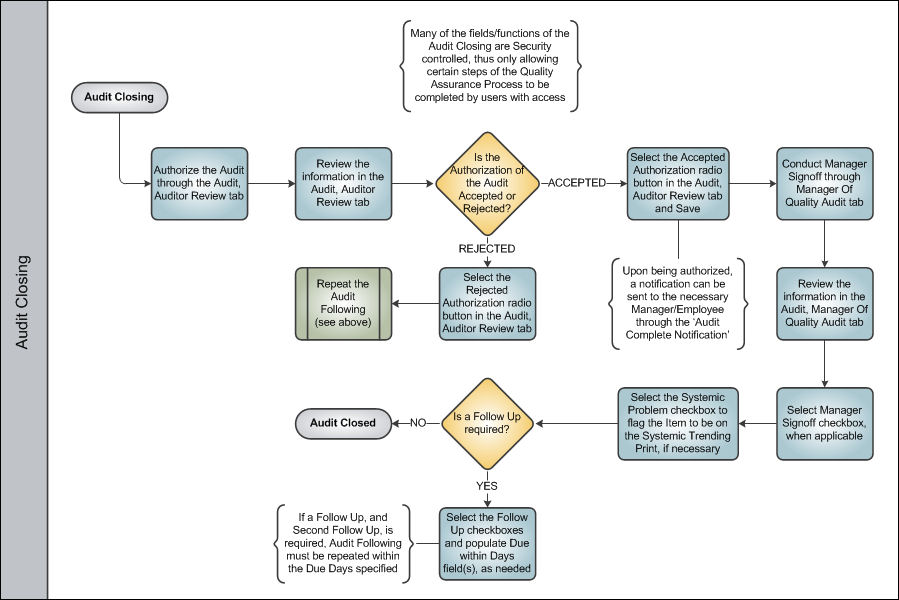
Once the Audit has been authorized and closed, its process is complete.
Share
Print
|
©1997-2026 Trax USA Corp. All rights reserved. This manual may not be copied, photocopied, reproduced, translated, or converted to any electronic or machine-readable form, in whole or in part, without prior written approval from Trax USA Corp. |
 |