
 Share
Share
 Print
Print
|
|
|
|
|


Quality Assurance Request
In the event of an Audit for a Vendor not being performed by its Due Date, the Vendor will be placed in 'Q/A Inactive' Status. This can only be changed back to its proper status by the completion of the Audit. However, for an individual order from the Vendor, the 'Q/A Inactive' Status can be temporarily overridden. The Q/A Request Creation/Following window allows users to create One Time Order Approvals for Vendors that are under 'Q/A Inactive' Status. These One Time Approvals allow the Vendor to be entered against one order (which include P/Os, E/Xs, L/Os and R/Os). Without a One Time Approval, a 'Q/A Inactive' Vendor cannot be entered against an order. For the Vendor to be used against another order, whether it's the same order type or a different type altogether, a new Approval must be created. To be able to use the One Time Approval, it must first be Authorized. And once the order is created, the One Time Approval is automatically closed.
The following is the basic life cycle of the Quality Assurance Process, particularly the Q/A Request:
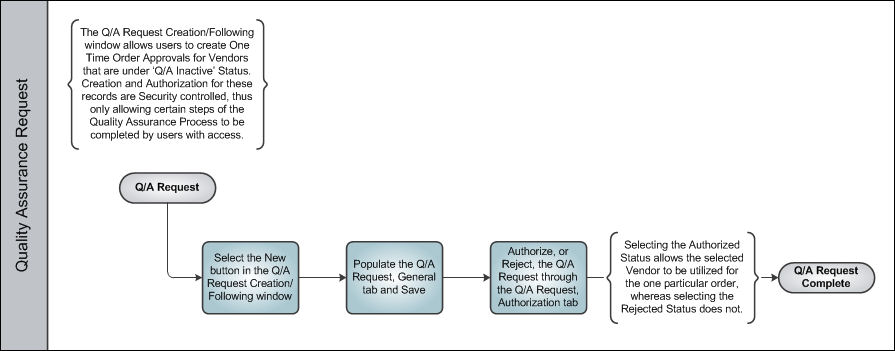
Once the Q/A Request has been created and authorized, its process is complete.
Share
Print
|
©1997-2026 Trax USA Corp. All rights reserved. This manual may not be copied, photocopied, reproduced, translated, or converted to any electronic or machine-readable form, in whole or in part, without prior written approval from Trax USA Corp. |
 |