
 Share
Share
 Print
Print
|
|
|
|
|


Return to Vendor Button, via Order Receiving Discrepancy Closing
Upon closing the Discrepancy, the order can be returned to the Vendor through the Return To Vendor  button. For more information, refer to the Return To Vendor.
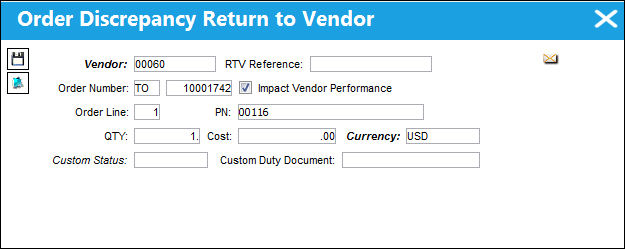
The following information/options are available in this window:
_____________________________________________________________________________________
Vendor
The Vendor to which the part will be returned.
RTV Reference
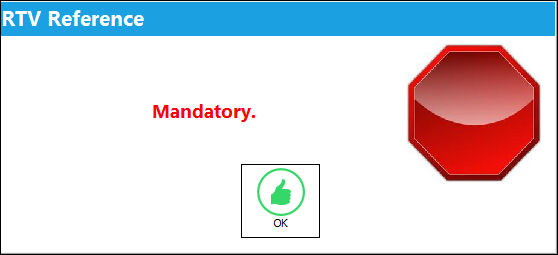
This field may become mandatory if the RTV Reference Mandatory checkbox is selected in the Vendor Master, Optional Tab window. As a result, when the user attempts to save, the following hard stop warning will appear.
Order Number
The Order number associated with the returned part.
Impact Vendor Performance checkbox
Check this to have the system automatically deduct points from the Vendor for poor performance.
This functionality must be set up in System Transaction Codes/Settings/Vendor Performance.
Order Line
The line number on the Order associated with the returned part.
PN
The Part Number reference for the aircraft part.
QTY
The quantity of parts to be returned.
Cost
The Cost associated with the part.
Currency
The currency code to be used for the transaction.
 When Switch
  INVCURO is set to Yes, if the rate of currency for a part has changed from the time it was received into the system and the time a Return To Vendor transaction has occurred, the system will acknowledge the change in currency by noting the date the part was received into the system against the Journal Entry. When Switch INVCURO is set to No, the system will acknowledge the change in currency by noting the date of the currency conversion against the Journal Entry.
Custom Status
Customs status that applies to the part in the transaction, as applicable.
Custom Duty Document
Document used to verify that the part was accepted by customs.
_____________________________________________________________________________________
 Share
Print
Share
Print
|
©1997-2026 Trax USA Corp. All rights reserved. This manual may not be copied, photocopied, reproduced, translated, or converted to any electronic or machine-readable form, in whole or in part, without prior written approval from Trax USA Corp. |
 |