 Download Online Help
 Print
|
|
|
|
|


Security Options
Various options in the Production Control application are security-controlled via the main application. The following options can be configured via Production Control/ Update in the Security Explorer.
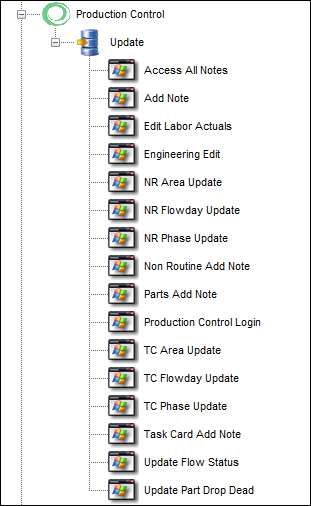
The following security options are available in the Production Control application:
_________________________________________________________________________
Access All Notes
Provides access to update notes created by other users other than the user who created the note.
Add Note
Provides access to the Add Notes  button for the Site Notes via the Homepage.
Edit Labor Actuals
Provides access to edit the Labor Actuals via the Ready to Inspect tab.
Engineering Edit
Provides access to the Edit  button and Delete
 button via the Engineering tab.
NR Area Update
Provides access to the Area field via the NR's tab.
NR Flowday Update
Provides access to the Flowday field via the NR's tab.
NR Phase Update
Provides access to the Phase field via the NR's tab.
Non Routine Add Note
Provides access to the Add Note button via the NR's tab.
Parts Add Note
Provides access to the Add Note button via the Parts tab.
Production Control Login
Provides access to log in to the application.
TC Area Update
Provides access to the Area field via the Task Card's tab.
TC Flowday Update
Provides access to the Flowday field via the Task Card's tab.
TC Phase Update
Provides access to the Phase field via the Task Card's tab.
Task Card Add Note
Provides access to the Add Note button via the Task Card tab.
Update Flow Status
Provides access to update the status of the Task Card or Non-Routine via the Flow tab.
Update Part Drop Dead
Provides access to the Drop Dead Date field via the Parts tab.
_________________________________________________________________________
Download Online Help
Print
|
©1997-2018 Trax USA Corp. All rights reserved. This manual may not be copied, photocopied, reproduced, translated, or converted to any electronic or machine-readable form, in whole or in part, without prior written approval from Trax USA Corp. |
 |