
 Share
 Print
|
|
|
|
|


Concession Registry
A concession is a granted extension that increases the schedule limitation for the specific item as per Company and Aviation Authority requirements.
This option allows a user to enter concessions for the following items:
- A/C E/C
- P/N E/C
- P/N Control
- Defect
Where a concession is applied to a repetitive inspection, once the inspection has been carried out, the concession limitation is removed (subtracted) from the next occurrence of the inspection.
Note: For example, if a 20 hour concession is applied to a 200 hour inspection, then it is due at 220 hours. Once an inspection is carried out at 220 hours, then the next inspection is due 180 hours later (not 200 hours). Furthermore, if the inspection was performed at 12 hours into the 20 hour concession (at 212 hours), the next inspection is then due 188 hours later (not 200).
The following tabs and buttons are available at the initial level.
Concession Registry Search Tabs |
Concession Registry Buttons |
|
|

 New button
 Find button
 Select button
For information on the options in the detail level, refer to Concession Registry Detail.
The Concession  icon appears next to the item on the A/C Planning Query window.
In the query results, the user may find the same item containing several concessions open and pending.
The following pop-up windows are displayed under the following instances:
Instance 1
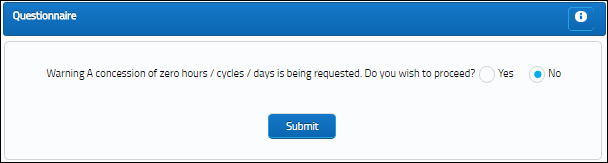
No Hours/Cycles/Days/Date information is given, or there is no consistency between Concession and Planned Control mechanism(s). For example, an existing Aircraft E/C is planned by Hour-limit and the Concession is requested in Cycles or Days format. The following message appears:
Instance 2
The Concession is greater than the Concession limit. For example, a Part Number E/C has a threshold or interval of 5000 hours and an Aircraft has a Concession limit of 5% or 150 hours.
Instance 3
Concession is greater than the E/C Schedule. For example, an Aircraft E/C has a threshold or interval of 500 hours and the Concession Registry request is for 600 hours. A warning message appears.
Note: The Concession functionality is found throughout the system. For additional information, refer to the A/C Type/Series, Concession Tab and the A/C Master, Concession Tab via the Settings Training Manual.
Share
Print
|
©1997-2026 Trax USA Corp. All rights reserved. This manual may not be copied, photocopied, reproduced, translated, or converted to any electronic or machine-readable form, in whole or in part, without prior written approval from Trax USA Corp. |
 |