
 Share
 Print
|
|
|
|
|


E/C Mandatory Classification
A System Transaction Code is defined with the Code Name and Description. The Code Description directly states its functionality and role in the system, populating applicable fields as tasks are performed.
Transaction Code: |
E/C Mandatory Classification |
General Description: |
The E/C Classification and with optional Mandatory flag. |
Are Authorization Steps Available? |
N |
Is System Notification Available? |
N |
Control Panel Path(s): |
Engineering/ Update/ Engineering Control Selection |
Windows(s): |
oux_engineering_eu |
Related Switch(s): |
|
Functions: |
E/Cs with Mandatory Property checkbox selected will trigger flags when queried in the Planning module. Different transactions throughout the system will also trigger alerts. |
Reports: |
|
Available Functionality:
The Mandatory Property checkbox is available in order to assign the same hard-coded functionality of the Mandatory classification to other E/C classifications. When selected, this checkbox makes any E/C Classification mandatory. E/Cs with classifications that have the Mandatory Property checkbox selected will trigger Mandatory flags when they are queried in Planning. Alerts will also appear when completing different transactions.
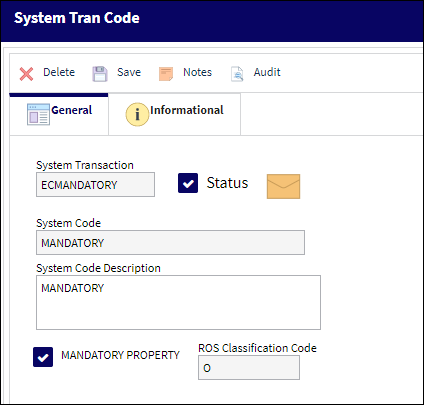
The following information/options are available in this window:
_____________________________________________________________________________________
Mandatory Property checkbox
The Mandatory Property checkbox is available in order to assign the same hard-coded functionality of the Mandatory classification to other classifications. When selected, this checkbox makes any E/C Classification mandatory. E/Cs with Classifications that have the Mandatory Property checkbox selected will trigger Mandatory flags when they are queried in Planning. Alerts will also appear when completing different transactions. For additional information, refer to the Mandatory Property Checkbox, via E/C Mandatory Classification of the Engineering Transaction Codes Manual.
ROS Classification Code
When the MANDATORY Property checkbox is selected, the ROS Classification Code auto populates to M. The field becomes protected and the user cannot change this ROS Classification Code unless the MANDATORY Property checkbox is deselected. When a new ECMANDATORY Transaction Code is created, the ROS Classification Code will default to O. This is a free text field, however only the following codes are acceptable for use at this time:
M - Mandatory
O - Optional
D - Improvements
R - Recommended
 The ROS Classification Code and subsequent functionality is a customized configuration and may not be available for your company. For additional information, consult the appropriate Interface Administrator.
_____________________________________________________________________________________
Share
Print
|
©1997-2026 Trax USA Corp. All rights reserved. This manual may not be copied, photocopied, reproduced, translated, or converted to any electronic or machine-readable form, in whole or in part, without prior written approval from Trax USA Corp. |
 |