
 Share
 Print
|
|
|
|
|


Task Card Type
A System Transaction Code is defined with the Code Name and Description. The Code Description directly states its functionality and role in the system, populating applicable fields as tasks are performed.
Transaction Code: |
Task Card Card Type |
General Description: |
Type of Task Card |
Are Authorization Steps Available? |
N |
Is System Notification Available? |
Y |
Control Panel Path(s): |
Engineering/ Update/ Task Card |
Windows(s): |
w_task_card_eu |
Related Switch(s): |
Not Applicable |
Functions: |
Allows for a list of Task Card Card Types with a common nomenclature among users for creating Task Cards with a Task Card Type. |
Reports: |
|
Available Functionality:
The Task Card Card Type code may be entered via Setting/ Explorer/ System Transaction Codes.
Set-up is identical to the creation of any other System Transaction Code and contains an additional button for the creation of System Notifications.
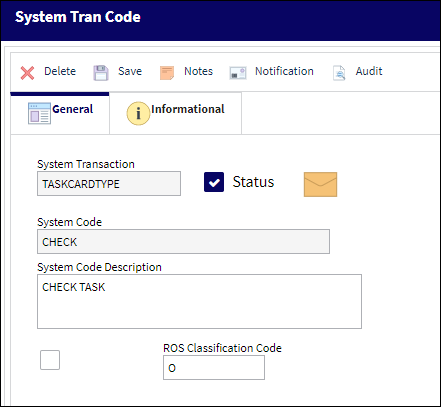
The following information/options are available in this window:
_____________________________________________________________________________________
System Notification  button
This button is used to set up system generated notifications to be sent to users when a Task Card with the specified Task Card Type is modified. The following notification triggers can be set-up for when a specified Task Card Type is created, saved or deleted. For information on how to set up System Notifications, refer to Setup - System Notification, via System Notifications of the Settings Training Manual.
_____________________________________________________________________________________
Share
Print
|
©1997-2026 Trax USA Corp. All rights reserved. This manual may not be copied, photocopied, reproduced, translated, or converted to any electronic or machine-readable form, in whole or in part, without prior written approval from Trax USA Corp. |
 |