
 Share
 Print
|
|
|
|
|


TraxDoc Master, General Tab
The TraxDoc Master, General tab is used to query for a TraxDoc based on the following search criteria. Enter any of the below search criteria for query for a desired TraxDoc and select the Find  button.
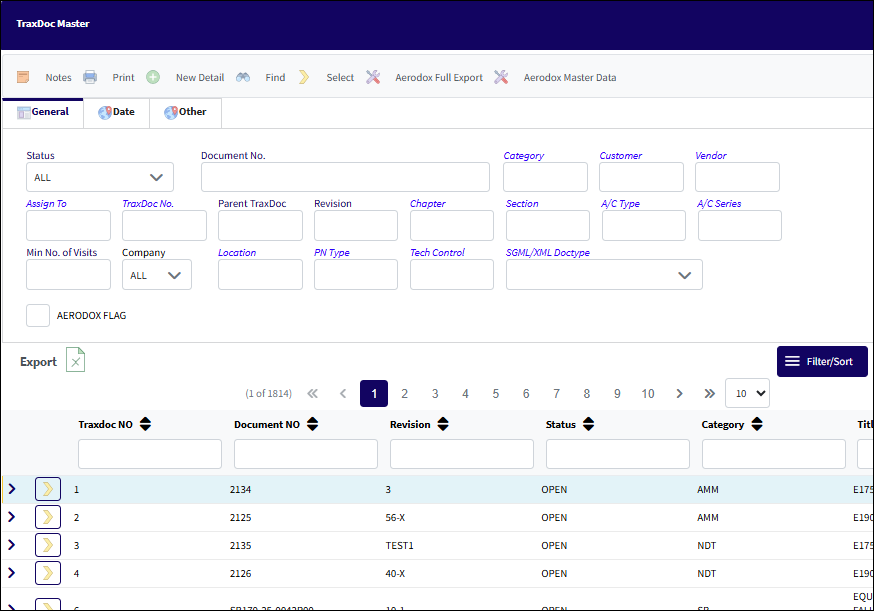
The following information/options are available in this window:
_____________________________________________________________________________________
Status drop down
The status of the TraxDoc being queried for. Select one:
All - Select to query for 'All' TraxDocs.
Draft - Select to query for only those TraxDocs that are in 'Draft' status.
Open - Select to query for only those TraxDocs that are in 'Open' status.
Terminated - Select to query for only those 'TraxDocs that are in 'Terminated' status.
Pending - Select to query for only those TraxDocs that are in 'Pending' status.
Document No.
The document's number.
Category
The document's category. The Category is set up via Settings/Explorer/System Transaction Code/TraxDoc/TraxDoc Category.
Customer
The Customer that the TraxDoc was created for.
Vendor
The Vendor in which the TraxDoc was created from.
Assigned To
The employee the TraxDoc was assigned to.
TraxDoc No.
The TraxDoc Document ID number, which is automatically generated by the system.
Parent TraxDoc
The original TraxDoc number created. The Parent TraxDoc number can be used to search for all child TraxDoc records with the same parent record.
Revision
The document’s current revision number. Each TraxDoc can have multiple revisions as the data/records created through the TraxDoc will need to be updated (revised) regularly depending on the requirements of the aircraft manufacturer, regulatory agency, airline, etc.
Chapter
The ATA chapter reference (if applicable).
Section
The ATA section reference (if applicable).
A/C Type 
The type of aircraft.
A/C Series
The aircraft series.
Minimum Number of Visits
The minimum number of times the TraxDoc was accessed.
Company
The Company that the TraxDoc record pertains to.
Location 
The Location that the TraxDoc record pertains to.
PN Type
The PNTYPE transaction code details the P/N's Type/Series information as it pertains to maintenance work.
Tech Control
The Tech-CTL drop-down defines a part's Tech Control (e.g., APU, Engine, Landing Gear, Module, Disk, Recorder, None, etc).
SGML/XML Doctype dropdown
The Doctype refers to the SGML or XML manual that is linked to the TraxDoc record. For more information on the types of Doctypes, refer to that the TraxDoc Document Detail, Optional Tab.
AeroDox Flag checkbox
Indicates that the TraxDoc record was exported to the AeroDox app once authorized.
_____________________________________________________________________________________
The Export as Excel  button can be selected to view the queried data (including all pages) in an Excel spreadsheet. This Excel file can be saved for later use. For more information refer to the Export as Excel Button via the eMRO System Standards manual.
The Filter/Sort  button is used to alter the search criteria for records associated with the host module and window. For more information, refer to Filter/Sort Button via the eMRO System Standards Module.
Share
Print
|
©1997-2026 Trax USA Corp. All rights reserved. This manual may not be copied, photocopied, reproduced, translated, or converted to any electronic or machine-readable form, in whole or in part, without prior written approval from Trax USA Corp. |
 |