 Download Online Help
 Print
|
|
|
|
|


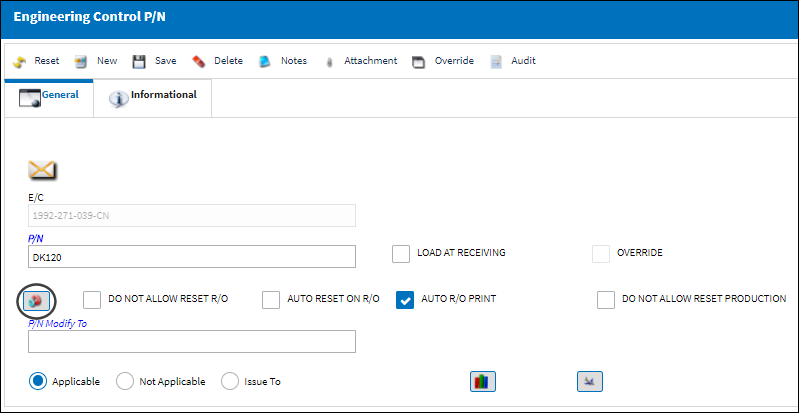
The Schedule Override (P/N E/C)  button automatically overrides E/C records so that maintenance is scheduled accordingly with P/N hours.
From the Engineering Control P/N window, select the Schedule Override (P/N E/C) button.
When selected, the Engineering Schedule Override window appears, indicating that maintenance is automatically scheduled based on the number of P/N hours. If the part has accumulated less than 100 hours, maintenance is scheduled within 30 days. If the part has accumulated greater than 100 hours, maintenance is scheduled in 50 days.
Note: P/N maintenance is scheduled in the Planning window and P/N hours can be viewed in the Inventory Detail window.
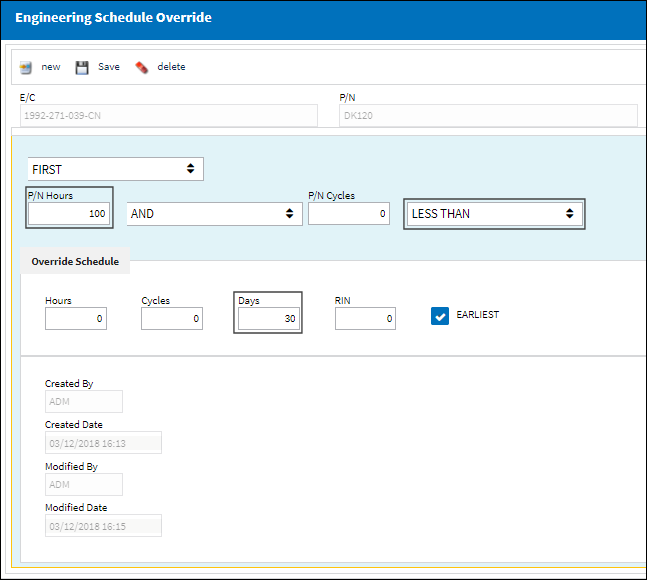
The following options/information is available in this window:
_________________________________________________________________________
E/C
The Engineering Control that specifies aircraft or component scheduled maintenance intervals.
First or Repeat radio button
This will automatically be selected depending on whether the Override  button was selected for the First Schedule or Repeat Schedule of the E/Cs Schedule Tab.
Note: This can not be changed. Only a First Schedule Override can be configured for a First Schedule, just as only a Repeat Schedule Override can be configured for a Repeat Schedule.
P/N Hours
The number of P/N hours that will have to be met in order for the Override Schedule parameters to become applicable.
Filter Condition drop down
Choose from: And, Or, Hours Only, Cycles Only, Days Only, or Flexible from the drop list to indicate which combination of Hours and/or/either Cycles will be used to determine the Override Schedule.
Note: The "Flexible" Schedule is for 14 CFR Part 135 Operators only. Please refer to the Flexible Compliance Schedule Override for more information.
Greater Than/Less Than drop down
Choose from either Greater Than, or Less Than to indicate how the A/C Hours and/or A/C Cycles will be accounted for in determining when the Override Schedule will become applicable.
P/N
The Part Number reference for the aircraft part.
Override Schedule Fields
The Schedule (Hours, Cycles, Days or RIN) that will become applicable once the override parameters have been met.
_________________________________________________________________________
Download Online Help
Print
|
©1997-2018 Trax USA Corp. All rights reserved. This manual may not be copied, photocopied, reproduced, translated, or converted to any electronic or machine-readable form, in whole or in part, without prior written approval from Trax USA Corp. |
 |