 Download Online Help
 Print
|
|
|
|
|


Having selected into the Engineering Control Range, select the New  button to create a serial number range with applicable status and reason information for in range and out of range serial numbers.
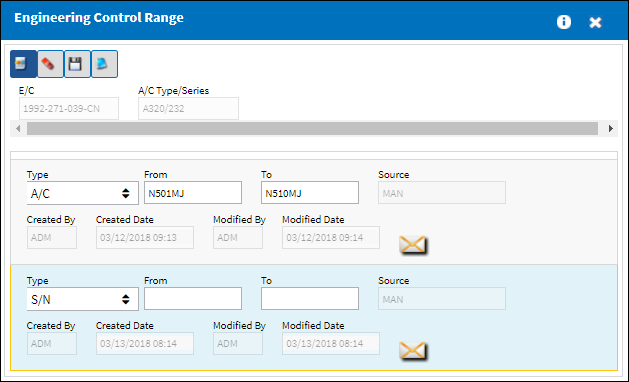
The following options/information is available in this window:
_________________________________________________________________________
Type
Serial Number. This field is hard coded and may not be changed.
From - To Range
Enter the From - To range for effectivity to be applied.
Source
The way that the range was imported/created. This field is updated automatically. The available options are E/C, IPC, and MAN (Manual). The Source is 'MAN' when any part of the range was entered or altered manually.
Note: This field is not available when Switch  ADDSTENGRANGE is set to Yes.
Status
Enter the appropriate status for the specified part serial number.
Note: This field is not visible when Switch ADDSTENGRANGE is set to No.
Reason
Enter the reason for the change to the range of Serial Numbers.
Note: This field is not visible when Switch ADDSTENGRANGE is set to No.
Created By
The user who created the record.
Created Date
The date the record was created.
Modified By
The user who last modified the record.
Modified Date
The date the record was last modified.
Default SN Status and Range
Enter the default Status and Reason for all serial numbers that are out of the specified range.
_________________________________________________________________________
Populate the From-To range, Status and Reason fields and select the Save  button.
The Save prompt appears. Select 'OK.'
An Effectivity pop-up window will appear informing the user that the status for the part, with the serial numbers within range and out of range, will be updated with the specified status.
Select 'Yes' to continue.
Select the Override  button and the system displays the Engineering Effectivity Override window. The Status field currently displays the status change specified in the Engineering Control Range window by serial number.
Status/Reason Functionality:
Once the user selects into the part, the Engineering Effectivity Override window will display the selected part's information including the new status and reason information. To modify the Status and Reason fields, the Override checkbox must be selected.
Save the record. The change made to the Status field will then display in the Engineering Effectivity Override window.
In the Engineering Effectivity Override window, the new status is displayed and the Override field now states 'Yes'.
Download Online Help
Print
|
©1997-2018 Trax USA Corp. All rights reserved. This manual may not be copied, photocopied, reproduced, translated, or converted to any electronic or machine-readable form, in whole or in part, without prior written approval from Trax USA Corp. |
 |