 Download Online Help
 Print
|
|
|
|
|


The Positioning Control  button is designed to specify E/C applicability based on the part's installed position. Select the Positioning Control button to define P/N Positions by Engineering Control. The Positioning Control button is used along with the P/N A/C Configuration. This functionality should contain the same A/C Position information as detailed in the P/N A/C Configuration window for the E/C to effectively apply.
From the Engineering Control P/N window, select the Positioning Control button. Enter the A/C and A/C position information in the A/C Position field.
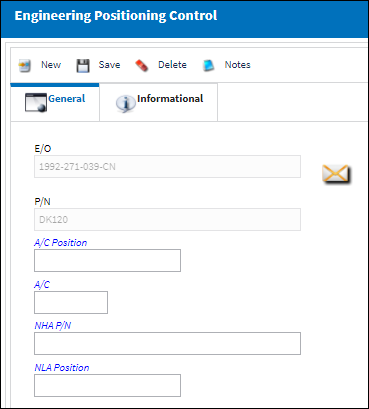
The following options/information is available in this window:
_________________________________________________________________________
E/O
The Engineering Control that specifies aircraft or component scheduled maintenance intervals.
P/N
The Part Number reference for the aircraft part.
A/C Position
The aircraft position reference.
A/C
The individual Aircraft tail number.
NHA P/N
The part’s Next Higher Assembly P/N (if applicable).
NLA Position
The position of the Next Lower Assembly.
_________________________________________________________________________
Note: If the specified part has a P/N Control, its schedule can be overridden and kept as such, regardless of any transactions that are conducted and/or any updates that are made within the P/N Master, through the Override checkbox, via the P/N Control Authorization.
The status of the installed part will automatically set to 'Open' when installed on the aircraft position specified in both the Engineering Positioning Control and P/N A/C Configuration window, otherwise upon the P/N's installation onto the specified aircraft, the status of the P/N will be set to 'N/A.'
Download Online Help
Print
|
©1997-2018 Trax USA Corp. All rights reserved. This manual may not be copied, photocopied, reproduced, translated, or converted to any electronic or machine-readable form, in whole or in part, without prior written approval from Trax USA Corp. |
 |