 Download Online Help
 Print
|
|
|
|
|


P/N Control Authorization
The P/N Control Authorization option is used to view the Authorization Status of any P/N Control. This process may require that parts be further investigated to ascertain their correct life before marking them as authorized for use. If the System Transaction Code/ Settings/ P/N Control Code has been set up with Authorization Steps, those steps will require completion during the P/N Control Authorization Process via P/N Control/ P/N E/C Authorization. Once these Authorization Steps have been set up, whenever a P/N is associated with a P/N Control, and a part is received, or P/N Initial Loaded into the system, that P/N Control must be authorized (the steps must be ‘Accepted’) via Technical Records/ Explorer/ P/N Control/ P/N E/C Authorization to place the P/N Control status to "Authorized."
See the following description of the Switch  PCPEATHS (P/N Control /P/N E/C Authorization Steps Only), via System Administration/ Explorer/ System Transaction Configuration/ Technical Records, for additional related information.
- PCPEATHS - (P/N Control/ P/N E/C Authorization Steps Only) - If set to Yes, the Authorization Status drop-list will not be visible in the P/N Inventory Control Window (via Receiving/ Update/ Order Receiving). The drop-list is used to change the Authorization Status of the item (P/N E/C or P/N Control) to: Acknowledge, Authorized, Pending, or Unknown. If set to Yes, although the Authorization Statuses cannot be changed at Order Receiving, all P/N E/Cs and P/N Controls can have their Authorization Statuses updated via Technical Records/ Update/ P/N Control Authorization. Updating can also be performed via Technical Records/ Explorer/ P/N Control/ P/N E/C Authorization.
Enter one or more search criteria in the Query section of the P/N Control Authorization window then select the Find  button.
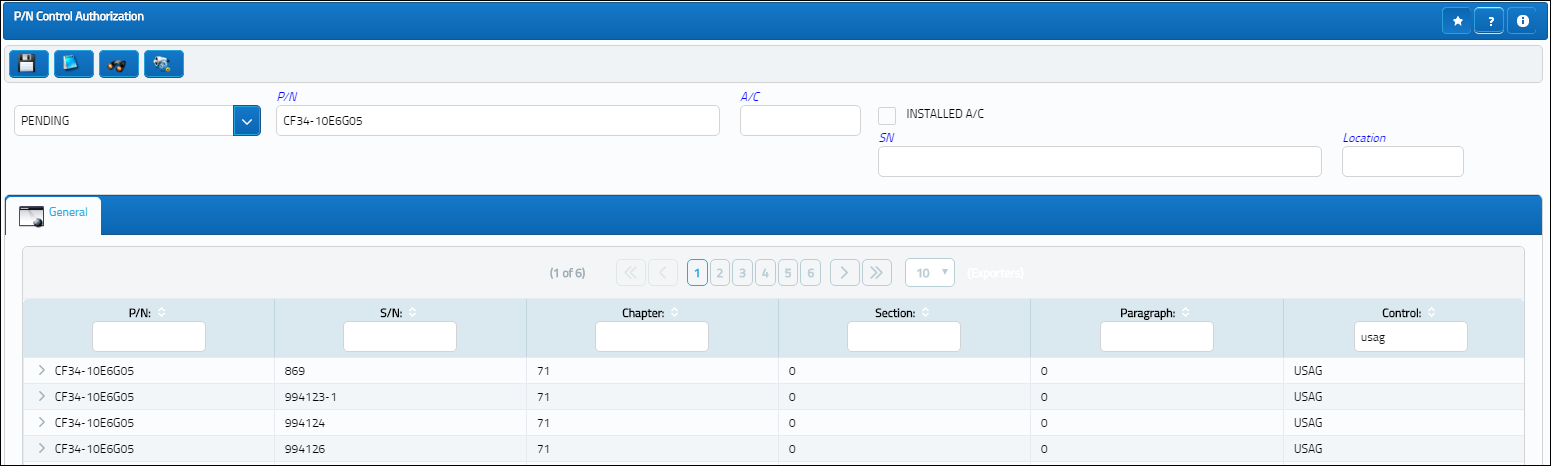
Query:
The following options/information is available in this window:
_________________________________________________________________________
Status
Select one of the following applicable statuses: Acknowledge, All Authorized, Pending, or Unknown.
- CTRLAUTH - P/N Control Authorization default. If set to YES, the system will allow you to default the P/N Control window to Pending, Unknown, Acknowledge, or Authorized. The Config Other field is used. The user specifies which default 'state' will be used by entering it in the Config 'Other' field.
P/N
The Part Number reference for the aircraft part.
A/C
The individual Aircraft tail number.
Installed A/C checkbox
The aircraft in which the part is currently installed.
S/N
The Serial Number for the specific serialized part.
Location
The Location for maintenance events, inventory stores, orders, transactions, or training events.
_________________________________________________________________________
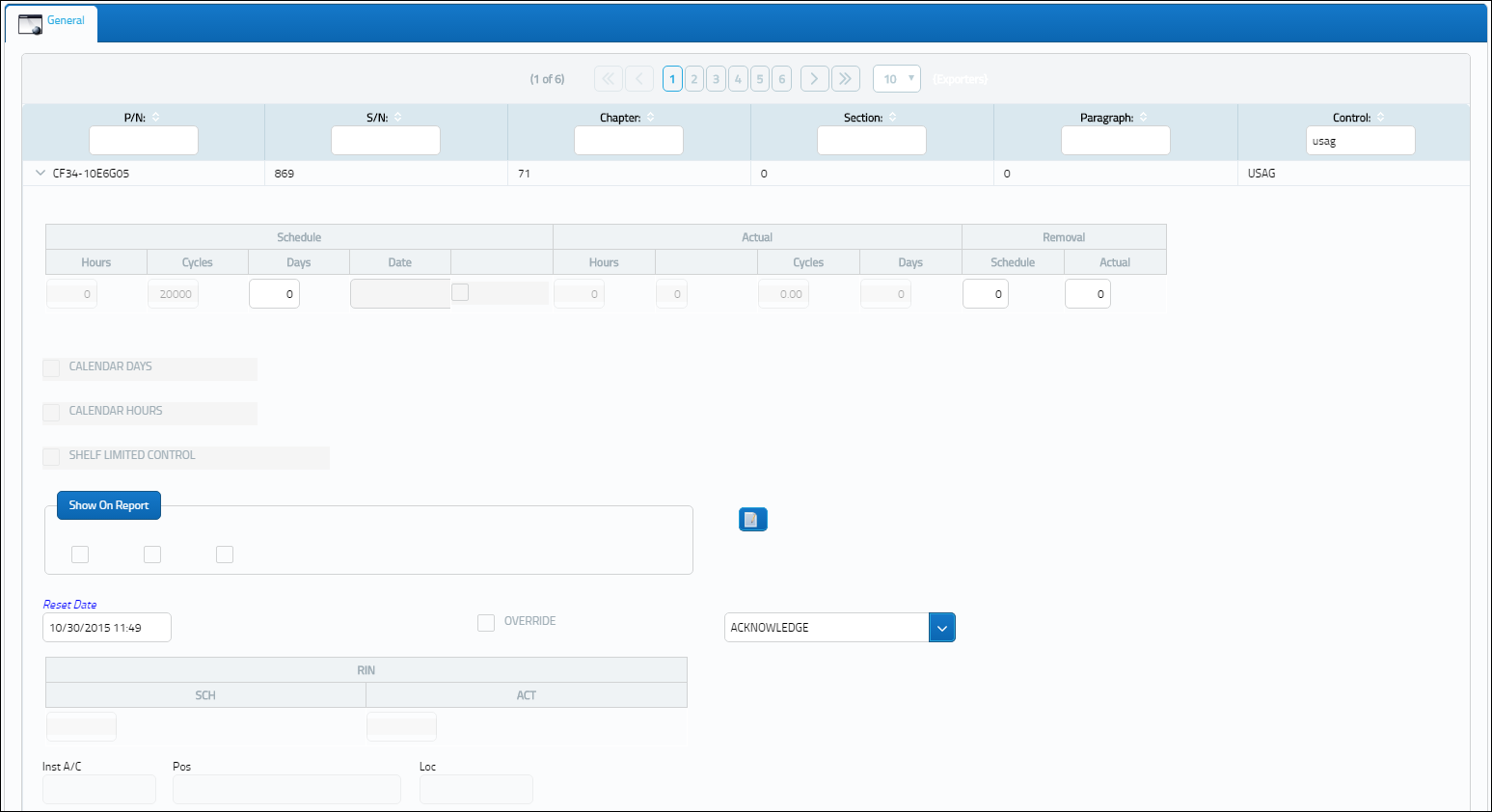
Results:
The following options/information is available in this window:
_________________________________________________________________________
P/N
The Part Number reference for the aircraft part.
S/N
The Serial Number for the specific serialized part.
ATA
The ATA chapter/section/paragraph, as applicable.
Lock checkbox
When selected, this P/N Control cannot be authorized/edited. When not selected, this P/N Control can be authorized/edited. This checkbox is only available when Technical Records Switch LCKPNCTAUTH is set to Yes. For more information refer to Switch LCKPNCTAUTH via the Technical Records Switches Manual.
 Further, this checkbox is only visible and can only be edited when the correct security access is applied via Technical Records/ Update/ P/N Control Authorization/ Lock Checkbox. For more information refer to the Security Explorer via the System Administration Training Manual.
Control
Time Control(s) related to part (i.e. TSN, TSO, etc.), used to define its limit(s).
Schedule Hours / Cycles / Days
Number of scheduled hours, cycles, and days for the control to come due.
Schedule Date
The control date for the part (if applicable). If the date control is selected in the P/N Master, this field will be open for edit.
Date Control checkbox
The Date Control checkbox applies a Date Control to the selected part's Time Control. If the P/N Control is marked with the date control checkbox, after the part was received and a date was entered, from the P/N Control Authorization window that date can be overridden by selecting the date checkbox and keeping the checkbox selected in order to maintain the value.
Actual Hours / Cycles / Days
The number of accumulated hours, cycles, and days against the time control schedule.
Removal Schedule
The Removal Schedule allows for a method of tracking tire removal information. Upon removal from the aircraft this number will automatically increment for each removal. At Receiving, the Removal Schedule information will appear, can be edited as required or reset with the reset of the P/N Control. Security access to this feature must be granted. The Removal Schedule information can also be updated via Technical Records/ Update/ P/N Control Adjustment.
Removal Actual
The number of times the component has been removed from an aircraft. The actuals' figure is automatically adjusted with each A/C P/N transaction.
Reset Date
Date and time at which control information was reset for having been performed/complied.
Calendar Control checkbox
Check to override the time control schedule for the part. The appropriate fields will be enabled once the user has checked the checkbox.
Hours Calendar Control checkbox
This checkbox is selected if the P/N Control Schedule is by calendar hours instead of flight hours and is to show up on the related report. For example, a P/N Control is to be performed every 36 calendar hours from last compliance (if repetitive).
Shelf Limited Control
This checkbox is selected when the shelf life of a part is being tracked while in inventory. When a part is installed on an aircraft, the Shelf Limited Control will not appear in the P/N Inventory Control window. The reset date will be deleted and the actuals will reset to zero. Once the part is removed from the aircraft, the Reset Date of the Shelf Limited Controls is set to the Removal Date. Tracking will begin upon the Removal Date.
Show On Report checkboxes
The Show On Report checkboxes can be checked to have the hours, cycles, and/or days appear on certain technical records and inventory reporting. It is recommended to keep the checkboxes checked (as defaulted) in order to maintain as much information about the part received as possible.
Override checkbox
Select this checkbox to change the P/N Control Schedule (security privileges apply here) for Serial Numbers which are prorated or de-rated from the defaulted P/N Control as indicated in the Control Button, via P/N Master. Leaving this checkbox selected will prevent changes to the P/N Controls via P/N Master from updating these serialized parts. For additional information, see Switch PNCASWOVERR via Technical Records Switch Manual.
Note: This functionality will set and keep the specified schedule for the particular P/N S/N regardless of transactions that are conducted along with updates that are made within the P/N Master.
Note: Override checkbox will not be selectable for P/N Controls which are controlled by Calendar Days.
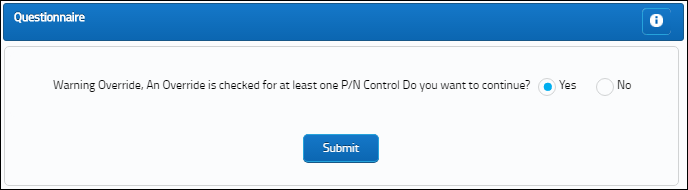
Note: When one or more Override checkbox is selected, the following soft warning will appear:
Authorization Status drop down
Use the Authorization Status drop-list to change the status of the P/N Control to: Acknowledge, Authorized, Pending, or Unknown.
- PCPEATHS (P/N Control/P/N E/C Authorization Steps Only) switch.
- When set to Yes, the Authorization Status drop-list will not be visible in the P/N Inventory Control Window (via Receiving/Update/Order Receiving) when receiving an appropriate part. Although the Authorization Statuses cannot be changed at Order Receiving, all P/N E/C's and P/N controls can have their Authorization Statuses updated via Technical Records/Update/P/N E/C Authorization or P/N Control Authorization.
- When set to No, the Authorization Status drop-list will be visible in the P/N Inventory Control Window (via Receiving/Update/Order Receiving) when receiving an appropriate part.
Audit  button
When the Audit button is selected, the P/N Inventory Control Audit window appears displaying the changes made to the P/N Control.
Prorate  button
The Prorate button will only appear for those P/N Controls which have been defined as having proratable A/C Type/Series or N/H/As. Select the Prorate button to update the P/N Control Loaded Times Proration window. To enter actuals, select the Override checkbox for the P/N Control.
Note: If the actuals are null (blank), upon selecting the Prorate button, a hard warning will appear.
Inst A/C
If the part is installed on an aircraft, the aircraft tail number will be populated.
Pos
If the part is installed on an aircraft with an A/C position defined, the position will be populated.
Loc
If the part is not installed on an aircraft, but located in an inventory location, the location will be populated.
_________________________________________________________________________
Select the Save  button when finished. The P/N controls appear in many places in the system. This is critical for Hard Time/Life Limited Components. This option is the best practice in correcting cumulative actuals for P/N Controls prior to their Install Date. Once installed, the system will update any P/N Control Actuals with flight times from the date and time of installation.
Information relevant to the record can be included through the Notes  button.
Any Next Lower Assembly information can be viewed through the N/L/A  button.
Download Online Help
Print
|
©1997-2018 Trax USA Corp. All rights reserved. This manual may not be copied, photocopied, reproduced, translated, or converted to any electronic or machine-readable form, in whole or in part, without prior written approval from Trax USA Corp. |
 |