 Download Online Help
 Print
|
|
|
|
|


P/N N/L/A Installation and Removal
This option can be used to strip and build Next Lower Assemblies (N/L/As) in the system. This is normally used in a workshop situation, but can also be used for other purposes such as engine or landing gear assembly.
- Search section - The top of the screen has three fields for you to enter/update: the P/N, S/N and Work Order for the assembly that you are working on.
- W/O Items section - The left block on the screen contains items that were issued to the Work Order (items that would be required to be installed on the assembly).
- Removed N/L/A Items section - The right block is used for the removed parts from the assembly.
- N/L/A section - The bottom section of the screen contains the next level down from the N/H/A P/N S/N specified at the top of the screen. This option can only install/remove one level at a time. If a part is removed that has lower assemblies, the lower assemblies will be removed too.
Once you have entered the P/N, S/N and Work Order, click the Find  button. The system will display the data for that Work Order and assembly as the following example.
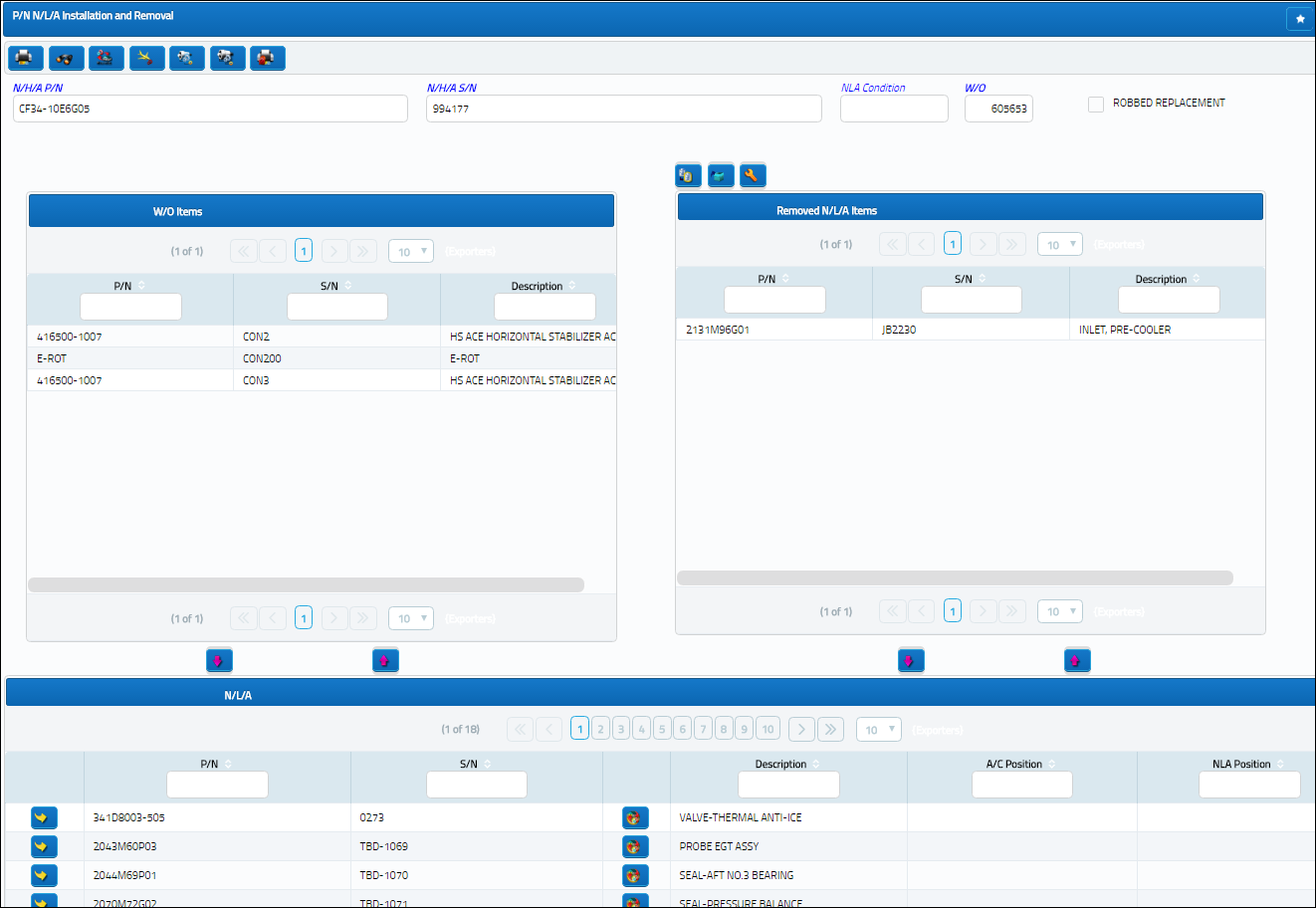
The following options/information is available in this window:
_________________________________________________________________________
N/H/A P/N
The Next Higher Assembly requiring an NLA part to be removed/installed.
N/H/A S/N
The Serial Number of the N/H/A requiring an NLA part to be removed/installed.
W/O
The Work Order used to categorize, manage, and schedule work requirements for aircraft maintenance. Work Order that has parts issued to it for installation to the assembly (mandatory).
Robbed Replacement checkbox
Select this checkbox if the NLA to be installed will replace a robbed part in the assembly.
Note: This checkbox is an indicator for financial purposes only.
_________________________________________________________________________
To move parts between sections, select the item to move and click the up/down arrows to the desired section.
Once the assembly has been built or stripped down, exit to return to the menu. The pending status will be updated on the parts following transaction.
The following buttons are available for additional functionality:
- Print Button
- Inventory Initial Button
- A/C Initial Install Button
- NLA Explorer Button
- NHA PN Button
- Removed Tag Print Button
Download Online Help
Print
|
©1997-2018 Trax USA Corp. All rights reserved. This manual may not be copied, photocopied, reproduced, translated, or converted to any electronic or machine-readable form, in whole or in part, without prior written approval from Trax USA Corp. |
 |