 Download Online Help
 Print
|
|
|
|
|


P/N E/C Authorization
The P/N E/C Authorization window allows the user to view all P/N E/Cs attached to serialized parts and update, edit, and override the authorization status, schedule, and actuals. When a P/N E/C is set up with 'Load at Receiving', the P/N E/C will load with a Pending authorization status and can then be updated in the P/N E/C Authorization window. Each customer will define their own steps for a P/N E/C authorization status process. Please note, the P/N E/C authorization status should not be confused with the actual P/N E/C status (i.e. Open, Terminated, N/A, Applicable/Not Embodied), or the status of the authorization steps to approve and release the E/C.
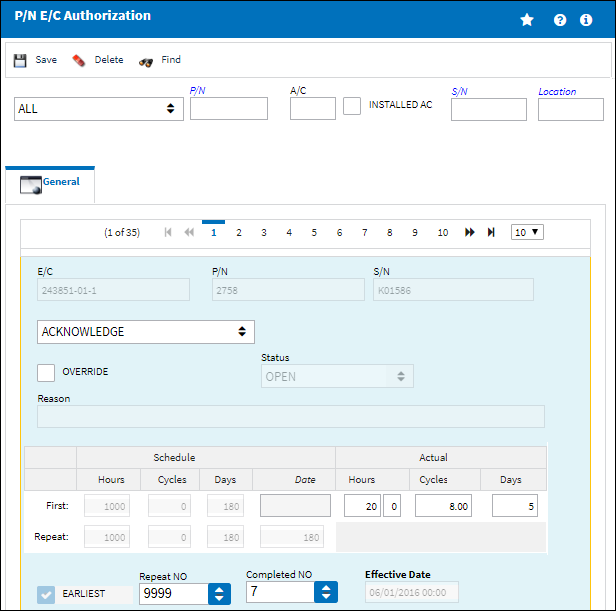
Query:
The following options/information is available in this window:
_________________________________________________________________________
Authorization Status
The authorization status of the P/N E/C: Acknowledge, All, Authorized, Pending, or Unknown.
P/N
The Part Number reference for the aircraft part.
A/C
The individual Aircraft tail number.
Installed A/C
When selected, the system will display all P/N E/Cs for all parts installed on-wing, regardless of the A/C.
Note: If the Installed AC checkbox is selected the system will ignore any entry made in the A/C field.
S/N
The Serial Number for the specific serialized part.
Location
The Location for maintenance events, inventory stores, orders, transactions, or training events.
_________________________________________________________________________
Results:
The following options/information is available in this window:
_________________________________________________________________________
E/C
The Engineering Control that specifies aircraft or component scheduled maintenance intervals.
P/N
The Part Number reference for the aircraft part.
S/N
The Serial Number for the specific serialized part.
P/N E/C Authorization Status
The authorization status of the E/C for the P/N S/N.
Note: Based on each customer's authorization status process, these definitions may vary.
Acknowledge - Indicates the control has been acknowledged.
Authorized - Indicates the control has been authorized.
Pending - Indicates the control is pending.
Unknown - Indicates the control status is unknown.
Override checkbox
When selected, the user is able to override the schedule hours, cycles, days, date, and the earliest, repeat number, completed number, and effective date fields.
Note: If the override checkbox is left selected, the override status for that P/N S/N E/C is set to yes in the Engineering Effectivity Override window. If the main P/N E/Cs schedule is modified, any P/N S/N records that have the override set to yes will not be updated with the new P/E E/C schedule.
P/N E/C Status
The status of the E/C for the P/N S/N.
Applicable/Not Embodied - The E/C is applicable to an A/C Type/Series or Part Number, but may not be mandatory. This status allows the E/C to be entered in the system, but does not require compliance.
Cancel - The E/C has been cancelled.
N/A - The E/C is not effective to a specific A/C or P/N.
Open - The E/C is Open.
Pending - This is the default status. This will be the status until the E/C is authorized.
Rejected - The E/C was rejected or not authorized and may need to be sent back through the authorization process for revision.
Terminated - The E/C is no longer in use. It has either been complied with for all effective aircraft or components, or the action of another E/C has terminated it. When an E/C is terminated, the termination applies to the entire fleet.
Reason
Free text reason.
Schedule
Number of scheduled hours, cycles, and days for the control to come due.
Actual
The number of accumulated hours, cycles, and days against the time control schedule.
Earliest
The Earliest checkbox option is selected if the E/C Schedule parameters are to be planned at the earliest occurrence. For the latest occurrence, this option should not be selected. By selecting the Earliest checkbox, the schedule will be determined by which occurrence comes first; Hours, Cycles, or Days.
Repeat NO
The parameter for the subsequent repetitive occurrences of the Engineering Control.
Completed NO
The number of times that the E/C has been complied with against the P/N.
Effective Date
The Effective Date is the date from which hours, cycles, and days accumulate. It is used to calculate times accrued and due dates in the Planning Query.
_________________________________________________________________________
Download Online Help
Print
|
©1997-2018 Trax USA Corp. All rights reserved. This manual may not be copied, photocopied, reproduced, translated, or converted to any electronic or machine-readable form, in whole or in part, without prior written approval from Trax USA Corp. |
 |