 Download Online Help
 Print
|
|
|
|
|


A/C Log Book Master
The A/C Log Book Master is used to track all Log Books including information such as which aircraft they are assigned to and any related date information.
To create a new book, select the New  button.
The user may also enter search criteria to query for a log book. Select the Find  button. The system displays the following log books.
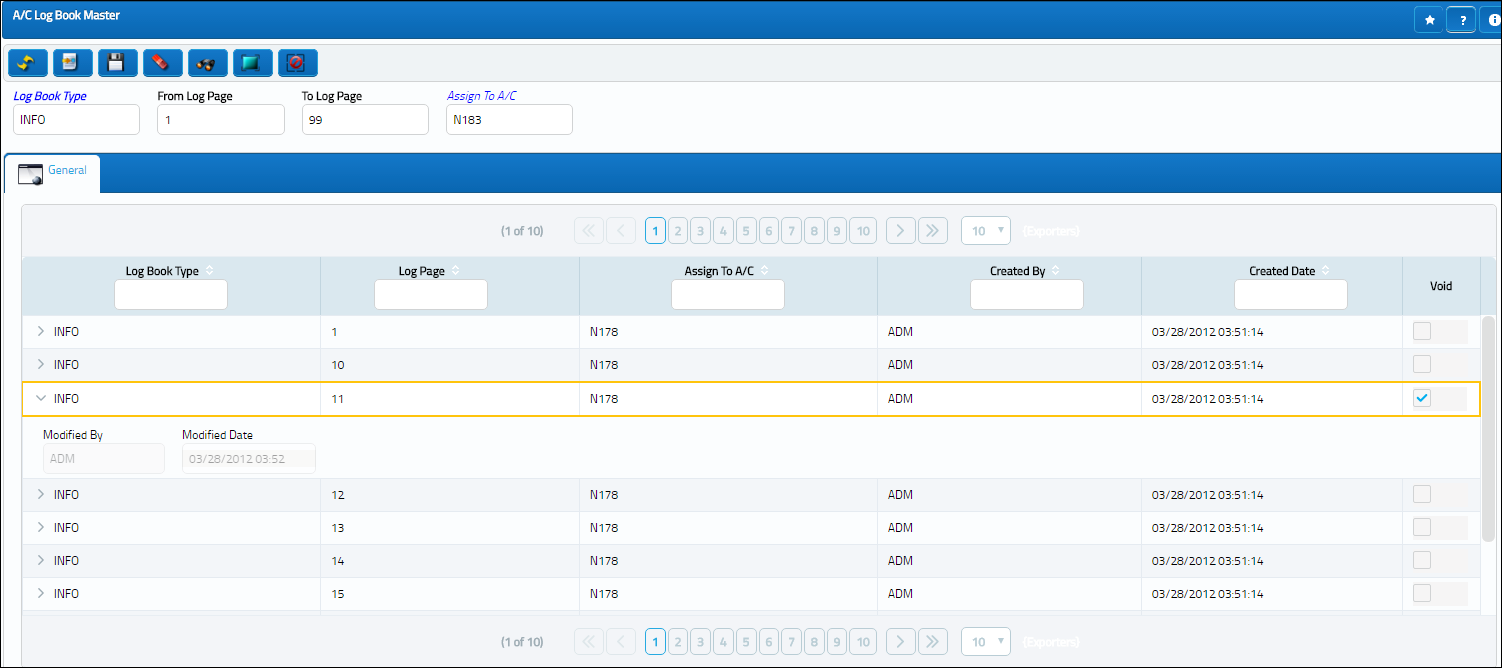
The following options/information is available in this window:
_________________________________________________________________________
Log Book Type
Select a Log Book type.
From Log Page
Enter a start page number.
To Log Page
Enter a last page number.
Assign To A/C
Assign this log to a particular aircraft.
Created By
The user who created the record.
Created Date
The date the record was created.
Modified By
The user who last modified the record.
Modified Date
The date the record was last modified.
Void checkbox
This checkbox identifies which log pages have been voided because they have been damaged and/or lost. The checkbox is only available if there is a Defect Report matching the log page. For example, notice log page '5' above does not have the Void checkbox available. This log page can be searched for in the Defect Report window.
Note: When Technical Records Switch  ACMSLOG is set to Yes, users are prevented from creating a Defect Report with a voided log page number. For more information refer to Switch ACMSLOG via the Technical Records Training Manual.
Select All  / Deselect All
 buttons
These buttons either select all of the Void checkboxes or deselect all of the Void checkboxes, respectively.
_________________________________________________________________________
This update window is also available in query mode where users can view the records provided in this window but cannot create new records or edit existing data. Refer to this module's Query menu.
Download Online Help
Print
|
©1997-2018 Trax USA Corp. All rights reserved. This manual may not be copied, photocopied, reproduced, translated, or converted to any electronic or machine-readable form, in whole or in part, without prior written approval from Trax USA Corp. |
 |