 Download Online Help
 Print
|
|
|
|
|


P/N N/L/A Creation
The P/N N/L/A Creation option allows users to create or modify P/N assemblies and sub-assemblies.
Users can modify P/N Controls, view related notes, and delete parts from the assembly as necessary.
Enter a valid N/H/A Part Number Serial Number and select the Find  button.
The search result displays as follows:
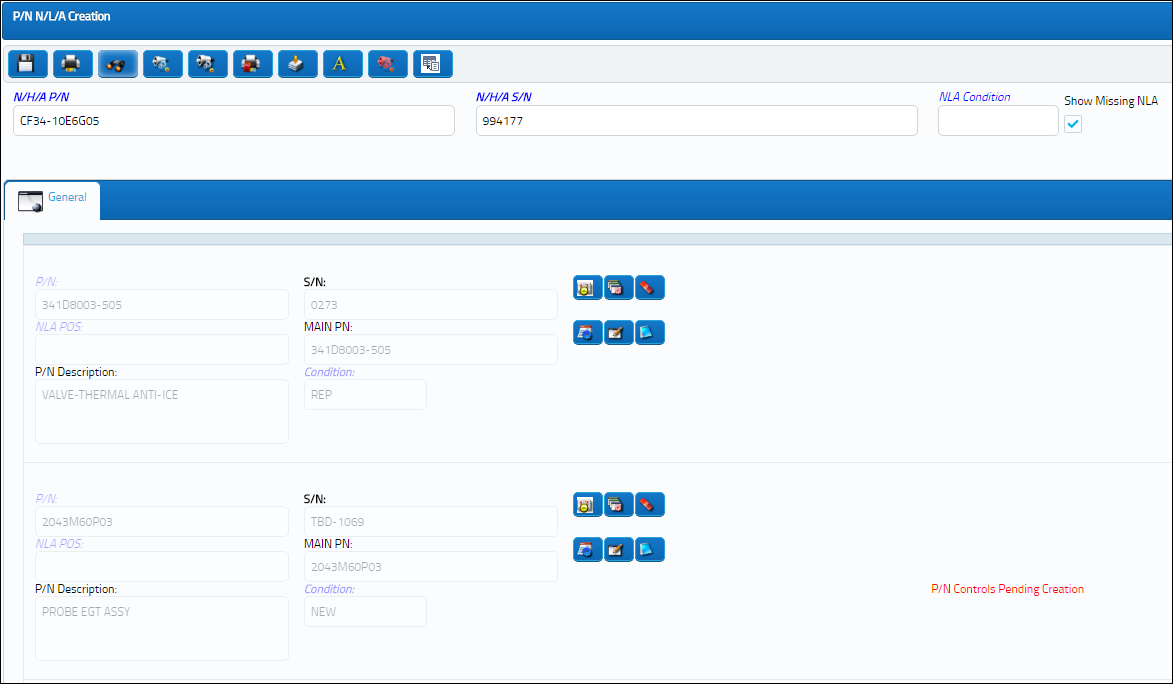
The following options/information is available in this window:
_________________________________________________________________________
N/H/A P/N
The part’s Next Higher Assembly P/N (if applicable).
N/H/A S/N
Next Higher Assembly (NHA) serial number.
NLA Condition
The condition of the N/L/A being received. Once the condition has been populated, it will cascade down to all of the N/L/A components.
Show Missing NLA checkbox
When this checkbox is selected, it allows the user to view all installed and missing NLAs on an assembly. This checkbox is selected by default upon opening the P/N N/L/A Creation window.
P/N
The Part Number reference for the aircraft part. The Next Lower Assembly component that is being updated. Multiple P/Ns will be listed as NLAs for the assembly.
S/N
The Serial Number for the specific serialized part. The Serial Number of the Next Lower Assembly components.
N/L/A Position
The position of the Next Lower Assembly. This position indicates where the NLA is to be installed in the assembly.
MAIN P/N
The NLA's Main P/N in the Part Number Master. This field is only necessary if the NLA component is an interchangeable with a main component.
Condition
The current Condition of the Next Lower Assembly component.
Shelf Life Expiration
Updates the shelf life expiration date of the part. For more information refer to the Override  button below.
_________________________________________________________________________
Note: The functionality of the highlighted buttons are described below.
Upon entry/update of the above information, select the Save  button. eMRO displays the following screen:
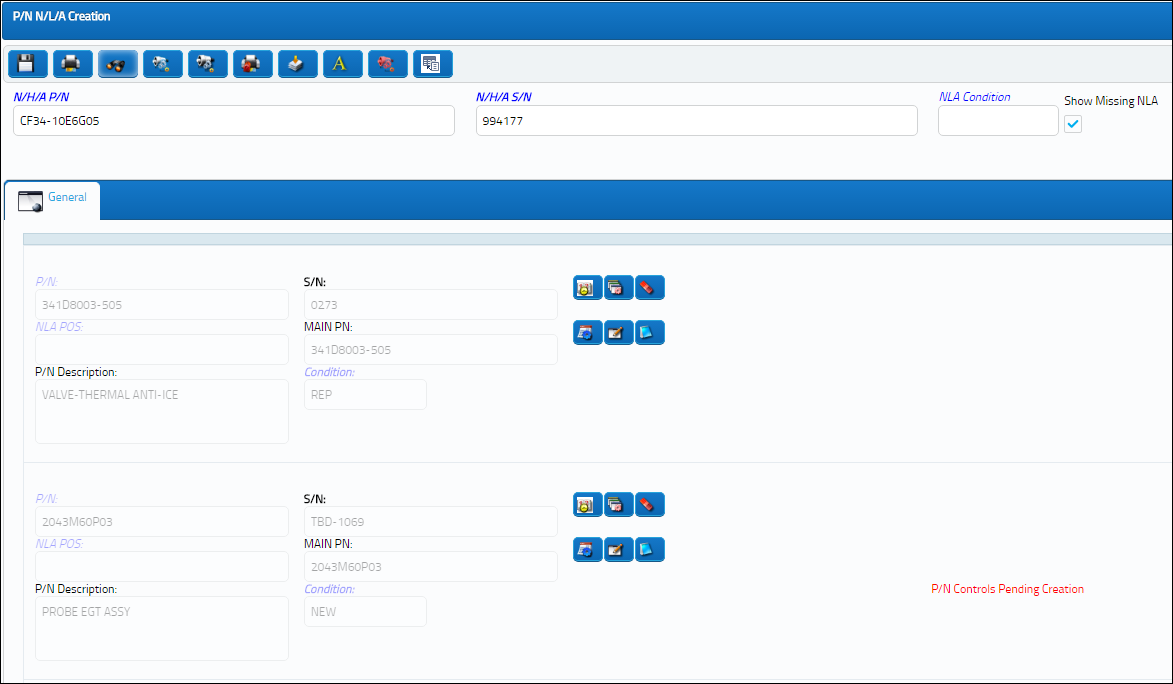
The following options/information is available in this window:
_________________________________________________________________________
P/N Control  button
Select this button to update the P/N Inventory Controls.
Note: Once this button has been selected, and any changes have been made and saved, the button will change from blue to red.
Notes  button
Select this button to view a note(s) added to the NLA as part of receiving.
Note: The user may not add or edit a note. The note is view only.
Delete  button
Select the Delete button to delete the selected N/L/A Serial Number from the assembly then enter a new Serial Number in its place. The new P/N S/N does not have to currently exist in inventory. A history record will be written for the new part.
Note: The deleted P/N S/N will be removed from inventory.
The following prompt will appear. The user will be asked to confirm your request.
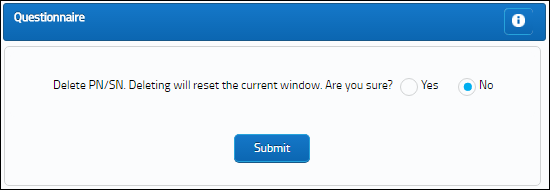
Select Yes. The user will be required to enter a new Serial Number for the specific deleted N/L/A. The P/N Assembly Explorer will indicate that the Serial Number (part) is missing from the assembly until a new Serial Number is input and saved.
P/N E/C  button
Opens the P/N E/C selection window where users can create or edit E/Cs for the selected part. For more information refer to the P/N E/C Button via the Receiving Training Manual.
 The Select checkbox, Complied checkbox, Revision field, Status field, and Reset Date field each are security controlled via Receiving/ Update/ Receiving Inspection/ P/N E/C Selection. For more information refer to the Security Explorer via the System Administration Training Manual.
P/N Initial Times Accrual  button
When this button is selected, the following window will appear:
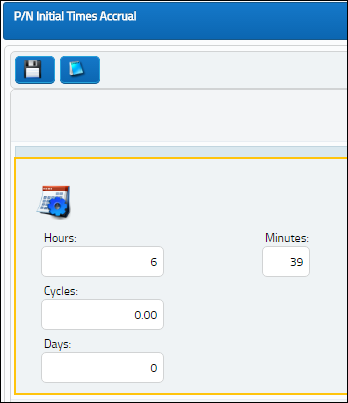
Populate the Hours/Cycles/Days fields and select the Save button. For additional information regarding this button, refer to the P/N Initial Times Accrual button, via the Inventory Training manual.
Edit  button
Select this button to edit the NLA position and NLA condition. Upon selecting the edit button, the P/N, S/N, NLA Position and Condition fields will be cleared out and available for update.
Override button
When selected, the Shelf Life Days in the P/N Master, Inventory tab is Overridden by 365 days of the entered date. For more information on Shelf Life, refer to P/N Master, Inventory Tab via the Settings Training Manual.
Replace Batch  button
Select this button to replace an existing PN S/N Batch with the new P/N S/N that was added to the assembly via a Repair Following transaction. This button is part of the Repair Following functionality (optional in the Repair Order process) and is only available when a Repair Following transaction took place during the repair. For more information refer to the Repair Following Button via the Orders Training Manual.
_________________________________________________________________________
Select the N/L/A  button to view the P/N Assembly Explorer (graphical format) which contains direct access to the P/N Detail Print. For additional information please see the NLA Explorer button section of the Technical Records Training Manual.
Select the Show Next Higher Part Number  button to view detailed information regarding the N/H/A part number. For additional information please see the Show Higher Part Number button section of the Technical Records Training Manual.
The following buttons are available for the window as a whole to offer additional functionality:
- Print Button
- NLA Explorer Button
- NHA PN Button
- Removed Part Tag Print Button
- Import Button
- Auto S/N Button
- NLA Build From History Button
- Set Control To All Button
Download Online Help
Print
|
©1997-2018 Trax USA Corp. All rights reserved. This manual may not be copied, photocopied, reproduced, translated, or converted to any electronic or machine-readable form, in whole or in part, without prior written approval from Trax USA Corp. |
 |