 Download Online Help
 Print
|
|
|
|
|


The Range EC Effectivity button allows the user to apply effectivity to an aircraft by using the the A/C, A/C S/N, Line, Variable Number, SGML Designator or IPC of the aircraft.
Note: This button will only appear next to an A/C Type/Series if that Type/Series is effective to the specified E/C and has been set up with a range for one or more of the range types listed below.
To utilize Effectivity with multiple ranges, utilize the Individual A/C Selection button.
From the Engineering Control window, select the Range EC Effectivity button.
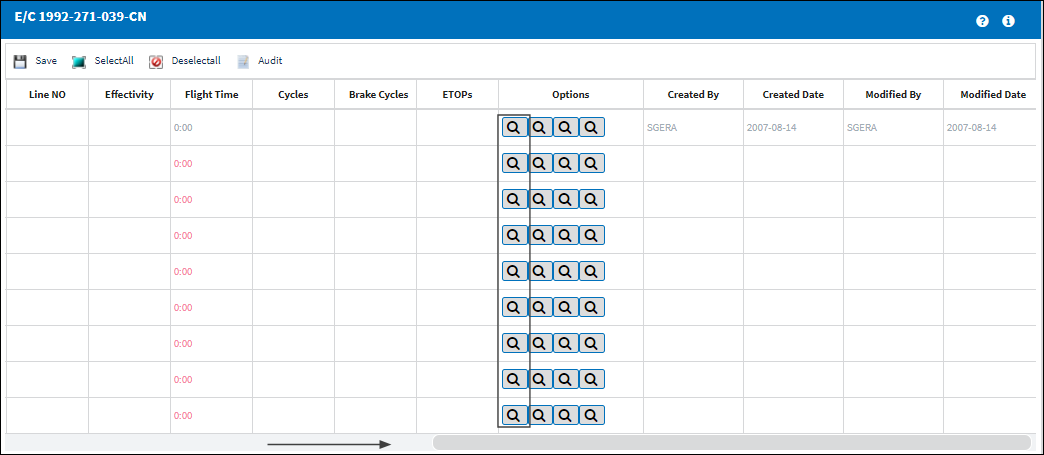
The system displays the Engineering Control Range window.
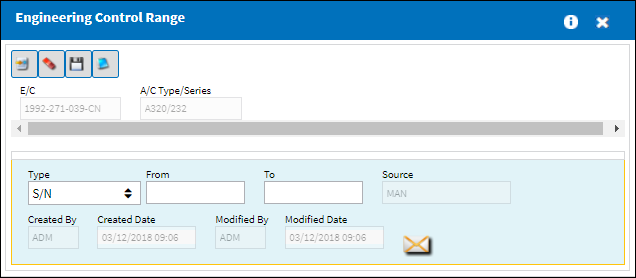
Note: This window is affected by Switch  ADDSTENGRANGE. When it is set to Yes, the window will show Status and Reason fields, as well as the Copy Ranges button.
The following options/information is available in this window:
_________________________________________________________________________
Type Drop Down
Select the Range Type from the drop down menu. This option allows the user to easily enter a range without having to override the E/C to the A/C S/N level. For example, this option is used when an AD states a specific range that the AD is effective to. The user does not have to override the A/C Type/Series to manually select/deselect the necessary A/C Tail Numbers.
A/C - Apply effectivity by Aircraft. This information is pulled from the A/C Master, General tab.
S/N (Serial Number) - Apply effectivity by specific Aircraft Serial Number. This information is pulled from the A/C Master, General tab.
Line - This information is pulled from the A/C Master, Optional 2 tab.
Variable No - This information is pulled from the A/C Master, Optional 2 tab.
SGML Designator - This information is pulled from the A/C Master, Optional 2 tab.
IPC - This information is pulled from the A/C Master, Optional 2 tab.
From-To Range
Enter the range of aircraft with effectivity being applied or not.
Source
The way that the range was imported/created. This field is updated automatically. The available options are E/C, IPC, and MAN (Manual). The Source is 'MAN' when any part of the range was entered or altered manually.
Created By
The user who created the record.
Created Date
The date the record was created.
Modified By
The user who last modified the record.
Modified Date
The date the record was last modified.
Status
The status that will be assigned to the range identified in the From - To fields.
Reason
Reason for the Schedule Effectivity to be updated/changed for the range.
_________________________________________________________________________
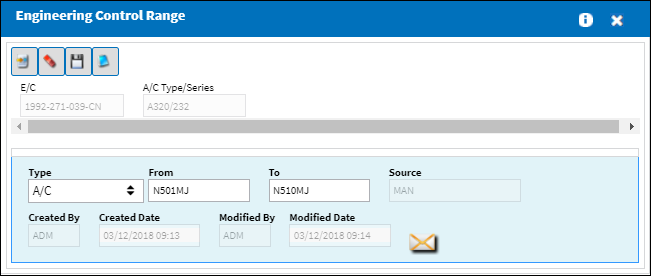
Select the New  button to create a range of effectivity for the E/C. Select a Type from the Type drop down menu. In this example, the user has selected the S/N Type. Populate the From-To range and select the Save
 button. The Save prompt appears. Select 'OK'.
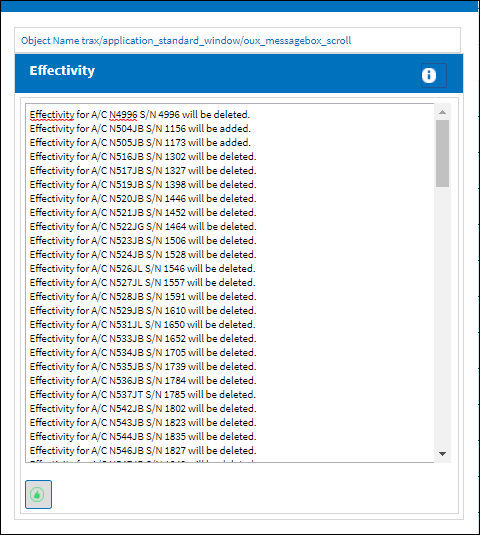
The following effectivity pop-up window will appear informing the user that all other effectivity for the specified E/C will be deleted. This pop-up only appears if the E/C has prior effectivity.
Select 'Yes' to continue.
Effectivity has been applied to the below aircraft:
To utilize Effectivity with multiple ranges, utilize the Individual A/C Selection button. Additionally, the Notes  button allows information relevant to the record to be included.
Download Online Help
Print
|
©1997-2018 Trax USA Corp. All rights reserved. This manual may not be copied, photocopied, reproduced, translated, or converted to any electronic or machine-readable form, in whole or in part, without prior written approval from Trax USA Corp. |
 |