 Download Online Help
 Print
|
|
|
|
|


The Engineering Effectivity Override window allows users to update E/C information for individual A/C tail numbers, such as Status, Schedule, Actuals, and Effective Date. This functionality can be used to update the actual times and effective date, or last reset date to allow correct forecasting in the planning module.
From the E/C effectivity window, expand the A/C Type/Series and use the Select  button to open the Engineering Effectivity Override window for an A/C tail number.
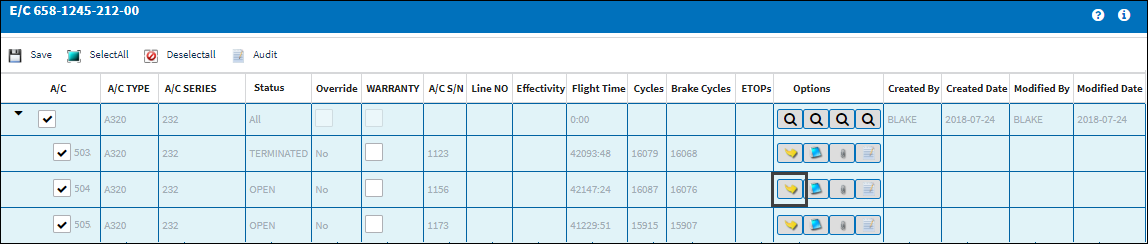
Select the Override checkbox to make edits and update available fields.
Note: System configuration, User security, E/C revision status, and path taken to access the Engineering Effectivity Override window (i.e. Engineering Control Selection, Engineering Control Authorization Management) will determine which fields will be available to edit when the Override checkbox is selected.
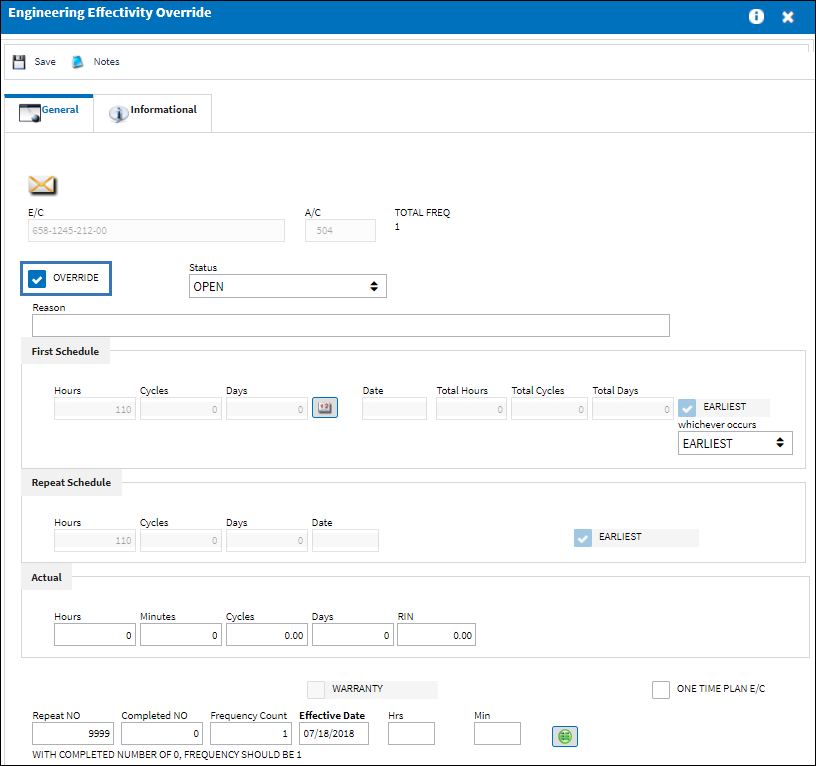
The following options/information is available in this window:
_________________________________________________________________________
E/C
The Engineering Control that specifies aircraft or component scheduled maintenance intervals.
A/C
The Aircraft registration number for the E/C Engineering Effectivity Override record. All items within this window will only pertain to this A/C and may not match the default blanket schedule on the Engineering Control, Schedule Tab due to override information added.
Total Freq
The total number of 'phases' included in this E/C. This field works in conjunction with the Schedule Control Tab. The Schedule Control Tab is a preferred method of creating complex relationships between E/Cs and their scheduling, which can make an E/Cs occurrence dependent on another E/Cs schedule. The benefit of this is that it eliminates the need for the Next E/C option (K1, K2, K3, K4, etc.). For additional information refer to the Engineering Control, Schedule Tab, via the Engineering - E/C Training Manual.
Override checkbox
Allows for the user to update many fields within this window and apply an alternate schedule against the E/C for a particular A/C tail number or P/N S/N. If the Override checkbox remains selected, any changes against the blanket schedule (Engineering Control, Schedule Tab) will not affect the A/C tail number or P/N S/N that has the checkbox selected; the Override A/C tail number or P/N S/N will only follow the schedule as defined here on the Engineering Effectivity Override, General Tab.
Note: The configuration of switch  ECVIAREV determines the accessibility of this checkbox as well as which information can be edited/updated in this window. The same functionality is also available when this window is accessed through the Engineering Control Supervisor window.
Status
The current E/C status for the Aircraft. For additional information regarding definition of each status, see the Engineering Control, General Tab, via the Engineering - E/C Training Manual.
Note: If the status is manually changed to a status which prevents the E/C from appearing in Planning Forecast, the Reason field will become mandatory.
Note: When Switches ECAUTH and ECVIAREV are set to Yes, and the status is changed to a different status from the main level E/C status, a soft warning will appear. This soft warning also appears at the revision level.
Reason
The Reason field allows for additional notations to be added against the Engineering Effectivity Override for a particular A/C.
First Schedule
The First Schedule is the parameter and threshold for the initial occurrence and compliance of the E/C, as some E/Cs may have multiple schedules. The First Schedule only takes effect if there is no previous compliance against the E/C. The Effective Date Based Schedule is the initial Schedule Hours/ Cycles/ Days threshold parameter for this E/C. The Hours/ Cycles/ Days are being calculated based on the effective date of the E/C. The system will default to the Earliest occurrence of these parameters, unless the Earliest flag is unchecked, then it will be the latest occurrence. For additional information on the First Schedule field, refer to the Engineering Control, Schedule Tab, via the Engineering - E/C Training Manual.
Note: First Schedule within the Engineering Effectivity Override window only applies to the selected A/C and E/C. If the Override checkbox remains selected then this A/C will have its own schedule and will not be reset/changed by any changes made on the blanket schedule (Engineering Control, Schedule Tab).
 The Schedule fields are security controlled via Engineering/ Update/ Engineering Control Selection/ E/C Edit Schedule. The same functionality is also available when this window is accessed through the Engineering Control Supervisor window. For more information refer to the Security Explorer via the System Administration Training Manual.
Date to Days Calculator  button
The Date to Days Calculator allows users to select future dates. Once selected, the button calculates the difference between the Effective Date and the Selected Date.
Repeat Schedule
If the E/C has a Repeat Number greater than 1, then the Repeat Schedule is the parameter for the subsequent repetitive occurrences of the E/C for repeat compliance requirements. As with the First Schedule, some E/Cs may have multiple schedules. When an E/C has multiple schedules, the Earliest checkbox is pivotal in the configuration as the E/C may call for the compliance to be accomplished at the latest occurrence. The First Schedule information must be entered in order for the Repeat Schedule to be applicable. For additional information on the Repeat Schedule field, refer to the Engineering Control, Schedule Tab, via the Engineering - E/C Training Manual.
Note: Repeat Schedule within the Engineering Effectivity Override window only applies to the particular A/C and E/C. If the Override checkbox remains selected then this A/C will have its own schedule and will not be reset/changed by any changes made on the blanket schedule (Engineering Control, Schedule Tab).
Actual
The user may enter accumulated flight times applicable to the E/C prior to the A/C In Service Date. The Actuals (Hours, Cycles and Days) will be added to any flight times recorded since the A/C last compliance date and/or Effective Date for the E/C in Planning to produce the A/C's E/C Actuals.
Note: The Engineering Effectivity Override Actual fields are only used for the A/C's initial induction into the system. This feature is typically not employed for the induction of new aircraft from the manufacturer.
The Actuals fields are security controlled via Engineering/ Update/ Engineering Control Selection/ E/C Edit Actuals. The same functionality is also available when this window is accessed through the Engineering Control Supervisor window. For more information refer to the Security Explorer, via the System Administration Training Manual.
Earliest checkbox
The Earliest checkbox option is selected if the E/C Schedule parameters are to be planned at the earliest occurrence. For the latest occurrence, this option should not be selected. By selecting the Earliest checkbox, the schedule will be determined by which occurrence comes first; Hours, Cycles, or Days.
Note: If a combination of the Schedule Hours, Schedule Cycles, Schedule Days, and Schedule Date fields are populated with a schedule, checking the Earliest checkbox will make the E/C become due at whichever schedule option comes due first.
Warranty checkbox
This will show as selected to indicate that warranty information is applied for a particular tail number of this A/C Type/Series.
One Time Plan E/C checkbox
Indicates that the Child E/Cs schedule is being overridden as a one-time only E/C for the selected Aircraft. For Child E/Cs that are adopting its parent E/Cs schedule for a Work Order, if the Child E/C is transferred from that Work Order to another W/O, then this checkbox is selected for the W/Os specific Aircraft. Once the Child E/C is complied with for that Aircraft, the checkbox is automatically deselected. The One Time Plan checkbox should only be used through the functionality of Switch ECCHLDTRC (when set to Yes). The functionality of this checkbox is for correcting purposes through the switch's automated functionality, and should therefore not be selected manually from the override window.
Note: When Switch ECCHLDTRC is set to Yes, when a Child E/C is transferred or canceled (via Task Card cancellation) from a W/O, the Child E/C will set to One Time Plan automatically. After the Child E/C takes its next compliance, the One Time Plan checkbox will automatically be de-selected. This functionality works if the Child E/C has it own schedule; if not, the system will prevent the transfer/cancel.
Note: The Child E/C must be brought onto the Work Order via a Parent E/C for this to function correctly.
Repeat NO
The number of occasions the E/C will be repeated. If the Repeat Number is set to 1, the E/C is a one time only E/C and only the First Schedule is applicable. If the Repeat Number is set to 9999, the E/C will be carried out on the First Schedule 1 time and then the Repeat Schedule indefinitely.
If the Repeat Number is a specific number, such as 5, the E/C will be carried out on the First Schedule 1 time and then be repeated 4 times according to the parameters configured on the Repeat Schedule (and then terminated).
Complete NO
The number of times that the E/C has been complied with against the A/C.
Note: Frequency Count and the Completed NO fields must match the Completed/ Frequency Flag for the proper E/C Called On functionality.
Frequency Count
The E/Cs current frequency status. For example, there are 4 Total Frequencies to the E/C A-Check (A1, A2, A3 and A4). This P/N may be on the 3rd Frequency Count (A3) out of the 4 Phases. This field tells planning which frequency the record is currently on, and which Called On E/C dependencies to pull onto the Work order. For additional information on the Called On functionality, refer to the Engineering Control, Schedule Control Tab, via the Engineering - E/C Training Manual.
Note: Frequency Count and the Completed NO fields must match the Completed/ Frequency Flag for the proper E/C Called On functionality.
Effective Date Hrs/ Min
The Effective Date is the date from which hours, cycles, and days accumulate. It is used to calculate times accrued and due dates in the Planning Query.
Note: If the effective date is greater than the current date, planning will not forecast for this E/C until the effective date has been met.
Display Compliance History  button
Select to view all historical compliance records for this E/C against the A/C. For additional information, refer to the Engineering Control Compliance button, via the Engineering - E/C Training Manual.
Completed/ Frequency flag
The Completed/ Frequency flag indicates that with the Completed NO being 'X' then the A/C Frequency Count should be 'Y' for the correct phase of the Check to be forcasted.

Note: For proper E/C Called On functionality it is required that the Completed NO and Frequency Count match the Completed/ Frequency Flag.
_________________________________________________________________________
For detailed information regarding the utilization of the functionality, refer to the following:
Download Online Help
Print
|
©1997-2018 Trax USA Corp. All rights reserved. This manual may not be copied, photocopied, reproduced, translated, or converted to any electronic or machine-readable form, in whole or in part, without prior written approval from Trax USA Corp. |
 |