 Download Online Help
 Print
|
|
|
|
|


Depending on the way a system is set up, a user may be required to update the A/C times and cycles at the aircraft effectivity level. If an aircraft has been acquired new, adjustments are not likely to be required as there will be no previous flight log details (other than test flights) from the start of the aircraft's life. The inspections will be accurately calculated.
If the aircraft brought into the system accrued previous flight hours and cycles, adjustments might be needed against the E/C actuals for the E/C to forecast correctly.
Note: The configuration of switch  ECVIAREV determines which information can be edited/updated in this window. The same functionality is also available when this window is accessed through the Engineering Control Supervisor window.
Go to Engineering/ Update/ Engineering Control Selection, find and select into the E/C. Select the A/C  button and then select the Expand
 button to open the aircraft type/series; within the A/C line select the Select
 button. The Engineering Effectivity Override window will appear.
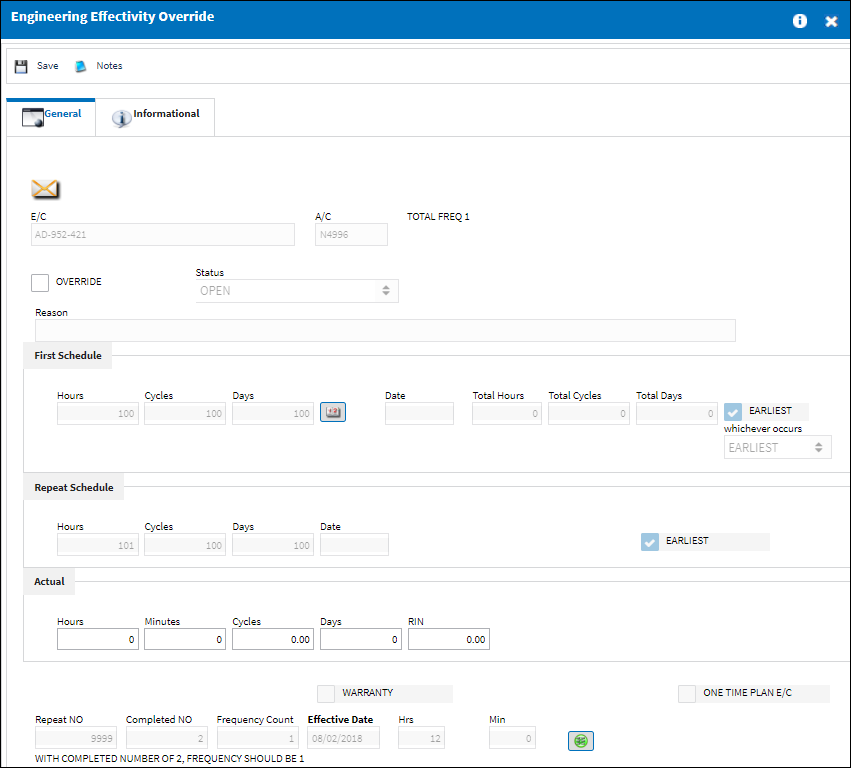
You would need to know the amount of flight time between the effective date and the beginning of the flight data. If the aircraft hours were 10,000 in 2014 and 18,000 in 2017 then you will need to enter 8,000 hours in the Actuals section (hours field). Also, the important thing in this case is to make sure the effective date is changed to the date the flight logs information starts (i.e.2017).
Override Checkbox:
If the Override checkbox is selected in the Engineering Effectivity Override window, the Effective Date field can be edited. Change the date as required, select the Override checkbox again to close the Effective Date, and remember to select the Save  button to record the information. This procedure will prevent an override from showing on the aircraft.
It is a good procedure to run the Planning query and check the results of the changes made to ensure that all calculations are correct. If a problem occurs where the hours appear to be grossly exaggerated, users may need to check that the effective date entered is not prior to the first aircraft log for that tail number. The Effective Date must be greater than (>) or equal to (=) the Z-Date. The Z-Date must be set for all tail numbers.
 The Schedule fields and the Actuals fields are security controlled via Engineering/ Update/ Engineering Control/ E/C Edit Actuals and E/C Edit Schedule. The same functionality is also available when this window is accessed through the Engineering Control Supervisor window. For more information refer to the Security Explorer via the System Administration Training Manual.
Download Online Help
Print
|
©1997-2018 Trax USA Corp. All rights reserved. This manual may not be copied, photocopied, reproduced, translated, or converted to any electronic or machine-readable form, in whole or in part, without prior written approval from Trax USA Corp. |
 |