 Download Online Help
 Print
|
|
|
|
|


Select the Notification  button to configure notifications to users that an E/C Control action has been triggered, for example E/C Terminated.
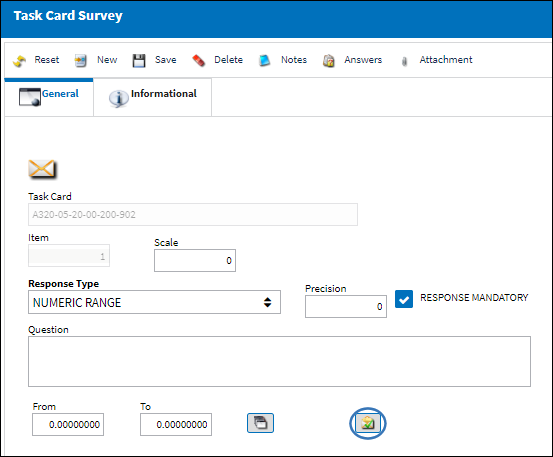
The system displays the System Notification Window:
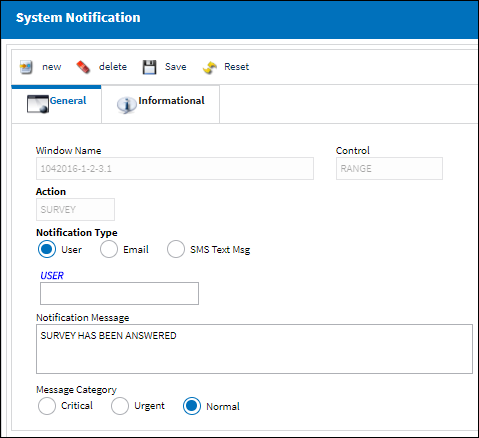
The following options/information is available in this window:
_________________________________________________________________________
Window Name
Screen/window that the notification refers to.
Control
Response Type
Action
Survey completed and triggers an E/C control action.
Notification Type
The method by which notification will reach the necessary individuals.
User radio button
Select this radio button to have the notification sent to a user through Notes receiving.
Email radio button
Select this radio button to have the notification sent through email.
SMS Text Msg radio button
Select this radio button to have the notification sent through an SMS Text Message.
User
Name of user to receive notification.
Note: This field only appears when the User radio button is selected.
Email address of recipient of the email notification.
Note: This field only appears when the Email radio button is selected.
Country Code/Phone
The country code/area code and telephone number of the recipient of the SMS Text Message.
Note: This field only appears when the SMS Text Msg radio button is selected.
Notification Message
The actual text that will appear in the notification message. This may be edited by user.
Message Category
The priority of the notification (i.e. Critical, Urgent, Normal). Select the appropriate Message Category radio button.
_________________________________________________________________________
Note: Multiple users may be set up to receive a system notification for this transaction.
Download Online Help
Print
|
©1997-2018 Trax USA Corp. All rights reserved. This manual may not be copied, photocopied, reproduced, translated, or converted to any electronic or machine-readable form, in whole or in part, without prior written approval from Trax USA Corp. |
 |