
 Share
Share
 Print
Print
|
|
|
|
|


The Alert levels can be set for ATA Chapters and ATA Sections (if required). These alert levels are used within the Reliability module of the system. The Reliability module is used to provide statistical data regarding the reliability of a specific aircraft or specific part numbers. Reliability reports can be produced as per company requirements and industry standards. Tracking of recurrent items can also be accomplished.
To add an alert level to the ATA Chapter, select the ATA Chapter with the Hand  pointer and click on the Alert
  button. A window will then appear showing all the aircraft type/series that are available on the user's system.
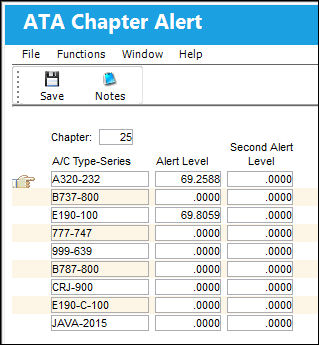
The following information/options are available in this window:
_____________________________________________________________________________________
Type/Series
The Aircraft Type and Series/Fleet assignment.
Alert Level
The numerical value that represents the first alert level. This may be provided by the A/C manufacturer or can be an organizational standard.
Second Alert Level
The numerical value that represents the second alert level.
_____________________________________________________________________________________
This ATA is now available on the system in the ATA pop-up window.
The Alert Level Calculation checkbox (that appears on the preceding ATA Chapter window) should be checked if the user wants a particular ATA's Alert Level to be automatically updated when the Alert Level Recalculation task is performed via Reliability /Print/ Alert Level Recalculation. Within this feature, the IFSD Option is available for utilization.
Additionally, the Notes  button is available to include relevant information.
Share
Print
|
©1997-2026 Trax USA Corp. All rights reserved. This manual may not be copied, photocopied, reproduced, translated, or converted to any electronic or machine-readable form, in whole or in part, without prior written approval from Trax USA Corp. |
 |