
 Share
Share
 Print
Print
|
|
|
|
|


MEL Authorization Group
The System Transaction Codes are displayed with both the Code Names and Descriptions. The Code Descriptions directly illustrate their functionality and role in the system, as fields are populated and tasks are performed.
Available Functionality:
Authorization Groups consist of users who will be able to authorize Authorization Steps. The Authorization Groups are System Transaction Codes. Users are added to the Authorization Groups via the Authorization Groups Explorer option. Authorization groups can consists of specific employee from various departments. This allows for the creation of specific groups of employees regardless of their departments (i.e. special project groups, committees, etc.). Authorization Groups (instead of departments) can be assigned to the specific steps in the authorization process.
MEL Authorization Groups are created via System Transaction Codes.
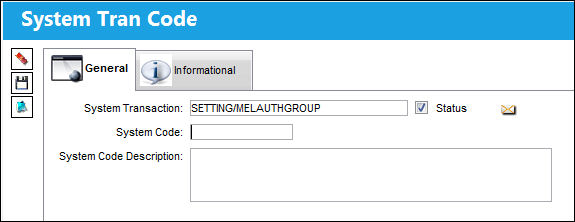
Go to Settings/Explorer/System Transaction Code/Settings/MEL Authorization Group. Right-click on any MEL Authorization Group and click New Record (to create a new record) or Update (for an existing record).
TRAX displays the following:
Share
Print
|
©1997-2026 Trax USA Corp. All rights reserved. This manual may not be copied, photocopied, reproduced, translated, or converted to any electronic or machine-readable form, in whole or in part, without prior written approval from Trax USA Corp. |
 |