
 Share
Share
 Print
Print
|
|
|
|
|


Department
The System Transaction Codes are displayed with both the Code Names and Descriptions. The Code Descriptions directly illustrate their functionality and role in the system, as fields are populated and tasks are performed.
Transaction Code: |
Department |
General Description: |
The different departments used throughout the system |
Are Authorization Steps Available? |
N |
Is System Notification Available? |
N |
Trax Control Panel Path(s): |
Throughout the system, for example: w_employee_master_eu |
Window(s): |
For example: Settings/ Update/ Employee/ New Button |
Related Switches: |
None |
Functions: |
The department codes defined here are used throughout the system to define for example the affiliation of an employee to a department. |
Reports: |
None |
Available Functionality:
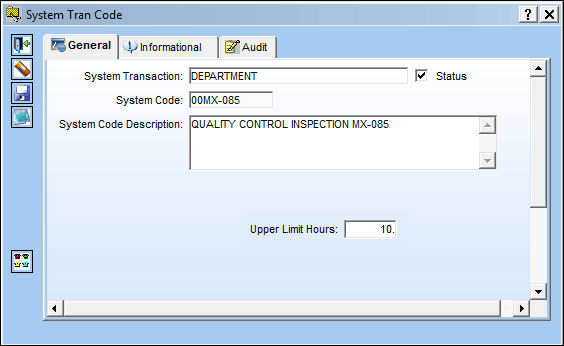
The following information/options are available in this window:
_____________________________________________________________________________________
Contact  button
The Contact button is used to create the default contact information to be associated with this Department Code. The user may add contact information for each individual record. This can include addressing and communication information. Select the Customer that you require to enter/amend contacts. Select the Contact button, the system will display at the bottom of the window any contacts already entered.
_____________________________________________________________________________________
Name
The contact's complete name.
Title
The contact's title.
Contact Type
The type of contact.
Company Information
Any pertinent company information (i.e. Company name).
Service Provided
The type of service provided by the contact.
Remit Location
Enter an additional division of the contact information by specific location.
_____________________________________________________________________________________
Upper Limit Hour:
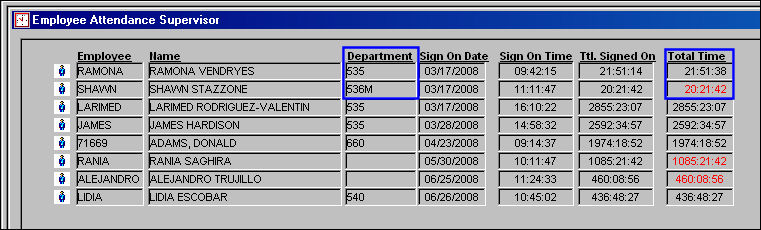
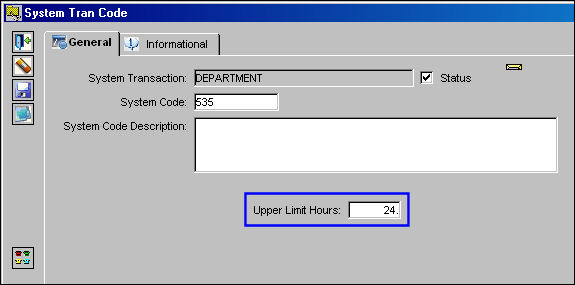
Employee 535 is still on time because that department is set up for 24 hours.
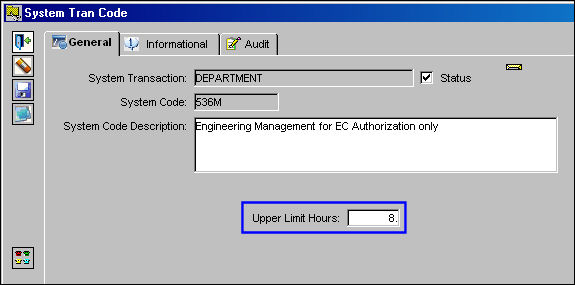
Notice that the 'Total Time' field is red for department 536M because the 'Upper Limit Hours' in the System Tran code is set for 8 hours, but the employee for department 536M has already worked over that time.
Share
Print
|
©1997-2026 Trax USA Corp. All rights reserved. This manual may not be copied, photocopied, reproduced, translated, or converted to any electronic or machine-readable form, in whole or in part, without prior written approval from Trax USA Corp. |
 |