 Download Online Help
 Print
|
|
|
|
|


Invoice Selection, Other Tab
The Invoice Selection, Other tab is used to query for Invoices based on the following search criteria. Enter any of the below search criteria to query for a desired Invoice and select the Find  button.
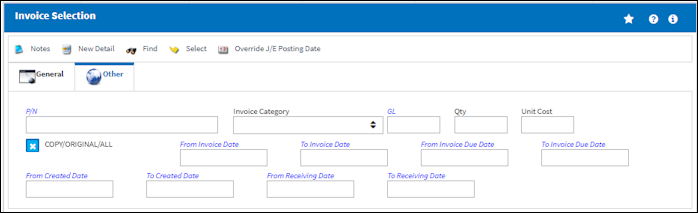
The following options/information is available in this window:
_________________________________________________________________________
P/N
The Part Number reference for the aircraft part.
Invoice Category
The Category specified on the Invoice Header.
G/L
G/L Cost Center/ General Ledger Reference of the G/L Account associated to the Invoice via the Invoice Order Detail window.
Qty
Invoiced quantity of items in the Order.
Unit Cost
Cost of the item when purchased (if known).
Copy/Original/ALL checkbox
Select this checkbox to determine if the invoice is a copy, or an original. If the checkbox is grey, a copy of the invoice is being filtered. If the checkbox is black, the original is being filtered. If ALL invoices are being filtered, this checkbox will remain un-selected.
From/To Invoice Date
Enter search parameter from invoice date to invoice date.
From/To Invoice Due Date
Enter search parameter from invoice due date to invoice due date.
From/To Created Date
Enter search parameter from invoice effective date to invoice effective date.
From/To Receiving Date
Enter search parameter from invoice receiving date to invoice receiving date.
_________________________________________________________________________
Download Online Help
Print
|
©1997-2018 Trax USA Corp. All rights reserved. This manual may not be copied, photocopied, reproduced, translated, or converted to any electronic or machine-readable form, in whole or in part, without prior written approval from Trax USA Corp. |
 |