|
TRAX MANUALS > Technical Records > Technical Records Switches > ACPNIMPORTDETAIL - A/C Initial Template Load And P/N N/L/A Creation Import Will Allow to Import Up to Five Unique P/N Controls Per P/N
ACPNIMPORTDETAIL - A/C Initial Template Load And P/N N/L/A Creation Import Will Allow to Import Up to Five Unique P/N Controls Per P/N

A/C Initial Template Load And P/N N/L/A Creation Import Will Allow to Import Up to Five Unique P/N Controls Per P/N
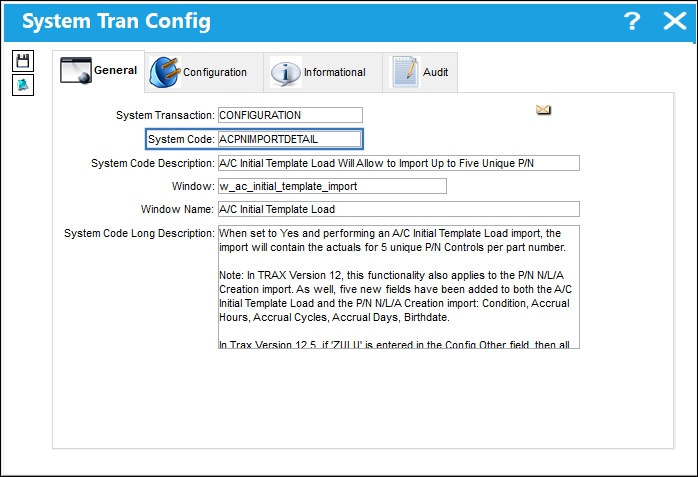
Affected Window: w_ac_initial_template_import
Note: Switch  ACIMPORTDETAIL was created in TRAX Version 11, however, additional functionality was added to this switch in TRAX Version 12, 12.5 and all later releases of TRAX. See below for details. ACIMPORTDETAIL was created in TRAX Version 11, however, additional functionality was added to this switch in TRAX Version 12, 12.5 and all later releases of TRAX. See below for details.
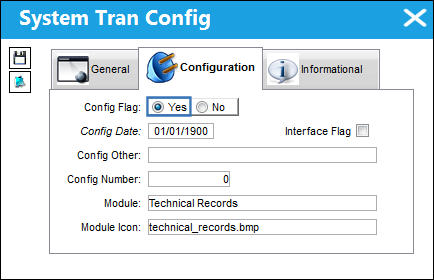
Switch Set to Yes:
When set to Yes and performing an A/C Initial Template Load, the import will contain the actuals for 5 unique P/N Controls per part number.
 Note: This functionality also applies to the P/N N/L/A Creation import. As well, five new fields have been added to both the A/C Initial Template Load and the P/N N/L/A Creation import: Condition, Accrual Hours, Accrual Cycles, Accrual Days, and Birthdate. Note: This functionality also applies to the P/N N/L/A Creation import. As well, five new fields have been added to both the A/C Initial Template Load and the P/N N/L/A Creation import: Condition, Accrual Hours, Accrual Cycles, Accrual Days, and Birthdate.
 Note: In TRAX Version 15, four new columns were added to the A/C Initial Template Load import file - Display Hours/Display Cycles/Display Days/Authorization. Each column is available for each P/N Control 01-05. The Display Hours/Display Cycles/Display Days columns are used to indicate if the 'Show On Report' checkboxes should be selected on its related P/N Control, and the Authorization column is used to indicate each P/N Control's authorization status. Additionally, the Reset date can now include the time (Hours/Minutes) using the format: DD/MM/YY HH:MM, and if the Actual Hours/Actual Cycles/Actual Days columns is left blank, once imported the related field will also remain empty (prior to Version 15 a value of '0' was populated). Note: In TRAX Version 15, four new columns were added to the A/C Initial Template Load import file - Display Hours/Display Cycles/Display Days/Authorization. Each column is available for each P/N Control 01-05. The Display Hours/Display Cycles/Display Days columns are used to indicate if the 'Show On Report' checkboxes should be selected on its related P/N Control, and the Authorization column is used to indicate each P/N Control's authorization status. Additionally, the Reset date can now include the time (Hours/Minutes) using the format: DD/MM/YY HH:MM, and if the Actual Hours/Actual Cycles/Actual Days columns is left blank, once imported the related field will also remain empty (prior to Version 15 a value of '0' was populated).
A/C Initial Template Load:
First, the user must prepare the file. For information regarding how to prepare the import file, refer to Preparing File For Import, via the Import Button of the System Standards Training Manual.
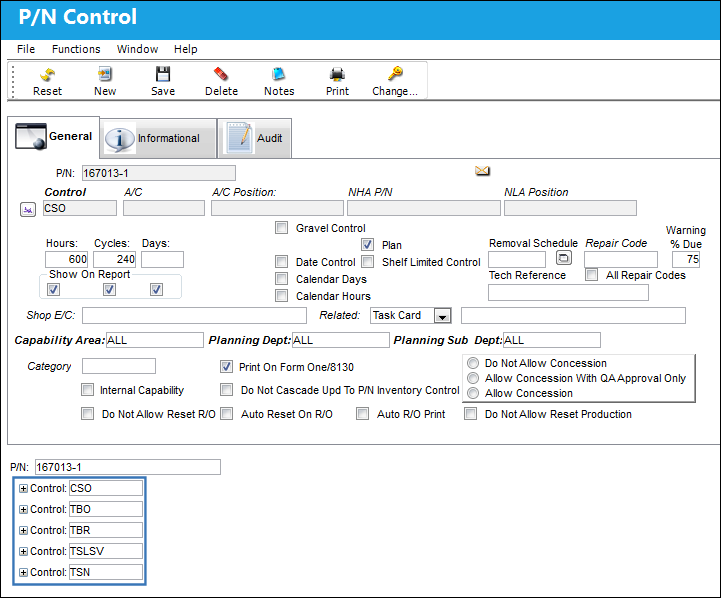
Part number '167013-1' has five unique P/N Controls entered in the P/N Master.
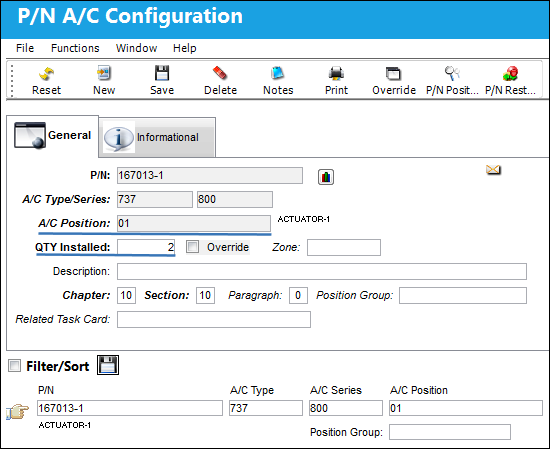
The following part number has the following A/C Position and specified part quantities for that position.
Note: During the import process, the quantity specified for the A/C position entered in the P/N Master must match the import file. An exception will occur at the completion of the import if additional serial numbers are specified for that A/C position therefore exceeding the quantity specified in P/N Master, P/N A/C Configuration.
Go to Technical Records/ A/C Initial Template Load. Select the Import  button. button.
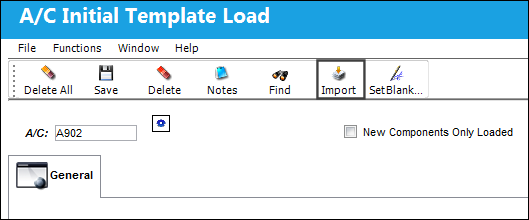
Complete the following import steps.
The following excel provides two parts with P/N Controls



Note: The Condition, Accrual Hours, Accrual Cycles, Accrual Days and Birthdate fields have been added to the A/C Initial Template Load.

Note: The parts must exist in the P/N Master, along with any of the P/N Controls listed in the import file, prior to the data being imported.
Note: In Versions 11, 11.5, and 12, the 'Skip' column (above) is required in column AD. There must be a blank column in between the Reset_Date_05 column and the Condition column, otherwise, the data will not be imported successfully. The Skip column should be left blank intentionally. However, in Versions 12.5 and onward, the 'Skip' column is not necessary.
For more information on the A/C initial template load import process, refer to A/C Initial Template Load Import via the Technical Records Training Manual.
Once the import is complete, if any exceptions are found, the system will display an error and the Exception tab will display. For more information on exceptions, refer to Exceptions via the Import Button of the System Standards Training Manual.
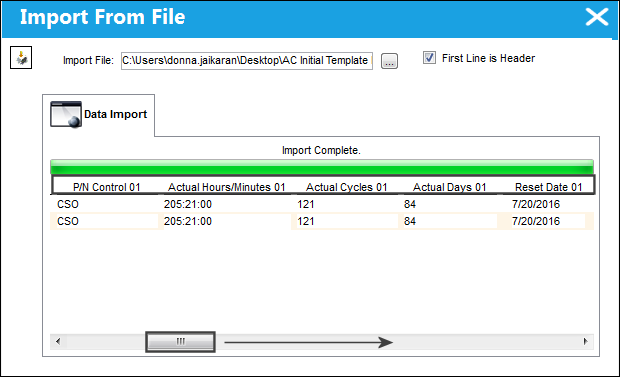
At the completion of the import, the first 5 P/N Controls will display along with all P/N Actuals information as displayed below, for each part number. Use the scroll bar to display the last (5th) P/N Control with Actuals and Reset Date information.
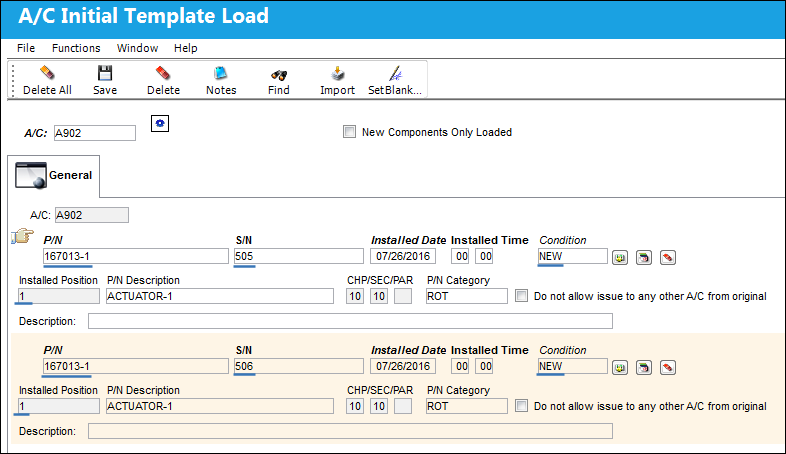
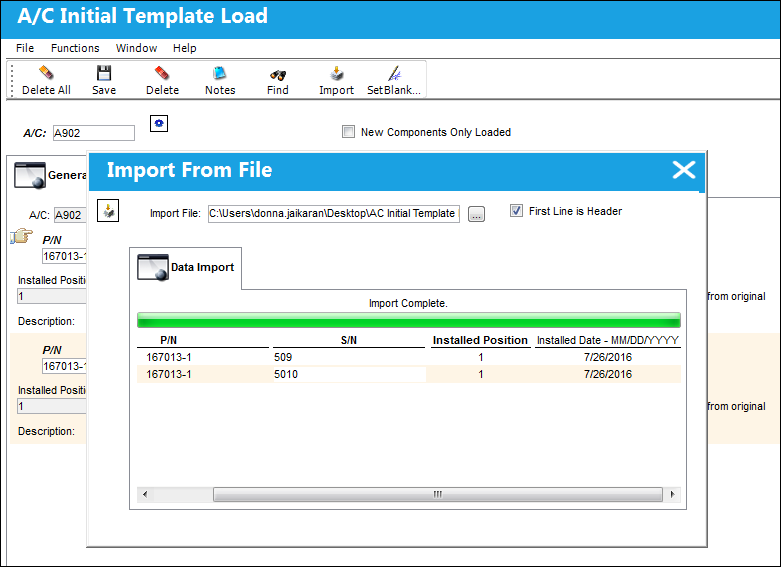
In the A/C Initial Template Load window, P/N '167013-1' was imported and installed on A/C successfully into the system.
As underlined in blue below, the part number, serial number, installed position and Condition is displayed.
Note: The Condition field was added to the A/C Initial Template Load.
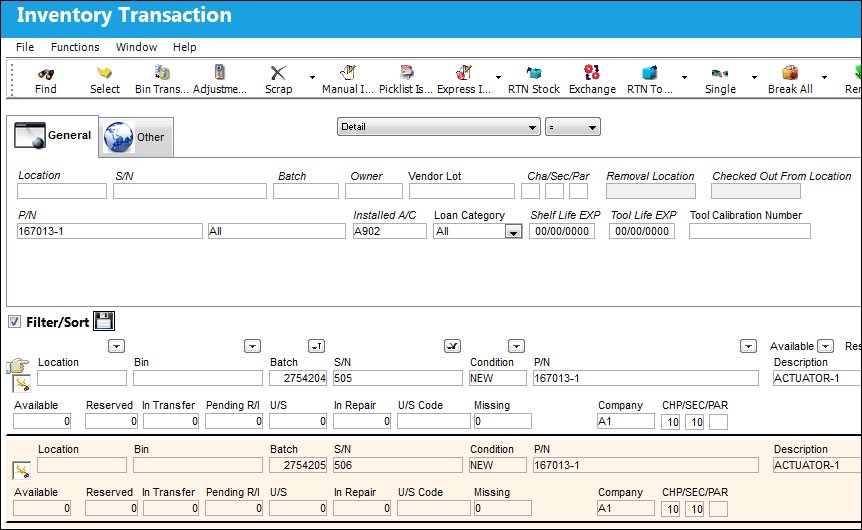
In the Inventory Transaction window, the part number's are installed on A/C A902.
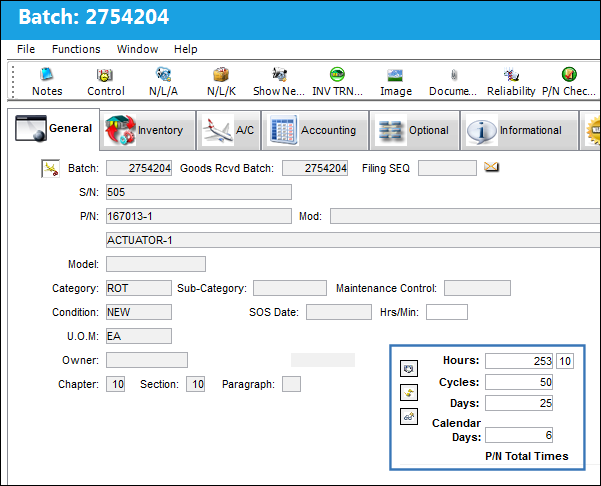
Select into the part number record detail. The Accrual Hours/Cycles/Days and Calendar Days (from the Birthdate column) are displayed.
Note: The Accrual Hours, Accrual Cycles, Accrual Days and Calendar Days (Birthdate) fields were added to the A/C Initial Template Load.
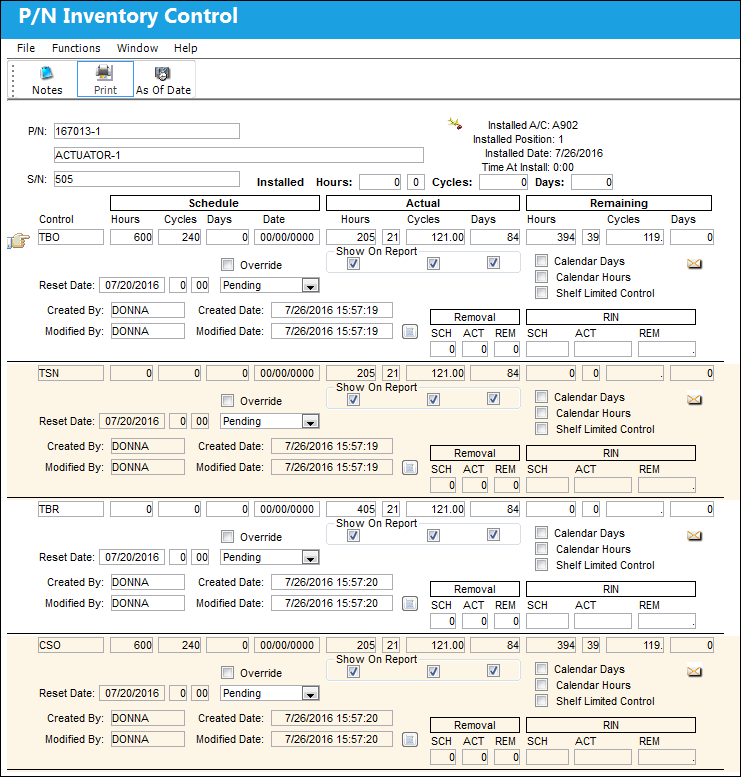
The P/N Inventory Control window will display with the 5 P/N Controls assigned to P/N '167013-1' and the actual and reset date information specified in the import file.
P/N NL/A Creation:
The above functionality also works for importing N/L/As via the P/N N/L/A Creation window. The user has the ability to import the actuals for 5 unique P/N Controls per part number.
Go to Technical Records/ P/N N/L/A Creation.
Select the Import button.
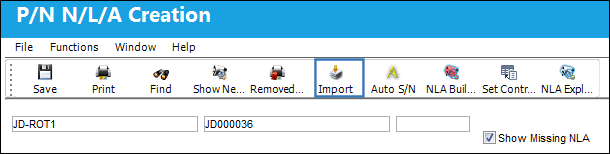
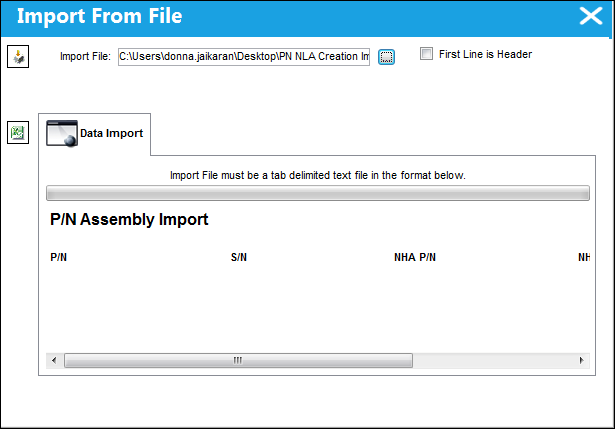
Specify the .txt file and select the Import button again.
The part numbers, serial numbers, and condition are displayed below.
Note: The Condition field was added to the P/N N/L/A Creation import.
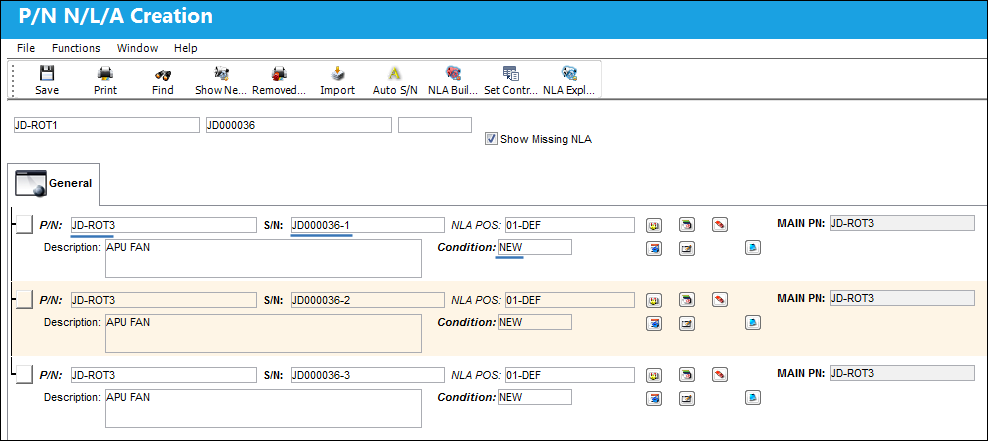
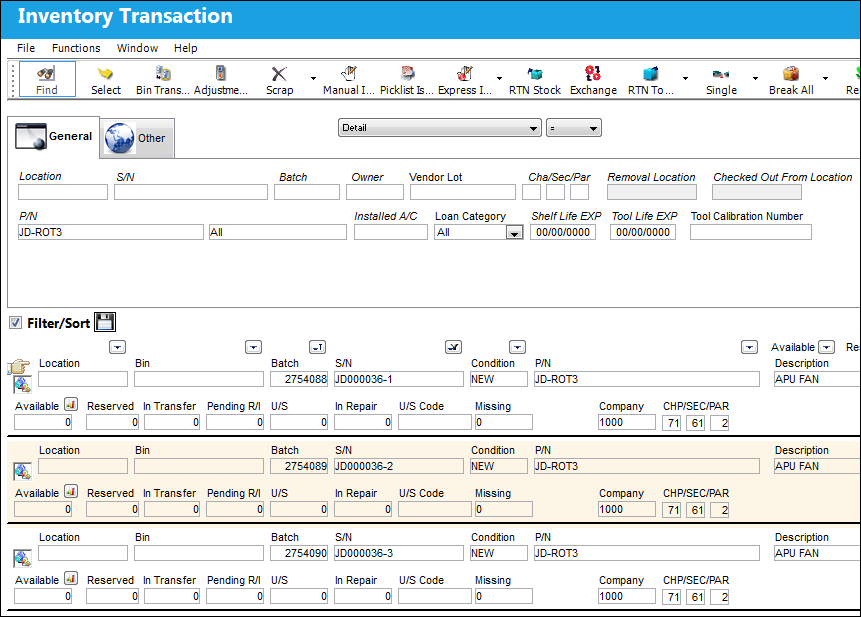
The parts are loaded into inventory.
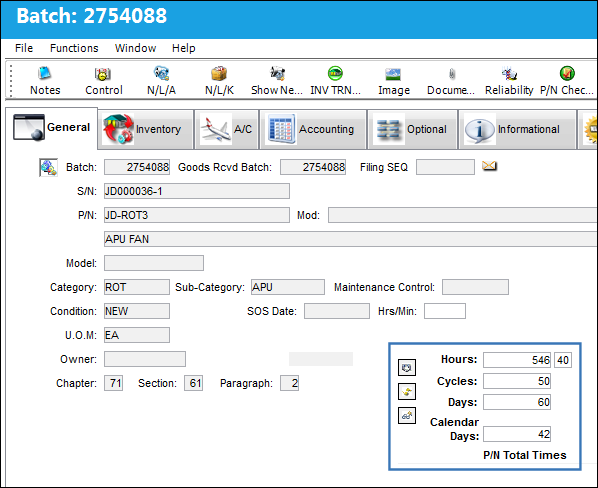
Select into the part number record detail. The Accrual Hours/Cycles/Days and Calendar Days (from the Birthday column) is displayed.
Note: The Accrual Hours, Accrual Cycles, Accrual Days and Calendar Days (Birthdate) fields were added to the P/N N/L/A Creation import.
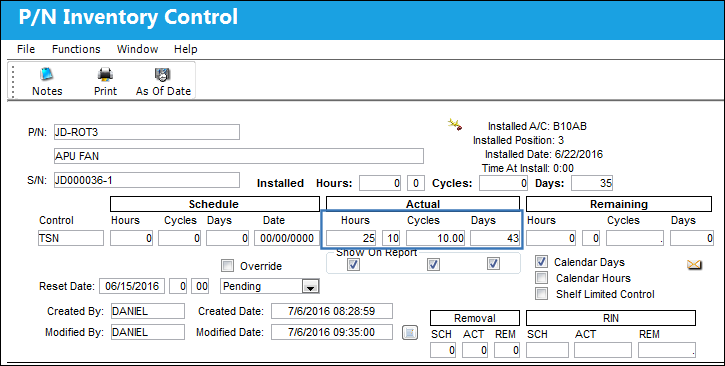
The P/N Inventory Control window will display with the 5 P/N Controls and the actual and reset date information specified in the import file.
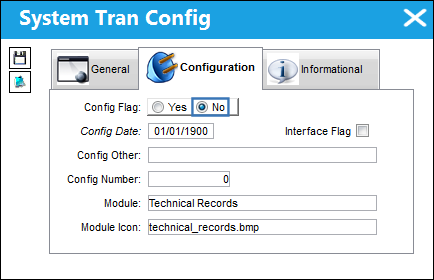
Switch Set to No:
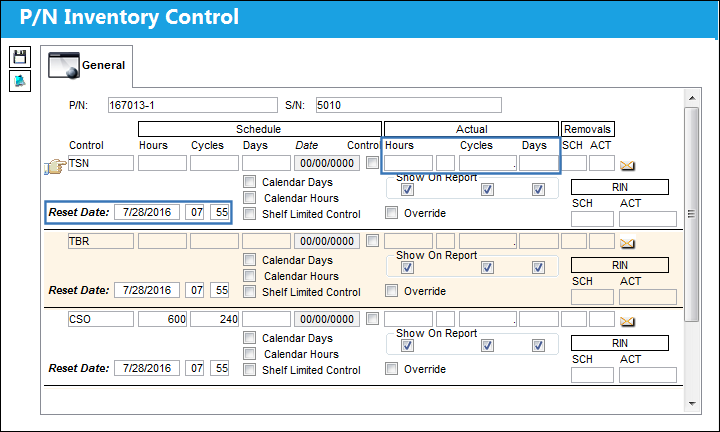
When set to No and performing an A/C Initial Template Load, the actuals for the P/N Controls listed in the import will not load into TRAX. The P/N Controls will be listed, but the Actuals will not be included, those fields will be null while the Reset Date will be the current date of the import.
Select the Import button. When you opt to import a file, the P/N Control and related columns will not display. Notice that the P/N Control fields are not displayed in the import window.
The imported parts with associated P/N Controls were successfully imported (similar import as used for the above 'Yes' testing). However, note that the P/N Control Actuals did not load into TRAX and the data remains null. The Reset date will populate with the current date of the import.
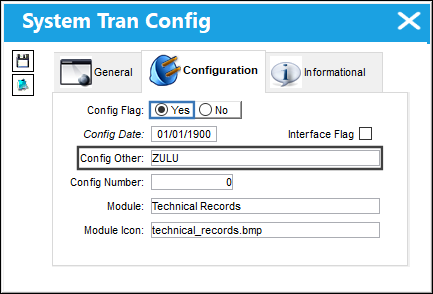
 ZULU Functionality ZULU Functionality
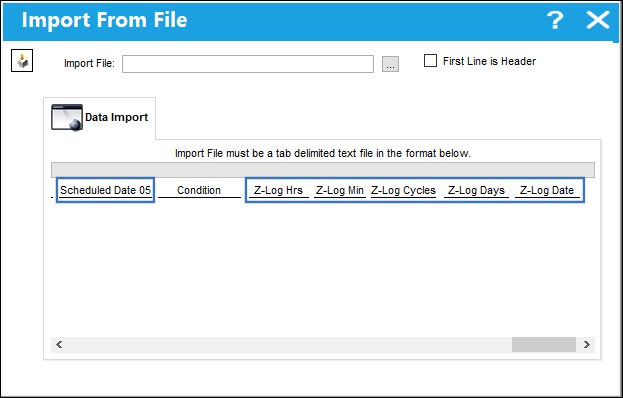
In TRAX Version 12.5, if 'ZULU' is entered in the Config Other field, then all date fields in the template load will be updated to the ISO-8601 date/time standard of YYYY-MM-DDThh:mmZ format so the import can bring in the times along with the date. A 'Scheduled Date' field for each P/N Control will be added. The following fields: Scheduled Date, Z-Log Hrs, Z-Log Min, Z-Log Cycles, Z-Log Days, Z-Log Date will only appear in the template load when 'ZULU' is entered in the Config Other field.
The following six fields will only appear in the template load when the switch is set to Yes and 'ZULU' is entered in the Config Other field.
|
See Also Technical Records Switches AC/SCHED - A/C Schedule Flight Daily Option ACAOG - A/Cs that are Out of Service due to Defects will be marked as AOG in A/C Controller Panel, A/C Out of Service Summary window ACAPPROACHDEFECT - Use Defect Number Rather than Flight Log for A/C Approach Survey ACAPPROACHDFMAND - Make Defect and Item Mandatory When Creating New A/C Approach Survey Entry ACAPSUAMD - Make the A/C Approach Survey Airport field Mandatory ACAPSUCATMD - Make the A/C Approach Survey Category field Mandatory ACAPSUFLMD - Make the A/C Approach Survey Flight Log field Mandatory ACAPSVDD - Limit Number of A/C Actual Flight Displayed in the A/C Approach Survey Drop Down ACCKNLAEFF - Validate NLA to A/C Effectivity ACCLOSE - This is an Auto-Set switch - DO NOT CHANGE MANUALLY! ACCOMPOMULTI - Allow Selection of Multiple Aircraft in A/C Component Print ACCPQEAUTOFILL - A/C Controller Panel Quick Entry Auto-Populated Fields ACCPQREMINDER - Turn ON/OFF Reminder Pop-Ups in A/C Controller Panel Query ACCPRR - A/C Control Panel Refresh Rate ACEXPSOFT - Show Missing Component of Software ACFLIGHTST - A/C Flights at the Same Time ACFLTCLS - A/C Auto Flight Closing ACFLTTIM - A/C Auto Flight Log Upload ACHISTORYREPORT - Add Flight Number, A/C Hours and A/C Cycles To A/C History Report ACMSLOG - Validate New Defect Reports Against Existing A/C Log Books ACOUTSRVCWOMSG - A/C Out of Service from W/O ACOUTSRVTP - A/C Out of Service Type Mandatory ACPERFCT - A/C Perfect Mask Verification ACPINSRMV - Include Validation of Perfect Mask At Install/Remove Transaction ACPMENSP - A/C Perfect Mask Exclude None Setup Position ACPNDTBK - Set A/C P/N Transaction Date/Time fields to Null ACPNEDIT - Edit Control at A/C P/N Transaction at Save ACPNEDITROT - Immediate Hard Warning When Attempting to Install Non-Serialized Part ACPNINILOADMULTI - Load An Assembly Part Using The A/C P/N Initial Load Multi Window ACPNLASTRMV - P/N Last Removed Validation ACPNSTA - Station field Mandatory for A/C P/N Transaction ACPNTRANSPKG - A/C P/N Transactions Run Through a Package ACPNTRNT - A/C P/N Transaction Time Auto Populate ACPNTRSQ - A/C P/N Transaction History Next Sequence Number ACPNTRSNDD - Deactivate S/N and Batch Menu from A/C P/N Transaction ACSCHFLTRD - Popup window with list of Actual Flight logs once the Reported Date field in the Defect Report window is right clicked ACTBLKOP - Allow Block Times to be Left Blank Without Being Computed ACTEMPL - (No Longer in Use) ACTRLTRAN - Control Time of Transactions in A/C Controller Panel ACTRLWOPN - Only Show Open Work Orders on the Controller Panel ACTRLWO72 - Filter for Work Orders In A/C Controller Panel window ACTRLWOTD - Only Show Work Orders Scheduled for Today on the A/C Controller Panel ACUNITSFLIGHT - Enables Process for Updating A/C Units and Resolved After Flight field on Defect Resolution is Available ACUNITSMAND - Make the Units fields in the A/C Actual Flights, A/C Units tab Mandatory ACUNITSREQ - Prompt for Required A/C Units When Saving a Defect Report ALLNRTCLOSED - Prevent defect closing via Resolution when linked to open Non-Routine T/C ALLSNFORPN - Search all engines and Consider Proration Configuration & History ALTFLTLOG - Allow Alternate Format For AC FLIGHTS LOAD FROM FLIGHT OPS APDDSKILL - Auto Populate Skill On Defer Tab Of Defect APSETDAP - Make AP Field Set to Dual AP APUHRVALIDATION - P/N APU Reading Operation Hours Validated Against the Config Number APUREAD - APU Reading Time Control Definition ASBLYCHK - Validate Complete Assembly Before A/C Install ASCMAND - Defect Report ASC (field) Mandatory ATCONPNL - Show Deferred Defected in A/C Controller Panel AUTDATEDEF - Auto Populate the Reported Date, and Time, and Resolved Date and Time fields for Defects AUTOINS - Check the Auto Install Process AUTOIR - Auto Install/Remove At Issue/Return To Stock AUTONAMEDEF - Auto Populate Reported By When Wall Password Entered AUTOSHPNLA - Created Auto Shop W/O At P/N N/L/A Removal BLKCONSAVE - Concession Read-Only After Save, Must Use Update Concession Button CLDFXFER - Close Defect Report when transferred to a W/O Non-Routine Task Card CLMDDRDT - Close Related MDDRs By Reported Date <= To Reported Date Of Closed Defect COMMONMDDR - Select Which Defects To Close With Common MDDRs CONCESSN - Concession Automatically Number, Next Sequence Number CONRCTMD - Make Concession Reason Category and Reason fields Mandatory CONTERM - Automatically Select Terminate Immediately Checkbox CORRMETA1 - Corrosion Meta Data Field 1 Available in N/R Express, Damage Tab CORRMETA2 - Corrosion Meta Data Field 2 Available in N/R Express, Damage Tab CORRMETA3 - Corrosion Meta Data Field 3 Available in N/R Express, Damage Tab CORRMETA4 - Corrosion Meta Data Field 4 Available in N/R Express, Damage Tab CPCPMANDEF - CPCP Mandatory Fields on Defect Report CPCPVALIDTRANCODE - Filter Section, Station, and Stringer Transaction Codes by A/C CPYINSRVDT - Copy W/O Completion Date to the Estimated In Service Date in A/C Out Of Service CTPNLNRTCWO - Attach Open Defect to a W/O even if already attached to another Completed W/O CTPNLPEND - Manually place A/C Flight Status back to 'In Service' DACOSERVP - Default A/C Out of Service to Pending If Open DACOUTSERV - Default Flight Status (radio button) to In Service/Out of Service DEFANDITMDUP - Validate the Defect and Item Combination DEFALERT - Defect Alert Notification for Defect Report DEFECTASR - ASR Field is Mandatory and a Notification will be Sent DEFCTDUE - Display Defect Due Date in Defect Report DEFCONFLICT - Prevent Application of Conflicting MELs to Defect Reports DEFDFDTFLT - Default Defer Date/Time from the Flight Number DEFDESCTOCREG - Auto Populate Reason for Concession Registry from Defect Report Description DEFDESMD - Make Defect Report Description and Resolution Description fields Mandatory DEFDUP - Defect / Defect Type Combination Error DEFECTAU - Defect Report Automatically Number, Next Sequential Number DEFECTDEFAULTSORT - Set Default Sort For Defect Reports DEFECTDEFERCATEGORY - Disable Defer Category Field Via Defect Report DEFECTORWO - The Defect Type, Defect, and Item OR the W/O and T/C Mandatory for A/C P/N Transaction DEFERCAT - Make Defer Category field Mandatory DEFERDATE - Auto populate Defer Date and Time DEFERMAND - Defer Field Mandatory in Defect Report Quick Entry DEFERSCHEDULEREQ - Deferral Repeat Schedule Required when Repeat Number Greater Than One DEFERWO - Allow Defect Type WO/DEFER''s Defect and Item to be Entered By User DEFEXPRESS - Open New Express Window By Default When Creating A Defect DEFITEMLIM - Restrict the Item field in Defect Reports DEFOPTMAND - Make CI (Critical Task), ETOPS, and CDCCL Radio Buttons Mandatory DEFPILOT - Defect Report Make Defect Type Default DEFPNAVAIL - Required Availability In Central Location To Apply Concession DEFPNLOC - Defect Report will show available parts in Current and/or Main Warehouse DEFPNSNREMNOT - Notify When P/N S/N Associated With Open Defect And P/N Is About To Be Removed DEFREPCATMAND - Make Category Field Mandatory In Troubleshooting Tab DEFREPMEL - Defect Repeat MEL Soft Warning DEFRLSTA - Defect Report Make Resolution Station (field) Mandatory DEFRPSCH - Defect Report Repeat Schedule DEFRSLCAT - Make Resolution Category field for Defect Report Mandatory DEFSCMAN - Defect Report Make Section (field) Mandatory DEFSKILLVAL - Make the Defect Report Resolution Employee Validate Skill DEFSTATIONWARN - Soft Warning for Defect with Invalid Station DEF_REF - Defect Report Generate Reference Number Button DELAYADDFIELDS - Make Additional Fields in Defect Delay window Visible DELSCHED - Delete Scheduled Flights by Days Specified in Config Other Field DFCAPAREA - Capability Area for E/Cs, PN Controls and Defects Defaults from Config Other DFCMFFLT - Defect Report Automatically Select Fault Confirm (radio button) DFITDUP - Validate the Defect Type and Defect Item Combination DFPOSMDTRY - Make Defect Report Position Mandatory DFPOSMDTRYDEFER - Make Position Field Mandatory when a Defect is being Deferred DFSCPREMVL - Auto populate the Removal Text from the corresponding reason DFTITMDEFT - Defect Report Item Default DFTREL - (No Longer in Use) DISABLEPC - Disable Planning Query and W/O Closing During A/C Flights Closing DMELDSC - Defect Report Description from MEL Description DMGSTR - Make the From Stringer, To Stringer and Plus field Mandatory DNROPT - Dispatch Notified Resolution Field Optional in All Cases DRMANDCAT - Make Defect Category Mandatory in Defect Report DRMANPHASE - Make Phase field Mandatory in Defect Report DRMELWINDOW - Do not display MEL window every time data is saved DSPNTFR - Dispatcher Notified field Mandatory on the Defer/Resolution Tab EMOBREQTYPEMAND - Location Site Fields in Picklist/Requisition Windows Mandatory for eMobility Apps ETOPSWARNSUPPRESS - Suppress Warning Message When Installing ETOPS P/N On Non ETOPS A/C FAAWEB - Set the Config Other field to Take the User to the FAA Website upon SDR Creation FLIGHTLOGMAND - Make Flight Log and Leg fields Mandatory FLIGHTMD - Make Flight field Mandatory for a PILOT Defect Type in a Defect Report FLTEDT - Flight Edit Warning for Arrival, Departure, and Days Control FLTLOG - (No Longer in Use) FLTSORT - Flight Closing Sort By Log FURNAMEDATE - Change FUR Naming Convention and Initial Date to Default to Defer Date FURUPDATE - Allow Users to Edit FUR E/Cs HIDEDEFECTTAG - Hide Defect Tags and only Display Them by Hovering Over Mark IN/RVMAD - Make Install/Removal Reason Code Mandatory for A/C P/N Transactions INFLTTRA - Check for A/C Flight in A/C P/N Transaction INSREMPNSWCONF - Copy Associated PN Software Configuration from Removed P/N to Installed P/N IRFUACPNTWTCAD - Include Retrospective Flight Updates For A/C P/N Transactions LCKGENDEF - Protect Certain Fields In The General Tab LCKGENRES - Protect Certain Fields in the General Tab of Defect Reports LCKPNCTAUTH - Lock the P/N Control When P/N is Installed on A/C LIMEMULTEXT - Show Linked or Called On text for each MEL LIMETYED - Linked MEL Defect Type Editable LOCKDEFFIELDS - Lock the Defer To Schedule fields for Deferred Defects with a Concession LOPNREMVNOTF - Include Extra Information in the LO P/N Removal Notification MANBBRIIRES - Make Buy Back or RII Mandatory On Resolution And Troubleshooting Tab MANDATRII - Make RII Field Mandatory MANDELAYFLDS - Make Delay Date, Delay Control, Cancellation, and Delay Code Fields Mandatory MANDINSP - Make Inspected By field Mandatory When Resolution CAT field is Populated MANDRDTIME - Defect Report Reported Time and Deferred Time Mandatory MANDRSTM - Make Resolved Time Mandatory MANDTSTM - Make Trouble Shooting Time Mandatory MAXREQINSMAN - Set A Maximum Number Of Skilled Workers In Configuration Tab MDDR - MDDR Field Mandatory NLAASSERV - Removed N/L/A made Serviceable in P/N N/L/A Installation and Removal Window MDDRAUTO - MDDR Auto Number Creation, Next Sequence Number MDDRDEFAULTDEFECT - Default Defect Number and Item as MDDR MDDRDUPL - Check for Duplicate MDDR Entries MDDRINNEWITEM - Automatically populate MDDR when creating a New Defect Report Item MDDRVSBL - Generate the MDDR number only after the defect has been authorized MDSKMNHR - Make Skill, Man Hours, and Men Required fields Mandatory in Defect Report MELCHNG - Allow Schedule Change Of A Set MEL/CDL and GMM MELMANDT - Make MEL/CDL Field Mandatory MELNOBLK - Disable MEL/CDL/GMM Category MELVEFMN - Validate Existing MEL/CDL/GMM MISSDRDFLT - Default MIS and SDR For Defect Called On MEL MOCTODSRP - Auto Populate MEL and Defect Description in Defect Report MTCDEFSITE - Default Site for New W/O in MTC Opportunities Window MTCMINGTR - Minimum GTR Setting for MTC Opportunities Window MTCOPPDAYS - Limit the Number of Days Displayed in the MTC Opportunities Window NAFEPNETOPSAC - Prevent Installation of NAFE Part On ETOPS A/C NHAMANDATO - N/H/A P/N and S/N fields Mandatory when Initial Loading an N/L/A NLA/LOC - N/L/A Remove/Install, Protect Location NLAINTRMVRB - NLA Right-Click Installation Deactivated NLAPERF - NLA Perfect Control OILCONSCAL - Control Oil Consumption Notification Alerts OOSNTFY - Add an acceptance step to the Out Of Service Process OOSNO - Generate Unique Number for Each Out of Service Event PCPEATHS - P/N Control Authorization update in P/N Inventory Control window PNCASWOVERR - Active Soft Warning when Override on P/N Control Authorization PNCTLTDL - P/N Control To Display Limits PNCTRLRESET - Disable Cascade P/N Control Reset Date From NHA To All NLAs When Updating P/N Control PNISSUEACMAND - P/N Issued to one Aircraft Cannot be Installed on Another Aircraft PNRMVEFF - Effectivity Removed for One Way Forward Interchangeable From Part PNRMVTUP - Update P/N Total Times After Removal PNWOISSUEACMAND - P/N Issued to W/O Cannot be Installed for another W/O QAAUTHREQ - Validate QA Authorizer READIEI - READI Exclusion Indicator REFSEQNUMQUICKF - Reference Sequence Number visible in the A/C Controller Find/Quick Entry RELIACHB - Makes Reliability Checkbox Visible in Defect Report REMREASO - Removal Reason (Text) Mandatory REMSERVCHK - Select Remove as Serviceable checkbox and Print Removal Tag REPINTDEFVALID - Validates Repeat Interval Reset Steps in Defect Reports REPRINTFONE - Re-Print the Form-1 Report at Removal Transaction REQCONAUTH - Required Concession Authorization REQINSMAN - Auto populate Inspector Man Hours in Defect Report RESLOGMDTRY - Make Resolved Log/Item fields Mandatory REVUNS - In Remove Only, Print P/N Identification Tag RFSQNODP - Defect Report Show Sequence and Previous Sequence Numbers RFSQNOMN - Defect Report Make Reference Sequence Number Mandatory RMVRTSNT - Part Removal Auto Return to Stock as Unserviceable ROUTECHK - Flight Entry Route Check RSLTNDESRP - Make Resolution fields Mandatory if Resolution Description is Entered RSNQUICKFMAN - Reference Sequence Number Mandatory in A/C Controller Find/Quick Entry SDR - Defect Report Make SDR (field) Mandatory SDRSETUP - SDR Unique Sequential Control Number SHFLTTRN - Time On Ground Before Crew Turn Over SHOWLINKDEFCREATED - Display change to Linked MEL Defect Type STATUSTROUBLE - Default Status Ongoing and Cannot Be Changed TCDEFDUE - Defer Item, Use Reported Date Instead of Defer Date TECHONLY - Technical Records Only TIMELMT - Time Limit Appearance Control TO2RMVPN - Transfer Owner field to Removed P/N on A/C Remove Install TO2RMVPNMANAGED - Do Not Transfer Owner of a Managed Part TRAKEEPCREBY - Update Modified By and Date fields if Transaction is Completed by Another User UPDTDFRP - Do not allow multiple users to update a Defect Report at the same time UPDTSKILLPNREQ - Update NRTC with Defect's Skill, Man Hours, Men Required and P/N Requirements URACCPOOS - Unlock Reason Code Available in A/C Out of Service Window VALGRNDTIME - Validates If A/C Is On Ground When Defects and Delays are Reported VALLSN - Shows All Serial Numbers Regardless of Being Issued VALPNONWING - Do Not Allow P/N Time Adjustment while P/N is on Wing WODONOTRESETPN - Upon P/N Removal Set P/N E/Cs and P/N Controls Linked to Open T/C in W/O to Do Not Reset WOPNECDEL - Automatic Deletion of P/N E/C and Controls from W/O Upon P/N Removal |
|

 Share
Share
 Print
Print


