
 Share
Share
 Print
Print
|
|
|
|
|


Import Button, via A/C Initial Template Load
The Import option is used to quickly import parts and P/N Controls into the system that are currently installed on the selected aircraft. This option allows the user to create a digital file listing these part numbers, part number controls, and all related information. The import process allows the user to efficiently import parts through a .txt file into the application, this allows the assignment of part number controls and positions at the time of import.
First, the user must prepare the file. For information regarding how to prepare the import file, refer to Preparing File For Import, via the Import Button of the System Standards Training Manual.
Switch  ACPNIMPORTDETAIL affects the functionality of the import process. When set to Yes, the user is able to import the actuals for 5 unique P/N Controls for each part. When set to No, the user is not able to import the actuals for P/N Controls. For more information, refer to Switch ACPNIMPORTDETAIL via the Technical Records Switches Manual.
Criteria for the A/C Initial Template Load import file:
Release |
Column Name |
Data Type |
Limitation |
Path |
|
P/N |
Alphanumeric |
35 |
Technical Records/ A/C Initial Template Load |
|
SN |
Alphanumeric |
20 |
Technical Records/ A/C Initial Template Load |
|
Installed Position |
Alphanumeric |
20 |
Technical Records/ A/C Initial Template Load |
|
Installed Date |
Numeric |
8 |
Technical Records/ A/C Initial Template Load |
|
P/N Control 01 |
Alphanumeric |
8 |
Settings/ P/N Master/ P/N Control |
|
Actual Hours/Minutes 01 |
Alphanumeric |
20 |
Settings/ P/N Master/ P/N Control |
|
Actual Cycles 01 |
Numeric |
6 |
Settings/ P/N Master/ P/N Control |
|
Actual Days 01 |
Numeric |
6 |
Settings/ P/N Master/ P/N Control |
|
Reset Date 01 |
Date/Time |
8 |
Technical Records/ A/C Initial Template Load |
|
Scheduled Date 01 |
Numeric |
8 |
Inventory/ Update/ Inventory Transaction, Inventory Transaction Detail/ Control button |
|
P/N Control 02 |
Alphanumeric |
8 |
Settings/ P/N Master/ P/N Control |
|
Actual Hours/Minutes 02 |
Alphanumeric |
20 |
Settings/ P/N Master/ P/N Control |
|
Actual Cycles 02 |
Numeric |
6 |
Settings/ P/N Master/ P/N Control |
|
Actual Days 02 |
Numeric |
6 |
Settings/ P/N Master/ P/N Control |
|
Reset Date 02 |
Date/Time |
8 |
Technical Records/ A/C Initial Template Load |
|
Scheduled Date 02 |
Numeric |
8 |
Inventory/ Update/ Inventory Transaction, Inventory Transaction Detail/ Control button |
|
P/N Control 03 |
Alphanumeric |
8 |
Settings/ P/N Master/ P/N Control |
|
Actual Hours/Minutes 03 |
Alphanumeric |
20 |
Settings/ P/N Master/ P/N Control |
|
Actual Cycles 03 |
Numeric |
6 |
Settings/ P/N Master/ P/N Control |
|
Actual Days 03 |
Numeric |
6 |
Settings/ P/N Master/ P/N Control |
|
Reset Date 03 |
Date/Time |
8 |
Technical Records/ A/C Initial Template Load |
|
Scheduled Date 03 |
Numeric |
8 |
Inventory/ Update/ Inventory Transaction, Inventory Transaction Detail/ Control button |
|
P/N Control 04 |
Alphanumeric |
8 |
Settings/ P/N Master/ P/N Control |
|
Actual Hours/Minutes 04 |
Alphanumeric |
20 |
Settings/ P/N Master/ P/N Control |
|
Actual Cycles 04 |
Numeric |
6 |
Settings/ P/N Master/ P/N Control |
|
Actual Days 04 |
Numeric |
6 |
Settings/ P/N Master/ P/N Control |
|
Reset Date 04 |
Date/Time |
8 |
Technical Records/ A/C Initial Template Load |
|
Scheduled Date 04 |
|
8 |
Inventory/ Update/ Inventory Transaction, Inventory Transaction Detail/ Control button |
|
P/N Control 05 |
Alphanumeric |
8 |
Settings/ P/N Master/ P/N Control |
|
Actual Hours/Minutes 05 |
Alphanumeric |
20 |
Settings/ P/N Master/ P/N Control |
|
Actual Cycles 05 |
Numeric |
6 |
Settings/ P/N Master/ P/N Control |
|
Actual Days 05 |
Numeric |
6 |
Settings/ P/N Master/ P/N Control |
|
Reset Date 05 |
Date/Time |
8 |
Technical Records/ A/C Initial Template Load |
|
Scheduled Date 05 |
Numeric |
8 |
Inventory/ Update/ Inventory Transaction, Inventory Transaction Detail/ Control button |
|
Condition |
Alphanumeric |
8 |
Technical Records/ A/C Initial Template Load |
|
Z-Log Hrs |
Numeric |
6 |
Inventory/ Update/ Inventory Transaction, Inventory Transaction Detail/ PN Total Time Breakdown button |
|
Z-Log Min |
Numeric |
6 |
Inventory/ Update/ Inventory Transaction, Inventory Transaction Detail/ PN Total Time Breakdown button |
|
Z-Log Cycles |
Numeric |
6 |
Inventory/ Update/ Inventory Transaction, Inventory Transaction Detail/ PN Total Time Breakdown button |
|
Z-Log Days |
Numeric |
6 |
Inventory/ Update/ Inventory Transaction, Inventory Transaction Detail/ PN Total Time Breakdown button |
|
Z-Log Date |
Numeric |
8 |
Inventory/ Update/ Inventory Transaction, Inventory Transaction Detail/ PN Total Time Breakdown button |
|
Accrual Hours |
Numeric |
6 |
Inventory/ Update/ Inventory Transaction, Inventory Transaction Detail |
|
Accrual Cycles |
Numeric |
6 |
Inventory/ Update/ Inventory Transaction, Inventory Transaction Detail |
|
Accrual Days |
Numeric |
6 |
Inventory/ Update/ Inventory Transaction, Inventory Transaction Detail |
|
Birthdate |
Numeric |
6 |
Inventory/ Update/ Inventory Transaction, Inventory Transaction Detail |
|
Display Hours 01 (02, 03,04, 05) |
Numeric |
Yes/No |
Settings/ P/N Master/ P/N Control |
|
Display Cycles 01 (02, 03,04, 05) |
Numeric |
Yes/No |
Settings/ P/N Master/ P/N Control |
|
Display Days 01 (02, 03,04, 05) |
Numeric |
Yes/No |
Settings/ P/N Master/ P/N Control |
|
Authorization 01 (02, 03,04, 05) |
Alphanumeric |
Acknowledge, |
Settings/ P/N Master/ P/N Control |


If a field designated for a checkbox is left unpopulated, TRAX considers this 'N' for Null, and the field is left blank once the import has been completed.
 Note: Switch ACPNIMPORTDETAIL must be set to Yes and 'ZULU' entered in the Config Other field for the following fields to appear in the template load: Scheduled Date, Z-Log Hrs, Z-Log Min, Z-Log Cycles, Z-Log Days, Z-Log Date.
 Note: In TRAX Version 15, four new columns were added to the A/C Initial Template Load import file - Display Hours/Display Cycles/Display Days/Authorization. Each column is available for each P/N Control 01-05. The Display Hours/Display Cycles/Display Days columns are used to indicate if the 'Show On Report' checkboxes should be selected on its related P/N Control, and the Authorization column is used to indicate each P/N Control's authorization status. Additionally, the Reset date can now include the time (Hours/Minutes) using the format: DD/MM/YY HH:MM, and if the Actual Hours/Actual Cycles/Actual Days columns is left blank, once imported the related field will also remain empty (prior to Version 15 a value of '0' was populated).
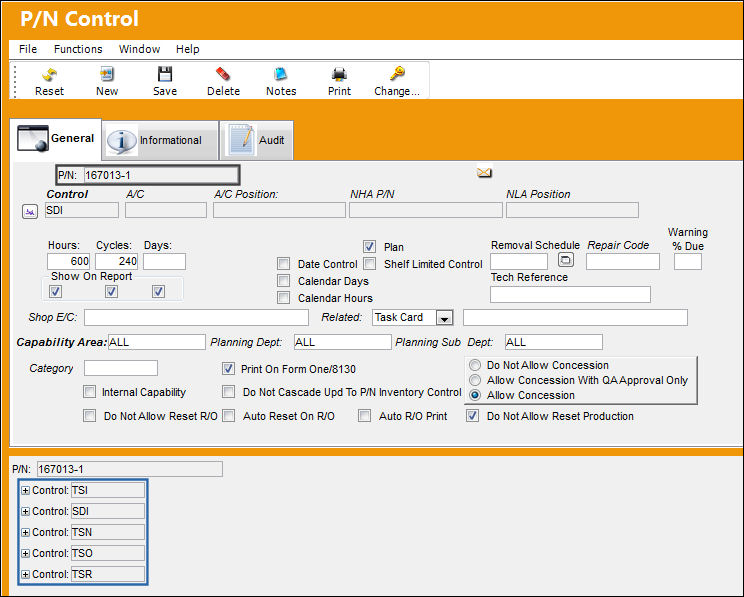
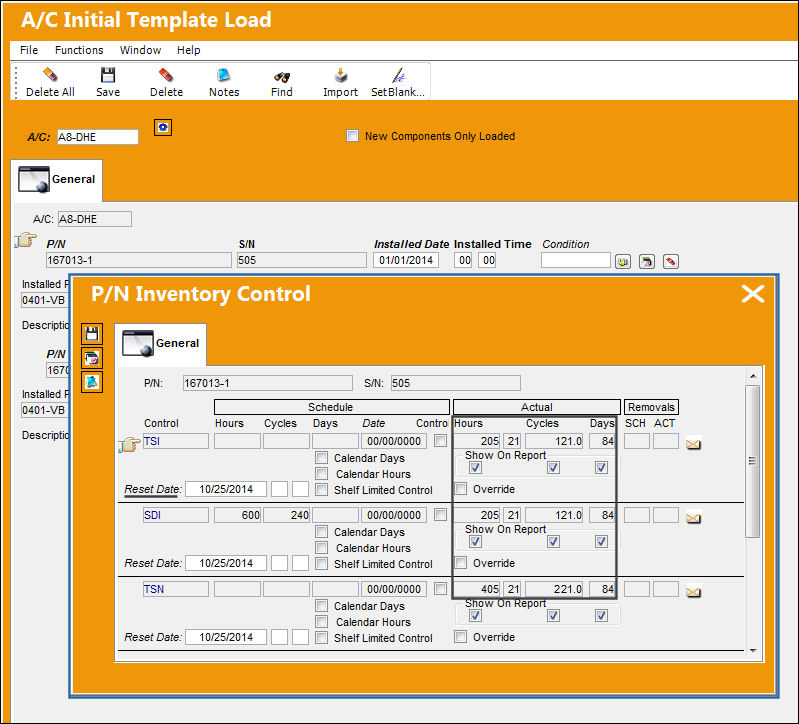
Part number '167013-1' has five unique P/N Controls entered in the system:
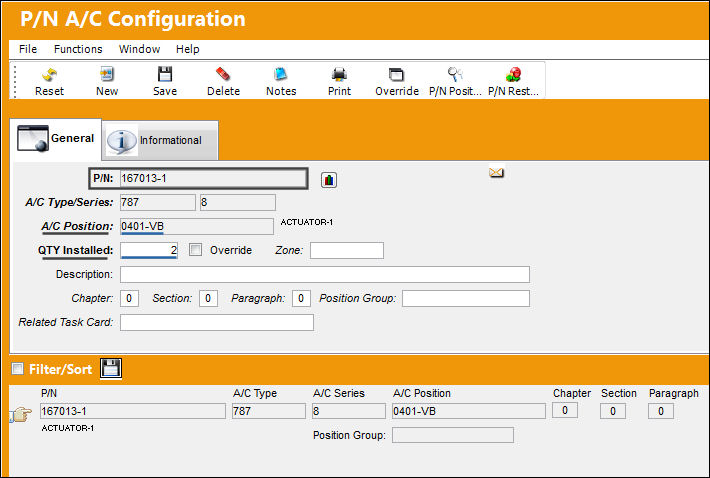
The following Part Number has the following A/C Position and specified part quantities for that position.
During the import process, the quantity specified for the A/C position entered in the P/N Master must match the import file. An exception will occur at the completion of the import if additional serial numbers are specified for that A/C position therefore exceeding the quantity specified in P/N Master, P/N A/C Configuration.
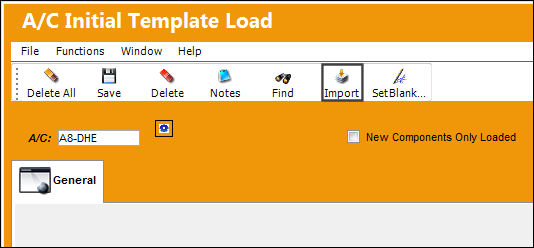
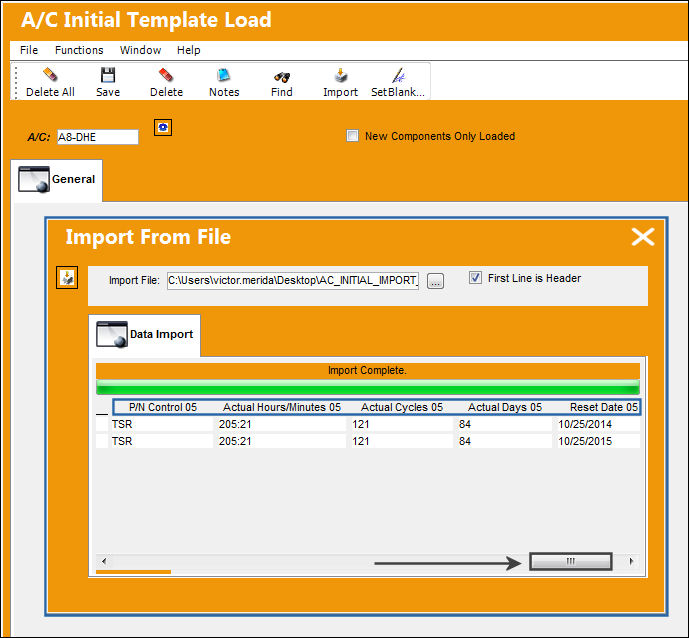
Go to Technical Records/ A/C Initial Template Load. Select the Import  button:
Complete the following import steps.
The following XML provides two parts with P/N Controls.

The above screenshot does not show all fields available in the import. Refer to the table above for a listing of all columns in the import file.
The parts must exist in the P/N Master, along with any of the P/N Controls listed in the import file, prior to the data being imported.
Once the import is complete, if any exceptions are found then the system will display an error. For more information on exceptions, refer to Exceptions via the Import Button of the System Standards Training Manual.
At the completion of the import, the first 5 P/N Controls will display along with all P/N Actuals information as displayed below, for each part number.
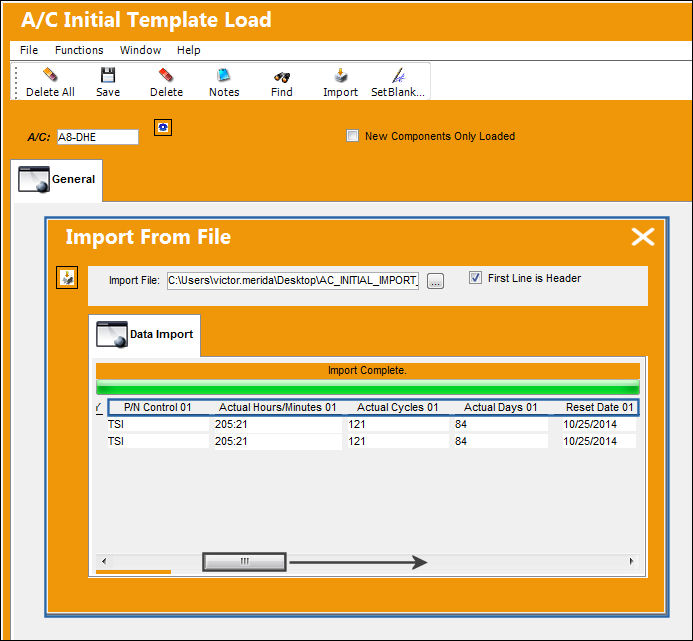
Use the scroll bar to display the last (5th) P/N Control with Actuals and Reset Date information.
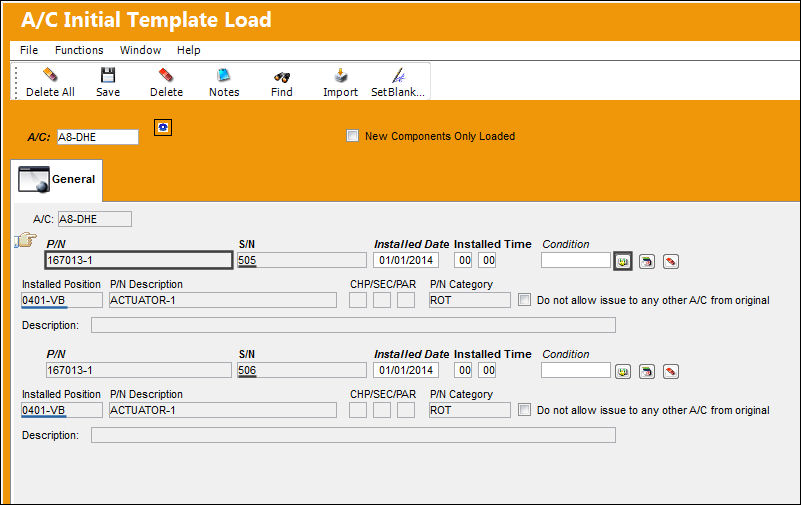
In the A/C Initial Template Load window, P/N '167013-1' was imported and installed successfully into the system.
As underlined in blue below, the Part Number's installed position is displayed.
Select the P/N Inventory Control button. The P/N Inventory Control window will display with the 5 P/N Controls assigned to P/N '167013-1' and the actuals and reset date information specified in the import file.
Share
Print
|
©1997-2026 Trax USA Corp. All rights reserved. This manual may not be copied, photocopied, reproduced, translated, or converted to any electronic or machine-readable form, in whole or in part, without prior written approval from Trax USA Corp. |
 |