 Download Online Help
 Print
|
|
|
|
|


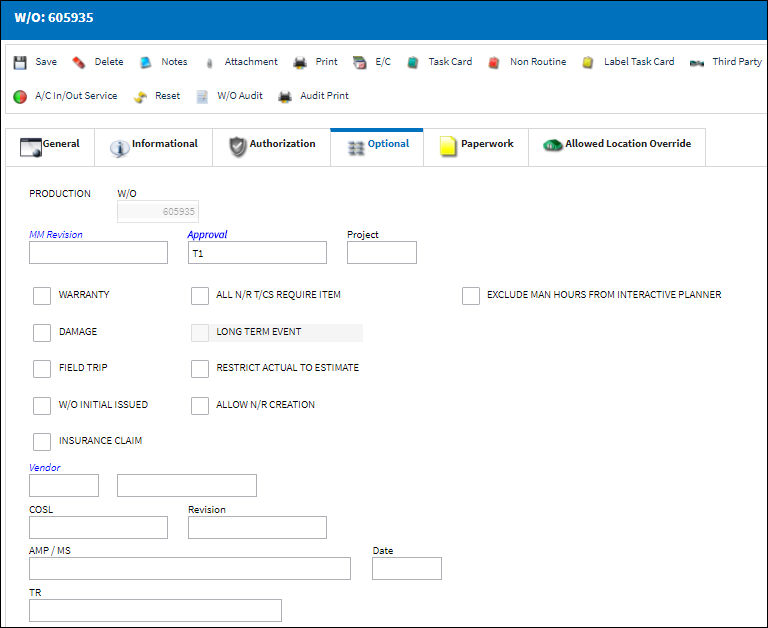
The Work Order Detail, Optional tab contains the following additional options.
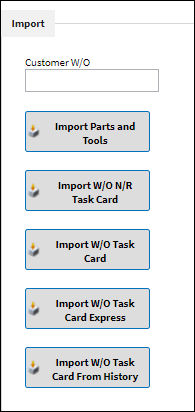
Scroll down to access the following Import options:
The following options/information is available in this window:
_________________________________________________________________________
Production W/O
The Work Order used to categorize, manage, and schedule work requirements for aircraft maintenance. This field is generated automatically once the W/O is created.
Re-Open All Financial Transactions  button
Select this button to re-open any closed Work Orders in order to reverse financial transactions. For additional information, refer to the Re-Open All Financial Transactions Button, via the Work Order Detail, Optional Tab of the Production Training Manual.
Note: This option does not work for Third Party Work Orders.
MM Revision
The current Maintenance Manual Revision.
Approval
The aviation authority. (i.e. FAA Federal Aviation Administration)
Project
The Project associated to the Work Order. Free text field for alphanumerical information. This field is informational only.
Warranty checkbox
This is checked if the Work Order is associated with a warranty condition. This is informational only.
All N/R T/Cs Require Item checkbox
When selected, all Non-Routine Task Cards attached to this Work Order must contain Items in order to print the N/R T/C.
 DEFNRTCITEM - When set to Yes, the 'All N/R T/Cs Require Item' checkbox is selected by default in the Work Order Detail, Optional tab when a new Work Order is created. This checkbox prevents users from printing a Work Order's Non-Routine Task Card if it does not contain Items.
Damage checkbox
This is checked if the Work Order is associated with a damaged condition. This is informational only.
Field Trip checkbox
This is checked if the Work Order is performed at a location other than a non-maintenance location or contract maintenance available location. This is informational only.
Restrict Actual To Estimate checkbox
When selected, the user may not update the Man Hours via W/O Task Card Manual Labor to surpass the Man Hours entered via the Work Order Task Card Item. For additional information, see Restrict Actual To Estimate checkbox via Work Order Detail.
W/O Initial Issued checkbox
Select to expense the rotable Fixed Asset if the rotable part is being installed for the first time. This checkbox is intended to allow the removal of Fixed Assets from the F/A Registry when the parts installed on the Aircraft will not be removed. Because another F/A would not take their place on the F/A Registry, they need to be removed (for example, when installing a new seat).
Note: All of the parts assigned to a Work Order where the W/O Initial Issued checkbox has been selected will be removed from the Fixed Asset Registry once the Work Order is closed. The removed F/A may not be the one on the Initial Issued Work Order and installed on the Aircraft. The system will follow the FIFO method (First In, First Out) to remove the F/A from the Registry.
Allow N/R Creation checkbox
Select this checkbox to allow the system to create a Non-Routine Task Card for the specified Work Order. If this checkbox is deselected, and the user attempts to create a Non-Routine Task Card, the system will generate a hard warning which will prevent the NRTC from being created.
Note: This checkbox is selected by default when creating a new Work Order.
Insurance Claim checkbox
This is checked when the Work Order is associated to an Insurance Claim. When selected, the Claim Number field appears.
Claim Number - The Insurance claim number, which applies to the part of the order.
Vendor
The system code for the service/part provider. This field is populated when maintenance is performed by an outside vendor. (i.e. This is commonly used for major maintenance such as a C-Check).
Note: This information comes from the Vendor Master.
COSL
The Component Operating Storage Limits for the Work Order. This field is informational only.
AMP/MS
The Aircraft Maintenance Program/Maintenance Schedule for the Work Order. This field is informational only. When Switch AUTOPAMP is set to Yes, the information in this field will be auto populated from the AMP field in A/C Type/Series, General tab. For additional information, refer to the Production Switches Manual. This field will be mandatory when Switch MANDATAMP is set to Yes. For additional information, refer to the Production Switches Manual.
Revision
The Revision number of the physical manual being used for this A/C Type/Series. When Switch AUTOPAMP is set to Yes, the information in this field will be auto populated from the AMP field in A/C Type/Series, General tab. For additional information, refer to the Production Switches Manual. This field will be mandatory when Switch MANDATAMP is set to Yes. For additional information, refer to the Production Switches Manual.
Date
The Date the manual was last revised. When Switch AUTOPAMP is set to Yes, the information in this field will be auto populated from the AMP field in A/C Type/Series, General tab. For additional information, refer to the Production Switches Manual. This field will be mandatory when Switch MANDATAMP is set to Yes. For additional information, refer to the Production Switches Manual.
TR
The Temporary Revision number of the physical manual being used for this Type/Series. When Switch AUTOPAMP is set to Yes, the information in this field will be auto populated from the AMP field in A/C Type/Series, General tab.
Customer W/O
The Work Order number of the customer for third party maintenance.
Import Parts and Tools  button
Select this button to import parts and tools. The import file must be in de-limited text file. For additional information, refer to the Import Parts and Tools Button via Work Order Buttons which can be found in the Production Training manual.
Import W/O N/R Task Card button
Select this button to import customer Non-Routine Task Cards. The import file must be in de-limited text file. For additional information refer to the Import W/O N/R Task Card Button via Work Order Buttons which can be found in the Production Training manual.
Note: This import option is only used for Third Party Work Orders. The Third Party Checkbox must be checked for this option to be available.
Import W/O Task Card button
Select this button to import customer Task Cards. The import file must be in de-limited text file. For additional information refer to the Import W/O Task Card Button via Work Order Buttons which can be found in the Production Training manual.
Note: This import option is only used for Third Party Work Orders. The Third Party Checkbox must be selected for this option to be available.
Import Work Order Task Card From History button
Select this button to import Work Order Task Cards from the history of the Work Order. For additional information, refer to the Import Work Order Task Card From History Button via Work Order Header which can be found in the Production Training Manual.
Note: This button only appears in the Work Order Detail, Optional tab for Third Party Work Orders.
_________________________________________________________________________
Download Online Help
Print
|
©1997-2018 Trax USA Corp. All rights reserved. This manual may not be copied, photocopied, reproduced, translated, or converted to any electronic or machine-readable form, in whole or in part, without prior written approval from Trax USA Corp. |
 |