 Download Online Help
 Print
|
|
|
|
|


The Import W/O N/R Task Card option is used to quickly import customer Non-Routine Task Cards which may not exist in the Engineering Task Card DB. This option allows the vendor to receive or create a digital file listing these task cards and related information for the import and quick creation of the Work Order package.
Note: The system allows users to import Non-Routine Task Cards using the STYLESHEET Editor. For additional information, refer to the Switch  NREDITOR, via the Production Switches Manual.
First, the user must prepare the file. For information regarding how to prepare the import file, refer to Preparing File For Import, via the Import Button of the System Standards Training Manual.
Criteria for W/O N/R Task Card Import file:
Column Name |
Data Type |
Limitation |
Path |
Aircraft |
Alphanumeric |
10 |
Production/Update/Work Order/W/O Non-Routine Task Card , General Tab |
Check |
Alphanumeric |
10 |
Production/Update/Work Order/W/O N/R Task Card, General Tab |
AT WO |
Numeric |
|
Production/Update/ Work Order/W/O N/R Task Card, General Tab |
WO |
Numeric |
|
Production/Update/ Work Order/W/O N/R Task Card, General Tab |
Work Order Task Card |
Alphanumeric |
22 |
Production/Update/Work Order/W/O N/R Task Card, General Tab |
Reference Task Card Work Order |
Alphanumeric |
25 |
Production/Update/W/O Task Card, Optional 2 Tab Note: This column is no longer in use. |
Reference Non-Routine Work Order |
Alphanumeric |
25 |
Production/Update/Work Order/W/O N/R Task Card, Optional 2 Tab. Note: This column is no longer in use. |
Non-Routine |
Numeric |
|
Production/ Update/Work Order/W/O N/R Task Card, General Tab |
Date Open |
Alphanumeric |
8 |
Production/Update/Work Order/W/O N/R Task Card, General Tab |
Date Closed |
Alphanumeric |
8 |
Production/Update/Work Order/W/O N/R Task Card, General Tab |
Work Order Task Card Schedule |
Alphanumeric |
25 |
Production/Update/Work Order/W/O Non-Routine Task Card , General Tab Note: This column is no longer in use. |
Chapter |
Numeric |
2 |
Production/Update/Work Order/W/O Non-Routine Task Card , Optional 2 Tab Note: This column is no longer in use. |
Defect Description |
Alphanumeric |
4000 |
Production/Update/Work Order/W/O Non-Routine Task Card , Optional 2 Tab Note: This column is no longer in use. |
Work Accomplished |
Alphanumeric |
4000 |
Production/Update/Work Order/W/O Non-Routine Task Card , Work Accomplished Tab Note: This column is no longer in use. |
Work Card |
Alphanumeric |
35 |
Production/Update/Work Order/W/O N/R Task Card, General Tab |
ATA |
Numeric |
|
Production/Update/Work Order/ W/O Non-Routine Task Card, Optional 2 Tab |
Discrepancy |
Alphanumeric |
4000 |
Production/Update/ Work Order/ W/O N/R Task Card, Optional 2 Tab |
Corrective Action |
Alphanumeric |
4000 |
Production/Update/Work Order/ W/O N/R Task Card, Work Accomplished Tab |
Defect Type |
Alphanumeric |
8 |
Production/Update/Work Order/W/O Non-Routine Task Card, General Tab |
Item |
Numeric |
2 |
Production/Update/Work Order/W/O Non-Routine Task Card, General Tab |
Reported Date |
Numeric |
8 |
Production/Update/Work Order/Non-Routine Task Card/Defect Button, General Tab |
Reported By |
Alphanumeric |
10 |
Production/Update/Work Order/Non-Routine Task Card/Defect Button, General Tab |
Station |
Alphanumeric |
10 |
Production/Update/Work Order/Non-Routine Task Card/Defect Button, General Tab |
Resolved By |
Alphanumeric |
10 |
Production/Update/Work Order/Non-Routine Task Card/Defect Button, Resolution Tab |
Resolved Date |
Alphanumeric |
8 |
Production/Update/Work Order/Non-Routine Task Card/Defect Button, Resolution Tab |
Resolved Station |
Alphanumeric |
10 |
Production/Update/Work Order/Non-Routine Task Card/Defect Button, Resolution Tab |
Corrosion Area |
Alphanumeric |
10 |
Production/Update/Work Order/Non-Routine Task Card/Defect Button, Corrosion Prevention and Protection Tab |
Corrosion Level |
Alphanumeric |
8 |
Production/Update/Work Order/Non-Routine Task Card/Defect Button, Corrosion Prevention and Protection Tab |
Section |
Numeric |
2 |
Production/Update/Work Order/Non-Routine Task Card/Defect Button, General Tab |
Structure Repair |
Alphanumeric |
10 |
Production/Update/W/O/N/R Task Card, Optional 1 Tab Note: This field is invisible and appears only in the background. |
Structure Repair Classification |
Alphanumeric |
10 |
Production/Update/W/O N/R Task Card, Optional 1 Tab Note: This field is invisible and appears only in the background. |
Description |
Alphanumeric |
2000 |
Production/Update/W/O N/R Task Card, General Tab |
Scheduled Start Date |
Numeric |
6 |
Production/Update/W/O/ Non-Routine Task Card/ Schedule Tab |
Hour (Start) |
Numeric |
2 |
Production/Update/W/O/ Non-Routine Task Card/ Schedule Tab |
Min (Start) |
Numeric |
2 |
Production/Update/W/O/ Non-Routine Task Card/ Schedule Tab |
Scheduled End Date |
Numeric |
6 |
Production/Update/W/O/ Non-Routine Task Card/ Schedule Tab |
Hour (End) |
Numeric |
2 |
Production/Update/W/O/ Non-Routine Task Card/ Schedule Tab |
Min (End) |
Numeric |
2 |
Production/Update/W/O/W/O Non-Routine Task Card/ Schedule Tab |
Additional Work |
Alphanumeric |
10 |
Production/Update/W/O/W/O N/R Task Card, General Tab |
Source Code |
Alphanumeric |
25 |
Production/Update/W/O/W/O N/R Task Card, Optional 1 Tab |
RII |
N/A |
Y/N |
Production/Update/W/O/W/O N/R Task Card, Optional 3 Tab |
CDCCL |
N/A |
Y/N |
Production/Update/W/O/W/O N/R Task Card, Optional 3 Tab |
Critical Task |
N/A |
Y/N |
Production/Update/W/O/W/O N/R Task Card, Optional 3 Tab |
ETOPS |
N/A |
Y/N |
Production/Update/W/O/W/O N/R Task Card, Optional 3 Tab |
Informational Only |
N/A |
Y/N |
Production/Update/W/O/W/O N/R Task Card, Items button, General tab |
Main Skill |
N/A |
Y/N |
Production/Update/W/O/W/O N/R Task Card, Items button, Skills tab |
Mechanic |
N/A |
Y/N |
Production/Update/W/O/W/O N/R Task Card, Items button, Skills tab |
Skill Note: The Skill field will be validated against the Skills set up in the Skill Master. |
Alphanumeric |
10 |
Production/Update/W/O/W/O N/R Task Card, Items button, General tab |
Man Hours |
Numeric |
8 |
Production/Update/W/O/W/O N/R Task Card, Items button, Skills tab |
Men Required |
Numeric |
8 |
Production/Update/W/O/W/O N/R Task Card, Items button, Skills tab |
Quotation NO |
Alphanumeric |
10 |
Production/Update/W/O/W/O N/R Task Card, General Tab |
Note: If any exception is generated during the import, all of the records in the file will be rejected. For additional information, refer to Exceptions topic via the System Standards Training Manual.
Go to Production/Update/Work Order. Create a new Work Order, or find an existing one.
Select the Optional tab. Select the Import W/O N/R Task Card button.
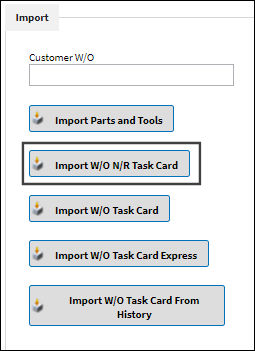
Complete all of the Import steps.
For information regarding how to Import a file, refer to Importing File via Import Button of the System Standards Training Manual.
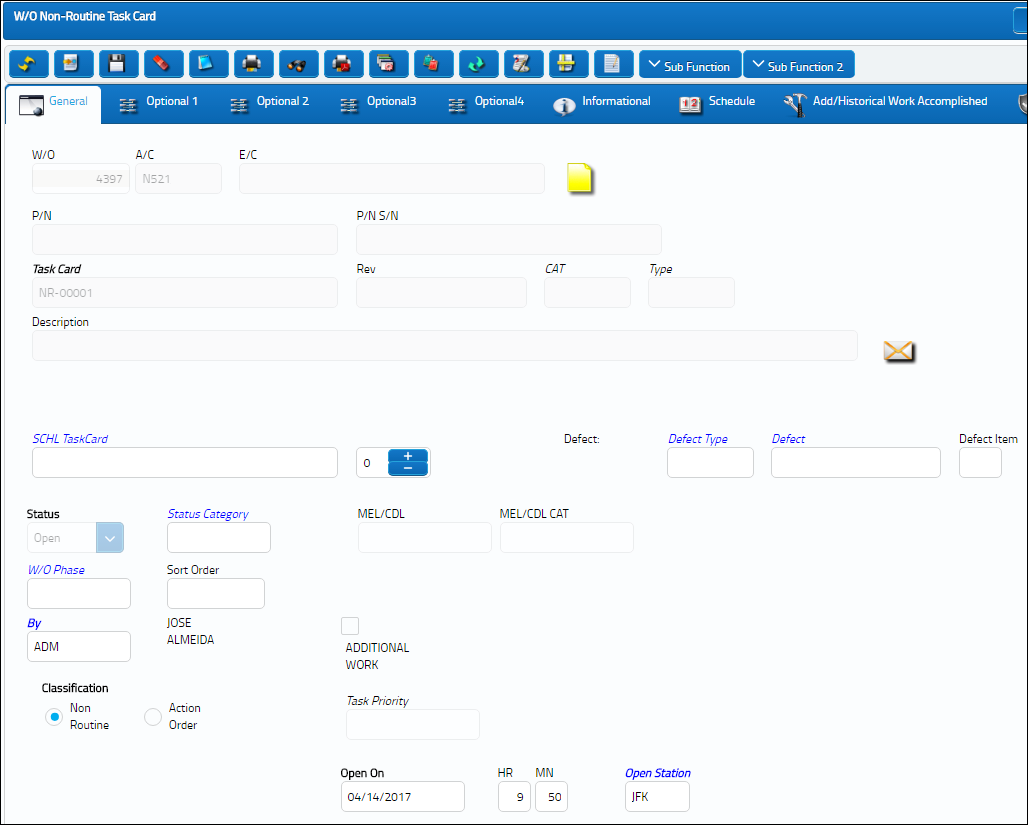
After the import has been complete, the user may view W/O Non-Routine Task Card window to see the imported Non-Routine Task Cards:
Download Online Help
Print
|
©1997-2018 Trax USA Corp. All rights reserved. This manual may not be copied, photocopied, reproduced, translated, or converted to any electronic or machine-readable form, in whole or in part, without prior written approval from Trax USA Corp. |
 |