
 Share
Share
 Print
Print
|
|
|
|
|


The Import  button, via the A/C Seat Configuration window is designed to import the seat configuration for an individual aircraft quickly and efficiently. Rather than creating the seat configuration row by row, this can be completed in one single import. This is especially useful when creating the configuration for multiple tail numbers that belong to the same fleet.
First, the user must prepare the file. For information regarding how to prepare the import file, refer to Preparing File For Import, via the Import Button of the System Standards Training Manual.
Criteria for Seat Configuration Import file:
Column Name |
Data Type |
Limitation |
Path |
|
Line |
Numeric |
2 |
Settings/ Update/ A/C Master/ Override Seat Configuration button/ Import button |
|
Configuration The user must use the following values: |
Alphanumeric |
20 |
Settings/ Update/ A/C Master/ Override Seat Configuration button/ Import button |
|
Value |
Description |
|
|
|
A |
Seat |
|||
U |
Galley |
|||
D |
Lavatory |
|||
_ or blank space |
Aisle |
|||
F |
Left Exit |
|||
C |
Closet |
|||
G |
Right Exit |
|||
J |
Jump Seat |
|||
B |
Business Seat |
|||
A/C Width |
Numeric |
2 |
Settings/ Update/ A/C Master/ Override Seat Configuration button/ Import button |
|
Section The user must choose from Front, Middle, or Rear. |
Alphanumeric |
6 |
Settings/ Update/ A/C Master/ Override Seat Configuration button/ Import button |
|
Go to Settings/ Update/ A/C Master/ Override Seat Configuration button. From the A/C Seat Configuration window, select the Import button.
Complete all of the Import steps.
For information regarding how to Import a file, refer to Importing a File via Import Button of the System Standards Training Manual.
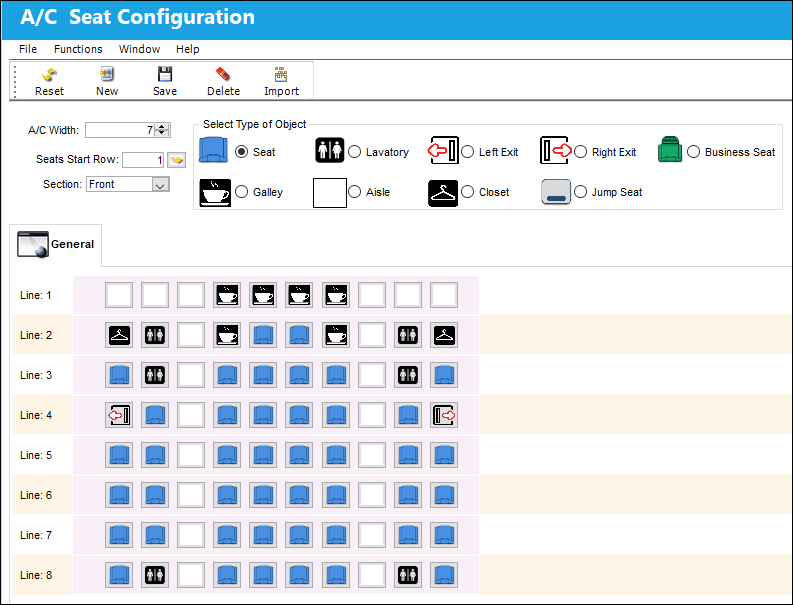
Once the import is complete, the user may go to the A/C Seat Configuration window to view the seat configuration information that was imported.
Share
Print
|
©1997-2026 Trax USA Corp. All rights reserved. This manual may not be copied, photocopied, reproduced, translated, or converted to any electronic or machine-readable form, in whole or in part, without prior written approval from Trax USA Corp. |
 |