|
MANUALS > Production > Production Switches > WOCHECKSK - Validates Main Skill For TC Completion
WOCHECKSK - Validates Main Skill For TC Completion
Validates Main Skill For TC Completion
Affected windows: w_wo_task_card_work_eu_individual_tc
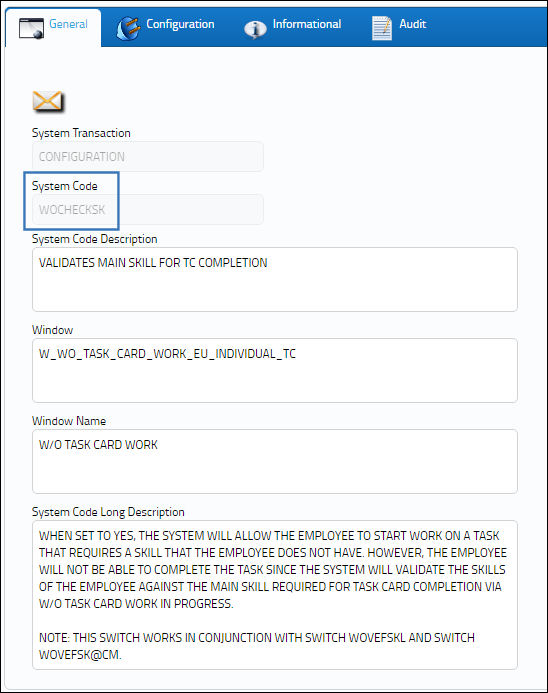
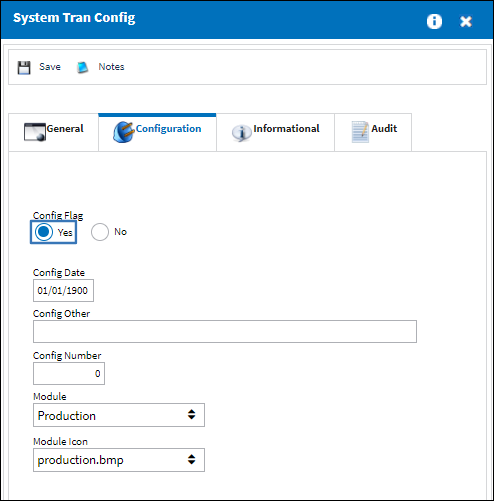
Switch Set to Yes:
When set to Yes, the system will allow the employee to start work on a task that requires a skill that the employee does not have. However, the employee will not be able to complete the task since the system will validate the skills of the employee against the main skill required for Task Card completion via W/O Task Card Work in Progress.
Note: This switch works in conjunction with Switch  WOVEFSKL, Switch WOTCVEFSKL, Switch WTUSKILLVAL, Switch WTUSKILLVALEXT and Switch WOVEFSK@CM. These should be reviewed before setting up this switch.
Note: This switch affects the Multi Task Card Sign Off function of the W/O Task Card Work In Progress window. The "Completed" radio button only appears in the Multi Task Card Sign Off when this switch is set to Yes.
Select into the W/O Task Card Item window, Skill tab to view the skill required to work on the Task Card.
In Employee Master, the following Employee does not have the main required skill.
Enter the W/O number and select the associated Task Card.
The system allows the Employee to start work on the Task Card without having the required main skill.
Save the record.
To complete the work, enter the W/O number and associated Task Card.
When the Employee changes the status to 'Completed' and attempts to save the Task Card, the system displays the following error message.
An employee with that specific skill must be the one to complete and close the Task Card. In the following example, a different Employee will complete and close the Task Card.
Enter the W/O and select the associated Task Card.
The employee must change the status of the Task Card to 'Stop' in order to have the employee with the correct skill complete the work.
Enter the W/O number and select the associated Task Card.
The employee with the correct skill is now able to sign-in and start the work on the Task Card.
To complete the Task Card, enter the W/O number and select the associated Task Card.
The employee is now able to complete and close the Task Card.
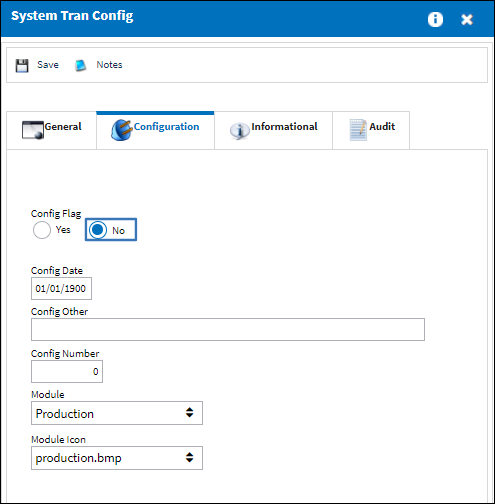
Switch Set to No:
When set to No, the system will allow the employee to start and complete work on a task that requires a skill that the employee does not have. The system will not validate the skills of the employee against the main skill required for Task Card completion.
Note: When Switches WOVEFSKL and WOVEFSK@CM are set to Yes, the system does not change and reacts as if the switch is set to Yes.
Select into the W/O Task Card Item window, Skills tab to view the skill required to work on the Task Card.
In Employee Master, the following Employee does not have the main required skill.
Enter the W/O number and select the associated Task Card.
The system will allow the Employee to start work on the task without having the necessary skill.
Change the status to Completed and enter the W/O number and select the associated Task Card.
The Employee is able to complete and close the Task Card.
|
See Also Production Switches 3PTACVAL - Third Party W/O E/C Effectivity ACTWOPUB - Activation of W/O Publish ADDECNOT - Add E/C With No Task Cards ADDECNTC - Add Child E/Cs with no Task Cards ADDEFTCLEC - Allow to Add Defect to Multiple W/Os through Called On E/C ADDNONEFPN - Add Non-Effective Parts as Part Number Requirements for W/O Task Card ADDNXTDUE - Add Next Most Due information to the W/O Closing Notification ALLWOPACKP - Ability to Print All W/Os from a specific date range AUDITMOVE - Save the Reason for Moving in W/O Task Card Gantt AUTOCREATENRTCITEM - Auto create an item by default for a NRTC AUTOPAMP - Auto populate AMP information from A/C Type/Series to W/O AUTOPENDEF - Auto Populate Open On Time and Station From Defect Report Associated to Non-Routine Task Card eMRO AUTOPICKLIST - Generate Picklist from W/O Task Card P/N window AUTOPNTC - Auto Create P/N Control Task Card through W/O Pack Print AUTOTCLINE - Prevent the Automatic Creation of a New Line in W/O Task Card Closing AVMSTR - Aviation Management Systems Export To File BLOBCLEAN - Cleans Blob files from closed W/Os CASCADCOMP - Parent W/O Completion Date Cascaded Down to Sub W/Os CCLISTCOND CCPRODLOCOPT CCSHOPLOCOPT - Customer Contract Location Optional (Shop) CHOMITWOCA - Characters to Omit in Contractor Authorization Request Description CHOMITWONOTE - Omit Characters in eMRO Notes CLXECTERM - Cancel Terminated E/C on Open or Generation Status W/O COMPTECHLOGWOTC - Completed OnTech Log field Made Available in the W/O Task Card Window CONTRACTWO - Contract Work Order Billing Sequence CPCPIDNUM - Corrosion Prevention and Control Program Next Sequence Number CUSTAUTHSEQ - Customer Authorization Sequence DAILYEOARCHIVE - Daily EO Will Be Archived at Compliance DEF3PTY - Default New Work Orders to Third Party DEFECTRT - Only Add Work Accomplished to Defect Resolution when Repeat is Complete DEFECTTC - Load Defect Text Into The Work Order Non-Routine Task Card DEFECTTS - Add Trouble Shooting to Non-Routine Task Card as Item DEFNRTCITEM - Default New Work Orders to Require having N/R T/Cs Items Before Printing DEFPROD - Default Work Order Task Card Defect Report Defect Type Code DERTCSH - Deferred TC Items to Defect Trouble-shooting DFTCFMTC - Task Card Item from Deferred Task Card DONETGROVE - Use .NET version of GroveBuilder Entities Parser ECCBCDO - E/C Controlled by Calendar Days Override Reset Flag ECCBCDW - E/C Controlled By Calendar Days Warning ECCHLDTRC - Set One Time Plan to Checked status if Transferred/Canceled from a W/O ECCOMPRESEQ - Auto Re-sequence Compliance In Sequential Order by E/C ECMANTCR - Reset E/C If All Mandatory Task Cards Have Been Closed ENABLEPW - Enable fields in W/O, Paperwork tab GENCONTRACT - Validate Generic Customer Contract When Closing Work Order GENRECALTWO - Generate Recurrent Alert From Work Order HIDEDEFWARN - Hide Warning for Defects not linked to a Task Card or Work Order LABORDATEVAL - Stop Validation of W/O Date on Manual Labor LABORTIM - Maximum Work Hours Allowed In The Work Order Manual Labor LABORTIMEMAND - Defaults the Manual Labor's Time(hrs/min) based on the Start and End Times LBTCPRFX - Label Task Card Prefix and Sequential Number LIMITFURCRITERIA - Set First Schedule Parameter Limits for Follow Up Requirements (FUR) LOCDAMAGEEDITCHK - Corrosion/Damage & Repair Location of Damage fields Validation MAINSKILLTOTC - Copy Main Skill From T/C Item To Skill Field On T/C MANDATAMP MANTCDT - Mandatory Closing Time For W/O Task Cards MKLVLMD - Make Level Field Mandatory if the Corrosion is Selected MNWORKACC - Mandatory Work Accomplished at T/C and Item Level for Stop or Completed Status MSGRIID - 'Is RII required?' message appears when closing a W/O Task Card MULTITASKASSIGN - Select And Assign Multiple Task Cards In W/O Task Card Assignment NONRWOTCUPD - Prevent Closing of N/R T/Cs Using W/O Task Card Closing NREDITOR - Defaults the W/O N/R Task Card Editor NRHDU - Multiple Users Cannot Edit same W/O Task Card Item Record at Same Time NRHWAC - W/O T/C Status Check in Add/Historical Work Accomplished Tab NRITEMDEFSKILL - Create Blank Line Item With Default Skill For NR TCs NRRELCATMD - Make Resolution Category for Non-Routine Task Card Closing Mandatory NRSELFASSIGN - Self Assign N/R T/C NRSVPAUTO - Non-Reserved Items Auto Print at Picklist Location Set Up Printer NRTCASC - ASC Field Mandatory in W/O N/R T/C, Optional 2 tab NRTCATA - ATA Chapter and Section (fields) Mandatory on Non-Routine Task Cards NRTCDEF - Auto Populate The Defect Description To The Task Card Description NRTCFRNO - Load Non-Routine Task Card from Issue W/O Not Parent NRTCPRAP - Non-Routine Task Card Protect After Printing NRTCPRFX - Non Routine Task Card Prefix NRTCWAMP - Non-Routine Task Card Work Accomplished Mandatory NRTFRDEC - Allow Transfer of N/R T/C when Linked to E/C NR_MPD - W/O Non-Routine Task Card - MPD field Mandatory ONLYPEFFTCITEM PCWOFBR - Prevent Closed W/Os From Being Re-Opened PENDINGRII - Add Pending RII Status to W/O Task Cards at Task Card Completion PKLCANCEL - Picklists and Requisitions Canceled at Work Order Completion or Post Completion PNLABORRESE - Auto Re-reservation Of Part And Labor If W/O Changes PNMANAGEDISSUE - Do Not Delete Managed P/Ns Once W/O Is Closed PNTCACVALIDATE - Validate A/C Effectivity Against P/N Task Cards PPCWOFBR - Prevent Post-Completed W/Os From Being Re-Opened PPONEJOB - Print W/O Pack Prints as a Single Print Job PREVASKTORESET - Prevent E/C Prompt 'Do you want to Put E/C at Do Not Reset' At Status Cancel And Automatically 'RESET' Linked E/C PREVDEFERTC - Prevent Message Regarding the Closing of a Child E/C PREVENTTASKCLOSE - Prevent Closing T/Cs When Un-sequenced T/Cs Are Against The W/O PRINTPDFJOB - Send one job to the printer when printing from the W/O Print PRTSKLTC - Protect Skill in Work Order Task Card Item Work RESEQWARN - Re-Sequence Warning When Opening Workpack Print RESETCEC - Update Reset Flag on Child E/Cs with No Task Cards RPTINSPP - Repeat Inspection Performed SCTCMAN - Schedule Task Card Mandatory For Non-Routines Of Specified Defect Type SEPARATETCDOC - Print Task Card and Its Attachments in Individual Files When Using Email Function in Work Pack Print SIGNBREAK - To capture break and/or lunch for employee STOWOTASKONDB - Store The W/O T/C XML On Database SUBWOEDT - Sub WO Location/Site/Date Same as Parent WO TCBIDSHT - Load Task Card Bid Sheet Notes TCDEFBLB - Attach Task Card Images to Related Defect Reports TCDEFER - Work Order Task Card Defer Default Defect Type Parameter TCDEFEREXI - Exit Buttons removed from Defer Task Card Transfer To Defect Reports Window TCDESCRIP - Description field Open for W/O T/Cs and N/R T/Cs TCDFRSTS - Defer W/O Task Card Authorization Status TCDFTOPN - Keep Defect Open When Closing T/Cs Associated To W/O TCDUEPRT - Load Due Date into Task Card Print TCHMAP - Default Closed On (field) to Current Time of PC TCITEMCLOSEMDRY - Mandatory Item Select with W/O Task Card Item Close TCNRTCQTY - Default the Task Card P/N Quantity to 1 TCSTCHG - Change the Default Status at the Manual Task Card Closing TCVALMECHINSP - Same User Cannot Complete Mechanic and Inspector Work on a T/C Item TCWAMN - Task Card Work Accomplished Mandatory TCWORKACC - W/O TC/NRTC, Add/Historical Work Accomplished Tab TCWORKOOS - Work can be accomplished non-sequentially via W/O T/C Assignment Workshop TKCIWS - Accepted/Rejected prompt in W/O Task Card Assignment Workshop UPDTDELPNREQ - Warning That Removal Of P/N Requirements With Active Picklist/Requisition Will Not Be Reflected On NRTC VALAUTONR - Validate Mandatory Fields For NR TC When Auto Created VLDGRDTM - Validate ground time for Work Orders WALLBEFTCCLW - Prompt Wall Password for Task Card Closing Window WARNIFPNRESERVED - Prevents Reserved P/Ns from being removed through W/O Task Card P/N WOACCOMPNOTEMPTY - Prevent The Post Completion Of A W/O That Has T/Cs With No Work Accomplished WOACTPW - W/O Verify A/C For Third Party Work Orders WOACTSEQ - W/O Actual Next Sequential Number WOACTSNG - Check if the Employee is Signed On WOACTYPEMAN - A/C Type Mandatory in Work Order WOADTREC - Work Order Audit Recording WOAECDF - Defer E/C When Task Card is Deferred WOATHREL - Work Order Authorization By Step WOAUDITM - W/O Task Card Start Date/Time and Completion Date/Time Mandatory WOAUTOSO - W/O Employee Auto Sign Off WOBIDNO - Work Order Bid Next Sequence Number WOCHGAUTH - Re-Authorize W/O When Changes are Made to Mandatory Fields or Tasks are Added to W/O WOCLOCHB - Make Print W/O E/C Checkbox Unchecked WOCLOSENR - Do Not Allow Edit of Non-Routine When W/O is in 'Closed' Status WOCLOSEPENDTOOL - Prevent Closing the W/O If Tools Are Not Returned WOCOMPSWP - Perform Sweep Function At W/O Post Completed Status WOCUSTLOGO - Use Customer Logo for Third Party Work Order Task Card Prints WODDPLEC - Do Not Create a W/O Defer Defect When Deferring a Planned E/C WODEFER - Change Status of Parent E/C When Child E/C Is Deferred WODUEDATE - Display The Due Date Information For The W/O WOECCOMP - Write E/C Compliance from W/O Defer Defect WOECRESTDT - W/O Reset Date use W/O Start Date/ Time WOHRSBLANK - Make Hour/Minute fields Mandatory Before Closing a W/O WOINSPRII - W/O and Task Card Inspection and RII check item and Route WOIRSDR - Do Not Display SDR and IR Creation Buttons in W/O N/R T/C Window WOLABOREFFEMP - Filter W/O Man Labor Efficiences Report by Employee/User WOLABTCOPEN - Only Allow Labor For Open Task Cards WOLCSTEOPT - Make W/O Location/Site fields Mandatory WOLINEMULTI - Soft Warning when Multiple Line Status Work Orders are created WOLOCEMP - User's Location Must Match the W/O Location or T/C Closed Station when Closing WOMANHRSPRTFIELD - Allows for Query by A/C, Location, Site, and Date fields in W/O Print WOMNLINVREF - Manual Customer Invoice Reference WONRMANDSC - NRTC Source Code Field Mandatory WONRMAP - Populate Open On Time/Location from Server Time and W/O Location WONRPROD - Make the Open On, Hour/Minute, By, and Open Station fields Mandatory WONRSCHDEF - Make Schedule Task Card and/or Defect field Mandatory WONRTCAP - Append Accomplished Work Entries for W/O Non-Routine Task Cards via Add/Historical Work Accomplished Tab WONRTCRII - W/O N/R Task Card RII Checkbox Selection WOPICK1 - Create One Picklist Per W/O On Reservation WOPICKPRIO - Picklist Priority Updated when W/O Priority Changed WOPKLNLA - Automatic Picklist/Requisition Creation for Missing NLA Components WOPOSCMINSERV - Set the A/C OOS status to 'In Service' when W/O is set to Post-Completed Status WOPOSTCM - W/O Post Completion Close Material and Automatic Closing WOPPIDMR - File Path Setup for W/O Pack Print - Send to IDMR WOPPTRAXDOCREV - Work Pack Print TraxDoc Supporting Documents WOPRINTCLEAR - Clear W/O Print history on location update WOPUDTMD - Date Required Field Mandatory For Pop-up Located in Requisition Via W/O WOPUPRMD - Date Required Field Mandatory For Pop-up Located in Requisition Via W/O WOPURSVRQ - Display Pop-up For Requisition Location After Location Pop-up WOPUTPMD - Make Type Field Mandatory for W/O Location prompt WORELAPP - Make Approval Mandatory in Work Order WORELFORM - W/O Release Form Status WORESC - Display Message to Reschedule the Task Card WOSCHEDULE - Show Men Available for Work by W/O Header Schedule WOSCHLCFGWARN - Apply Warning To Overdue Items When Schedule Start Date Is Changed WOSCHTCAP - Append Accomplished Work Entries for W/O Schedule Task Cards via Add/Historical Work Accomplished Tab WOSCOPEDAYS - Specify Number of Days Used to Calculate T/Cs Displayed in W/O Scope Analysis, Time & Materials tab WOSEQ - Work Order Next Sequence Number WOSEQPFX - W/O Task Card Sequence Prefix WOSTATGEN - Set the Default Status of new W/O's to Generation WOTCCLOSINGSTATS - Default Status on W/O T/C Closing Window WOTCCMPM - Work Order Task Card Completion Information (fields) Mandatory WOTCCTLDT - Work Order Scheduled Start and Close Date and W/O Task Card Closed Date WOTCDTALL - Date (field) Mandatory when Status All button Selected to Close W/O Task Card WOTCESIGN - Create an Electronically Signed PDF for Work Order Task Cards at Closing WOTCGRP - W/O Task Card Work Group Sequence WOTCIMDEL - Delete Task Card Images When Closing W/O WOTCITDL - W/O Task Card Item Delete Blob Data WOTCITEMCL - W/O Task Card Items Closed through T/C Work WOTCITEMEDIT - Do Not Allow W/O T/C and N/R Items to be Edited WOTCRATIO - Calculate W/O Actuals Hours using a W/O Task Card Item Total Hours Ratio WOTCREOPEN - Allow Re-opening of Task Cards previously closed against a Work Order WOTCRIIINSP - Display pop up to Accept or Reject a T/C when status is Pending RII WOTCSCHEDPROTC - W/O Task Card Schedule Fields Protected WOTCVEFSKL - W/O Task Card Verify Employee Skill WOTPWXOAUTO - Enable Auto XO to function with Multi-Company WOTSKNWAUT - Send new tasks assigned to Work Order Authorization WOUSERETOPS - Same User Cannot Complete ETOPS Work on Both Engines for ETOPS A/C WOVEFSK@CM - Validate Skill Only at Completion in W/O Task Card Work in Progress WOVEFSKL - Verify Employee Skill in W/O Task Card Work in Progress WRKTOSEQ WTMSKILLVAL - Work Order Manual Labor Will Validate Employee Skill WTUSKILLVAL - Work Order Task Card Closing Will Validate Employee Skill WTUSKILLVALEXT - Extends Functionality of WTUSKILLVAL to Other Windows and Employee Skill Status |
|
 Download Online Help


