
 Share
Share
 Print
Print
|
|
|
|
|


P/N Reliability Print
The P/N Reliability General Tab provides a printout of reliability statistics gathered on Fleet Family-monitored part numbers conforming to Fleet Family company requirements and industry standards. A/Cs and P/Ns must be properly set up to trigger the Alert to generate accurate information via the Alert Level Calculation tool.
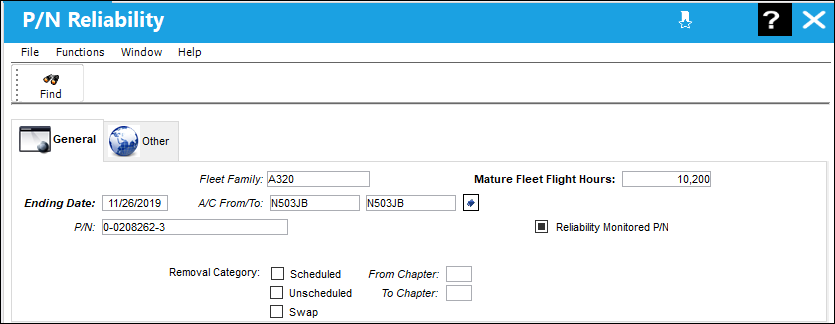
The following information/options are available in this window:
_____________________________________________________________________________________
Fleet Family 
This field is used to track P/N reliability organized by Fleet Family (e.g., Airbus, Boeing, Embraer, etc.).
Ending Date
End Date for report history.
A/C From/To
Enter the aircraft or aircraft range.
P/N
This P/N has been configured in such a way as to trigger Recurrent Item alerts whenever an unscheduled removal threshold is reached through the P/N Master, Reliability tab. Removals with the Unscheduled radio button selected in the A/C P/N Transaction window will affect the part's reliability.
Mature Fleet Flight Hours
The total flight hours accumulated across the lifespan of the specified aircraft.
Reliability Monitored P/N checkbox
Select this checkbox to have the Reliability module provide statistical data (on reports and Recurrent Alert Items) regarding the reliability of this particular part. Reports can then be filtered to display only parts that are “Reliability Monitored.”
Removal Category
The removal category may be assigned during the A/C P/N Transaction and may be pre-defined by the Reason Code. The following is the available Removal Categories: (Schedule, Unschedule, and Swap).
Note: Only Unscheduled Removals will trigger Removal Alerts. For additional information, please refer to Part Number Reliability section of the Reliability Training Manual.
Scheduled - Select this radio button if this is a scheduled component change.
From Chapter - The ATA chapter/section/paragraph, as applicable.
Unscheduled - Select this radio button if this is an unscheduled component change.
To Chapter
The ATA chapter/section/paragraph, as applicable.
Swap
Select this radio button if this component change is a result of a swap.
_____________________________________________________________________________________
Share
Print
|
©1997-2026 Trax USA Corp. All rights reserved. This manual may not be copied, photocopied, reproduced, translated, or converted to any electronic or machine-readable form, in whole or in part, without prior written approval from Trax USA Corp. |
 |