
 Share
Share
 Print
Print
|
|
|
|
|


Remove Only, via A/C P/N Transaction
One Serial number (or assembly) is removed from an aircraft. This transaction will usually be followed by an installation at a later time.
A transaction record is written for the removed part(s). This will include the P/N control times (TSN [Time Since New], TSO [Time Since Overhaul] etc.) as of the transaction.
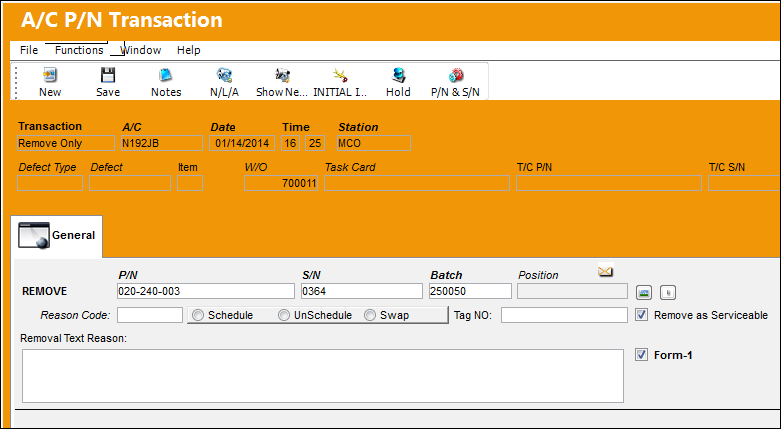
The following information/options are available in this window:
_____________________________________________________________________________________
P/N
The Part Number reference for the aircraft part.
S/N
The Serial Number for the specific serialized part.
Batch
The inventory number that is currently associated with a part or group of parts. A part's Batch number can change after various types of transactions take place.
Position
The Position of the item being removed.
Reason Code
The reason for changing the part. The Reason Code is a System Transaction Code which is defined in the Technical Records Transaction Code manual via A/C Installed Remove Reason.
Schedule radio button
Select this radio button if this is a scheduled component change.
Unschedule radio button
Select this radio button if this is an unscheduled component change. This checkbox could indicate that the particular component has failed or is faulty. This radio button will trigger Recurrent Unscheduled Removal Alerts for configured parts via the Reliability module. Recurrent Alerts are triggered when the same P/N is removed on multiple occasions (as set up in the P/N Master, Reliability tab). For more information refer to the P/N Master, Reliability tab via the Settings Training Manual.
Swap radio button
Select this radio button if this component change is a result of a swap.
Tag NO
The tag number associated with the part.
Remove as Serviceable checkbox
Select this checkbox if the part is to be removed as serviceable (i.e. it can still return for active use at a later time).
Form-1 checkbox 
Select this checkbox to generate a Form 1 print for the Removal transaction.
This checkbox is only available when Switch  REPRINTFONE is set to Yes. For more information refer to the Technical Records Switches Manual.
Removal Text Reason
Use this field to describe the reason for the removal.
_____________________________________________________________________________________
 Part Number Removal/Install Process
Part's Ownership Information included in F/A Swap:
When a part is removed from a managed aircraft, the Owner and Loan Category of the part (if any) is stored in the 'Fixed_Asset_Pending' table. Once another Serial Number is installed, the Fixed Asset record along with the Ownership information is swapped from the removed Serial Number to the installed Serial Number. (This information in the Fixed Asset Pending table ensures that the Owner information is swapped when a S/N is removed through a 'Remove Only' transaction and replaced through an 'Install Only' transaction.)
Share
Print
|
©1997-2026 Trax USA Corp. All rights reserved. This manual may not be copied, photocopied, reproduced, translated, or converted to any electronic or machine-readable form, in whole or in part, without prior written approval from Trax USA Corp. |
 |