
 Share
Share
 Print
Print
|
|
|
|
|


Interchange, via A/C P/N Transaction
The Interchange selection is used if the user has two part numbers and serial numbers installed and the positions are swapped and/or traded on the same A/C. For example, an issue with the A/C and two components are swapped to aid in the troubleshooting process. The functionality is the same as the Part Transaction Remove/Install, however, here two serialized components' positions are swapped on the same aircraft. Part transaction removal history records will be written for both parts, showing the swap. For reliability purposes, the transaction history will record the fact that the parts were swapped (not installed and removed).
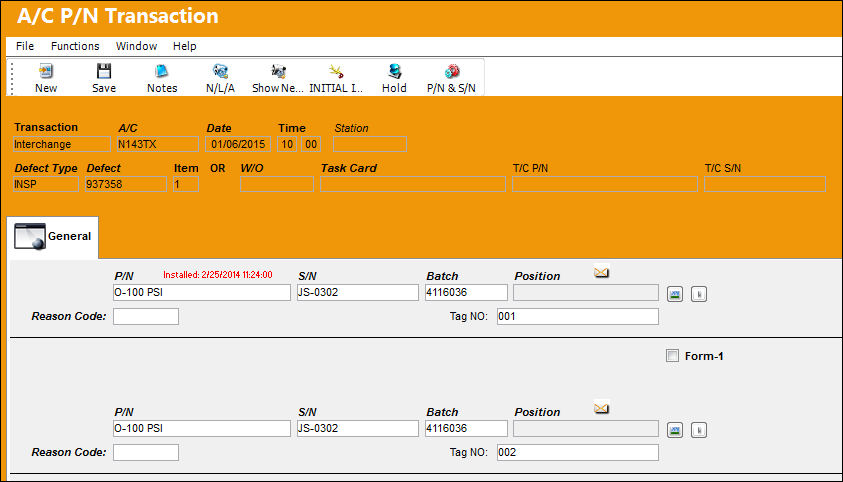
The following information/options are available in this window:
_____________________________________________________________________________________
P/N
The Part Number reference for the aircraft part.
S/N
The Serial Number for the specific serialized part.
Batch
The inventory number that is currently associated with a part or group of parts. A part's Batch number can change after various types of transactions take place.
Position
The Position of the item being removed.
Reason Code
The reason for changing the part.
Tag NO
The tag number associated with the part.
_____________________________________________________________________________________
Share
Print
|
©1997-2026 Trax USA Corp. All rights reserved. This manual may not be copied, photocopied, reproduced, translated, or converted to any electronic or machine-readable form, in whole or in part, without prior written approval from Trax USA Corp. |
 |