
 Share
Share
 Print
Print
|
|
|
|
|


Up/Software, via A/C P/N Transaction
From the A/C P/N Transaction window, select the Up/Software transaction. Populate all mandatory fields and select the New  button:

Once all mandatory fields have been populated, all fields become grayed out and the user is no longer able to edit the information for any of the fields.

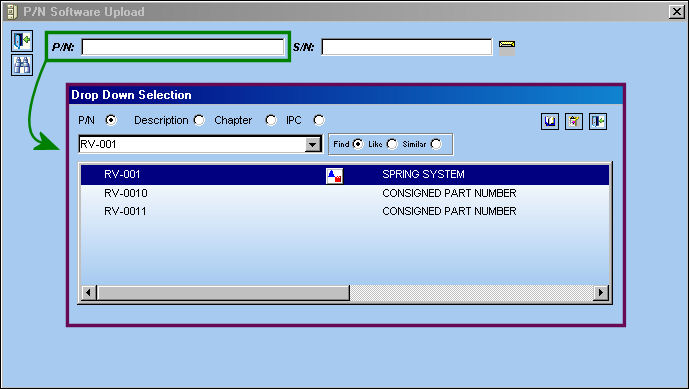
TRAX displays the P/N Software Upload window. Select into the P/N field. The following Drop Down Selection appears. Select a P/N from the Drop Down Selection. Select a S/N and select the Find  button.
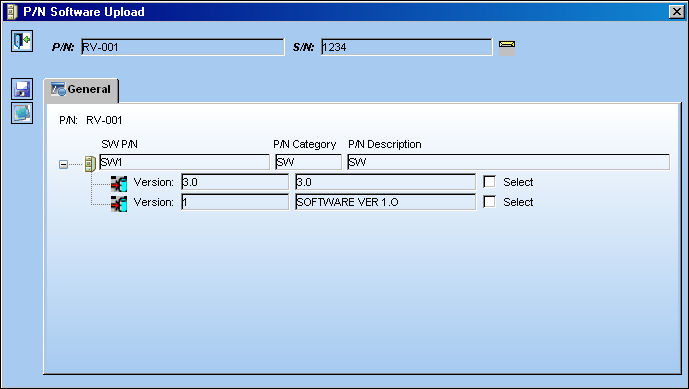
The Software P/N is loaded as shown below:
Several prints are available that may be useful when determining which software uploads are necessary or are currently installed. For more information refer to the P/N Software Configuration Prints via the Settings Training Manual.
Share
Print
|
©1997-2026 Trax USA Corp. All rights reserved. This manual may not be copied, photocopied, reproduced, translated, or converted to any electronic or machine-readable form, in whole or in part, without prior written approval from Trax USA Corp. |
 |