
 Share
Share
 Print
Print
|
|
|
|
|


The Delete  button allows each Line item to be removed from a Requisition, as needed, but to keep the Requisition open. In turn, the Requisition is no longer linked to the Order that was specified before being deleted.
The following Requisition is linked to an Order, as indicated in the Requisition Management Detail; therefore, it is in Order Status.
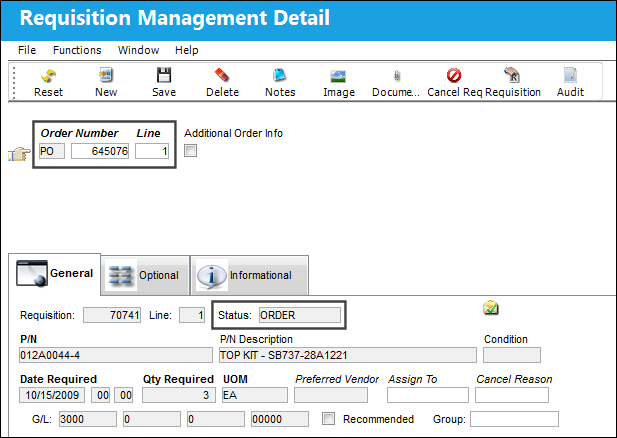
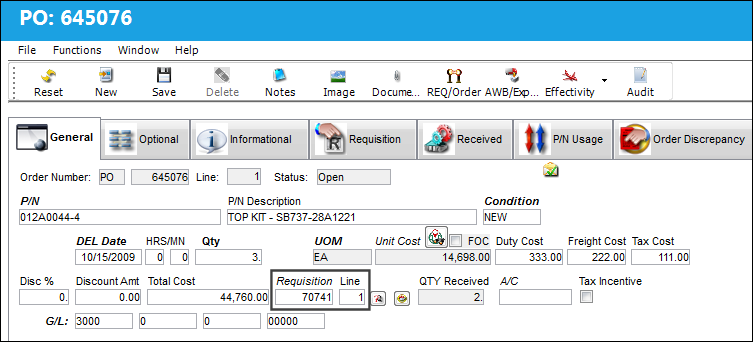
Notice the Requisition number and Line is linked to the specified Order.
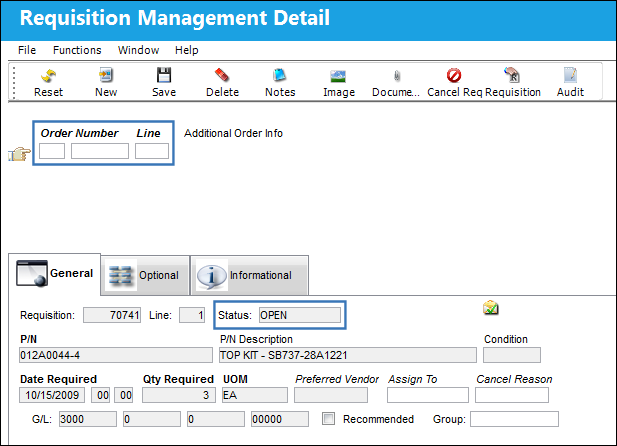
After selecting the Delete button for the particular Line, it no longer appears in the Requisition Management Detail. Additionally, the Status of the Requisition is automatically changed from Order to Open.
If there are multiple Lines for the Requisition that are linked to Orders and there is still at least one Line linked after using the delete functionality, the Requisition will remain in Order Status.
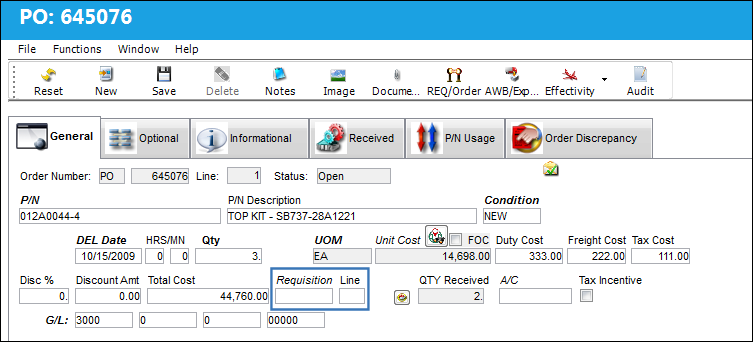
Notice the Requisition number and Line automatically no longer appear in the Order Detail.
Share
Print
|
©1997-2026 Trax USA Corp. All rights reserved. This manual may not be copied, photocopied, reproduced, translated, or converted to any electronic or machine-readable form, in whole or in part, without prior written approval from Trax USA Corp. |
 |