
 Share
Share
 Print
Print
|
|
|
|
|


Requisition Management Detail
In the Requisition Management Detail, the requisition may now be attached to an open order of your selection.
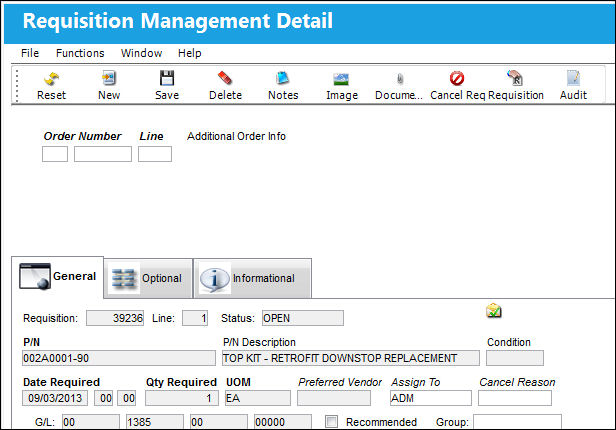
The following information/options are available in this window:
_____________________________________________________________________________________
Order
The Order type that will be associated with this requisition (PO, CO, etc).
Number
The Order number that will be associated with this requisition. Only open orders that have the part number in question will be accepted entries and will be available for selection when the user selects into this field. If the part number on the order and the part number on the requisition are not the same, a warning message will appear and the order cannot be saved against the requisition warning message:
Line
The line number (on the Order) that this requisition is associated with.
P/N
The Part Number reference for the aircraft part.
P/N Description
The description of the part.
Condition
The condition of the part.
Date Required
The date that the item(s) is/are required by.
QTY Required
The quantity of the part required for the Requisition.
UOM
The unit of measure. This will default if associated with a Part Number as defined in the P/N Master. Transactions for parts can be conducted in a different UOM than defined in the P/N Master. However, upon receiving the UOM, conversion will automatically adjust the quantities, providing that the conversion rate is defined in the UOM System Transaction Code (via Setting/Explorer/System Transaction Code).
Preferred Vendor
The preferred vendor to acquire the parts from (if applicable).
Assign To
The employee (buyer) that this Requisition is assigned to. This can only be edited on ‘Open’ Requisitions. This field is auto populated with the value that appears via Settings/ Update/ P/N/ Inventory Levels button/ General Tab/ Buyer field. The Assign To Buyer will be populated if the part has been previously set up with an assigned buyer. An assigned buyer is defined via Settings/ Update/ P/N/ Inventory Levels button/ General Tab/ Buyer field.
Cancel Reason
The Reason code associated with any cancellation of this requisition. This code will be mandatory once the Cancel  button is selected against the requisition for the save of the transaction.
G/L
The General Ledger accounting code for the order. The order G/L will default to the Part Number G/L as defined in the P/N Master, Costing tab. However, this field may be overwritten for any given order.
Recommend checkbox
Check if this is a recommended vendor. If requisition authorization is required then selecting this checkbox would produce the following ( ) icon in the requisition authorization queue (via Requisition/ Update/ Requisition Authorization) indicating this recommendation for fulfillment.
Group
The Group responsible for buying this part. The user can select into the field and select a group from the Drop Down Selection pop-up window or create a new buyer group by selecting the New  button. The Group field can be modified.
Line
The line number (on the Order) that this requisition is associated with.
Assign To
The line number (on the Order) that this requisition is associated with.
_____________________________________________________________________________________
The following buttons offer additional functionality:
- Delete Button
- Notes Button
- Image Button
- Material Request Messages Button
- Cancel Requisition Button
- Requisition Button
- Audit Button
Share
Print
|
©1997-2026 Trax USA Corp. All rights reserved. This manual may not be copied, photocopied, reproduced, translated, or converted to any electronic or machine-readable form, in whole or in part, without prior written approval from Trax USA Corp. |
 |