
 Share
Share
 Print
Print
|
|
|
|
|


Requisition Management, General Tab
As with the majority of the query selections on the system, it is better to input as many parameters as possible to minimize your search result. Select the Find  button to displays the search results. The Results are displayed below the Query fields:
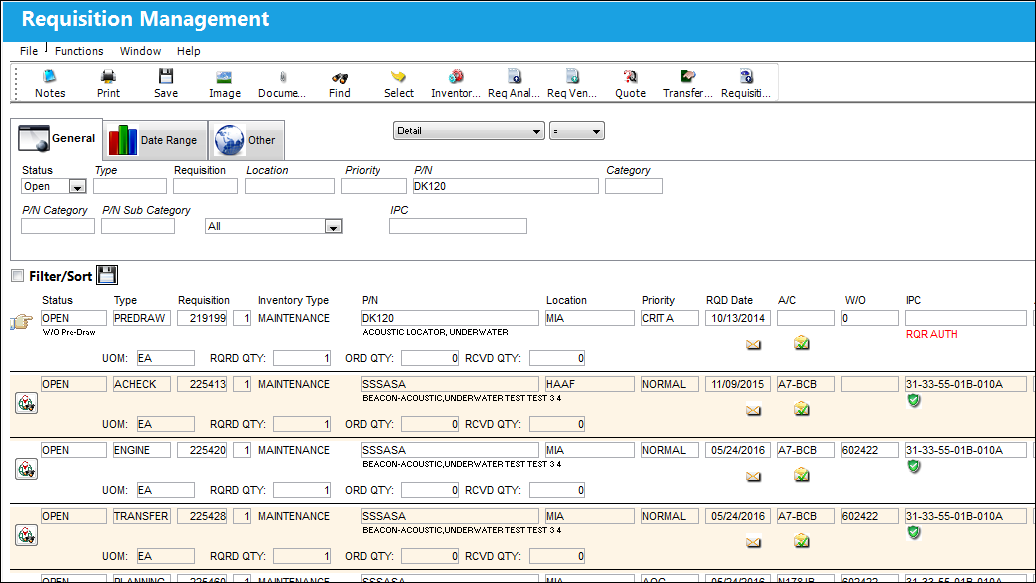
Query:
The following information/options are available in this window:
_____________________________________________________________________________________
Status drop down
The status of the Requisition. Open is set as the default.
Open - Requisition is open.
Closed - Requisition has been closed.
All - All Requisition statuses.
Order - A Requisition based on an Order.
Cancel - Requisition that has been canceled.
Type
The type of Requisition used to identify the purpose of the request. The requisition type is also useful for sort, filters and searches in the system. A default requisition type may be configured. These are defined in the Requisition Type System Transaction Code.
Requisition
List of required parts for either a maintenance item or for restocking.
Location
The Location for maintenance events, inventory stores, orders, transactions, or training events.
Priority
Identify the urgency of the request or requisition. Additionally, notification based on the requisition priority may be defined by location. These codes are defined in the Priority System Transaction Codes.
P/N
The Part Number reference for the aircraft part.
Material Request Status drop down
The status of the Material Request. The available Material Request Statuses that can appear in this field are as follows:
- Available
- Canceled by Customer
- Canceled by LHT (supplier)
- Delivery Confirmed
- Delivery in Progress
- Preparing for Shipment
- Processing Request
- Request Accepted
- Request Completed
- Request Received
 This drop down is part of the Material Integration functionality. For more information refer to the TRAX Material Integration Functionality documentation excerpt and consult your TRAX interface administrator.
P/N Category
The category of the part as defined in Settings/ Explorer/ System Transaction Code Explorer/ Settings/ P/N Category (e.g. Rotable, Consumable, Repairable) and entered for the particular part in the P/N Master.
P/N Sub Category
The Sub Category for each part.
Inventory Type drop down
The type of inventory the item is registered as in the system. The available options are All, General, GSE and Maintenance Inventory. All is set as the default.
_____________________________________________________________________________________
Results:
The following information/options are available in this window:
_____________________________________________________________________________________
Status
The status of the Requisition.
 The status is automatically updated when a requisition is placed on a PO (i.e. from Open to Order).
Type
The type of Requisition used to identify the purpose of the request. The requisition type is also useful for sort, filters and searches in the system. A default requisition type may be configured.
Requisition
List of required parts for either a maintenance item or for restocking.
Requisition Line
The line item number for the specific Requisition.
Location
The required delivery location.
Priority
Identify the urgency of the request or requisition. Additionally, notification based on the requisition priority may be defined by location.
A/C
The individual aircraft tail number.
W/O
The Work Order used to categorize, manage, and schedule work requirements for aircraft maintenance.
ATA
The Air Transport Association Chapter, Section and Paragraph numbers associated to the Requisition
Assign To drop down
The employee (buyer) that this Requisition is assigned to. This can only be edited on ‘Open’ Requisitions. This field is auto populated with the value that appears via Settings/ Update/ P/N/ Inventory Levels button/ General Tab/ Buyer field. The Assign To Buyer will be populated if the part has been previously set up with an assigned buyer. An assigned buyer is defined via Settings/ Update/ P/N/ Inventory Levels button/ General Tab/ Buyer field.
Only users who are set up with an Order Authorization amount will appear in this drop down selection. For additional information, refer to the Authorization section of the Settings Training Manual.
The user may now save a requisition without having this field populated. The drop down view changes depending on the setting of Switch  ASIGNTOSYSTRANCODE. For additional information, refer to Switch ASIGNTOSYSTRANCODE via the Requisition Switches Manual.
Group
The Group responsible for buying this part. The user can select into the field and select a group from the Drop Down Selection pop-up window or create a new buyer group by selecting the New  button. The Group field can be modified.
Requisition Description
Optional description about the requisition.
RQD Date
The date that the item(s) is/are required by.
 Note: The user may decide to postpone the Require Date of a reorder requisition by a specified number of days by using the Inventory Switch REQDATEREO. For more information on this functionality, refer to Switch REQDATEREO.
Created By
The user who created the record.
Inventory Type
The type of inventory the item is registered as in the system. The available options are All, General, GSE and Maintenance Inventory. All is set as the default.
P/N
The Part Number reference for the aircraft part.
P/N Description
The description of the part.
RQRD QTY
The quantity of items/parts required.
This value is automatically updated when the QTY has been updated via the Requisition Detail, General tab and also when the requisition has been placed on a PO.
ORD QTY
The number of parts for the transaction.
This value is automatically updated when the QTY has been updated via the Requisition Detail, General tab and also when the requisition has been placed on a PO.
RCVD QTY
The quantity of parts that were received.
World Part Locator  button
From this window, users can select the World Part Locator button to access the WPL marketplace in order to fulfill the part requirement. Through TRAX's World Part Locator, TRAX operators can connect seamlessly to a global marketplace of part suppliers through a business-to-business interfacing system. For more information refer to the World Part Locator. For more information on this button, refer to the World Part Locator Button, via Requisition Management.
UOM
The Unit of Measurement for the part(s) required.
Preferred Vendor
The preferred vendor to acquire the parts from (if applicable).
Past Prefer Vendor button
The former preferred vendor.
Planner
The Planner of the Requisition.
_____________________________________________________________________________________
Select the results to access the Requisition Management detail window. From there users are allowed to fulfill requisitions by manually referencing multiple orders and order types. For more information refer to the Requisition Management Detail.
The Paste Prefer Vendor  button allows the user to paste the preferred vendor information into the Preferred Vendor field. The preferred vendor for the P/N is defined in Settings/ Update/ P/N/ Cost
  button/Vendor P/N Information. Select the Prefer checkbox to indicate the preferred vendor for that P/N Condition.
Records with a red warning message saying 'RQR AUTH' require authorization.
Requisitions created for parts and their preferred vendors that are under contract will contain the word  listed in the Requisition Management listing. For more information refer to the Cost Button, General Tab via the Settings Training Manual.
Share
Print
|
©1997-2026 Trax USA Corp. All rights reserved. This manual may not be copied, photocopied, reproduced, translated, or converted to any electronic or machine-readable form, in whole or in part, without prior written approval from Trax USA Corp. |
 |